
turbotax icon
cancel
Showing results for 
Search instead for 
Did you mean: 
Announcements
Close icon
Do you have a TurboTax Online account?

We'll help you get started or pick up where you left off.

When amending a return, how to handle refund on 1040x

When amending a return with the on 1040x Form, how do I handle a refund I got? I put in all the numbers from my K1 and that was great. My problem is with filling out lines 18-23 - Refund or Amount You Owe. I received a refund but with the new information, I now owe more taxes, owe money to the IRS.  The instructions in i1040x_instructions.pdf from the IRS say "It is as if you were using the new information to complete your original return." OK. I can adjust all the values. That would mean that the taxes would be larger and the refund smaller, but I got the refund already. There is no provision for that. Should I just change the value of the taxes up and the refund down and send them a check for what I owe? How should I handle that? Thanks much, M

x
Do you have an Intuit account?

Do you have an Intuit account?

You'll need to sign in or create an account to connect with an expert.

1 Best answer

Accepted Solutions
rjs
Level 15
Level 15

When amending a return, how to handle refund on 1040x

It appears that you are amending a 2018 tax return, and that you are not using TurboTax to amend the return. If you used TurboTax it would do all the calculations and fill in the Form 1040X for you. The FAQ at the following link gives instructions for amending a 2018 tax return that you filed with the CD or download TurboTax software.


How do I amend my 2018 return in the TurboTax CD/Download software?


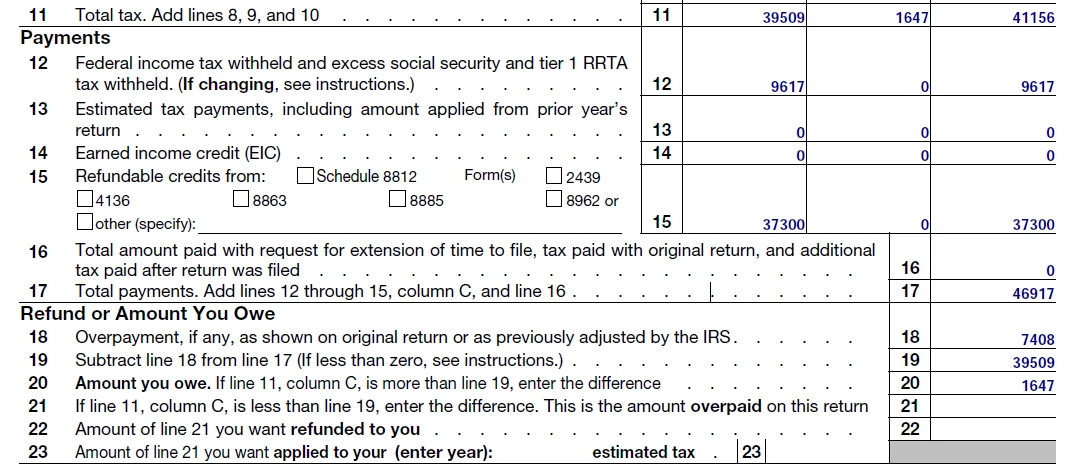
First of all, you have an error on Form 1040X line 11. You transposed digits in the amount in column B. Column B should be 1,647 and column C should be 41,156. But that is not the cause of your problem.


@MBreeden wrote:

What is on line 18? As you say and the instructions say it is the amount shown on the original return. But if I use that value, then Line 20 the Amount You Owe will be 0.

I don't see how you would get zero on line 20. You didn't show us the calculation, but you must have done something wrong.


@MBreeden wrote:

. . . then Line 20 the Amount You Owe will be the amount of the original refund I got minus the amount for the taxes from the K1. That is what I owe.

That is not the amount you owe. You owe only the additional tax on the K-1 income, $1,647. You do not have to repay the refund. You originally paid your total tax, $39,509, plus the $7,408 overpayment. When you got the refund of the overpayment you were even. You paid your total tax. When your total tax increases because of adding the K-1, you only have to pay the additional tax.


Just follow the instructions. Here's what your 1040X should look like.


MBreeden 1040X.png


View solution in original post

6 Replies

When amending a return, how to handle refund on 1040x

What is on line 18?  That should be the original refund you got.  If not then go into forms and change it.  Not sure what your problem is.  The amended return will only show the difference you get back or need to pay. You can confirm this by printing your amendment and looking at the 1040X. Line 18 should be your original refund amount and line 21 should be your additional refund. If you paid on your original return it will be on line 16. If there is an amount owed with the amendment, it will be on line 20.


When amending a return, how to handle refund on 1040x

What is on line 18? As you say and the instructions say it is the amount shown on the original return. But if I use that value, then Line 20 the Amount You Owe will be 0.
If I update line 18 to the amount now shown on the return with the K1 entered, then Line 20 the Amount You Owe will be the amount of the original refund I got minus the amount for the taxes from the K1. That is what I owe. It should be easier to give them money...

TurboTax_1040x_Question_010820_1.png

rjs
Level 15
Level 15

When amending a return, how to handle refund on 1040x

It appears that you are amending a 2018 tax return, and that you are not using TurboTax to amend the return. If you used TurboTax it would do all the calculations and fill in the Form 1040X for you. The FAQ at the following link gives instructions for amending a 2018 tax return that you filed with the CD or download TurboTax software.


How do I amend my 2018 return in the TurboTax CD/Download software?


First of all, you have an error on Form 1040X line 11. You transposed digits in the amount in column B. Column B should be 1,647 and column C should be 41,156. But that is not the cause of your problem.


@MBreeden wrote:

What is on line 18? As you say and the instructions say it is the amount shown on the original return. But if I use that value, then Line 20 the Amount You Owe will be 0.

I don't see how you would get zero on line 20. You didn't show us the calculation, but you must have done something wrong.


@MBreeden wrote:

. . . then Line 20 the Amount You Owe will be the amount of the original refund I got minus the amount for the taxes from the K1. That is what I owe.

That is not the amount you owe. You owe only the additional tax on the K-1 income, $1,647. You do not have to repay the refund. You originally paid your total tax, $39,509, plus the $7,408 overpayment. When you got the refund of the overpayment you were even. You paid your total tax. When your total tax increases because of adding the K-1, you only have to pay the additional tax.


Just follow the instructions. Here's what your 1040X should look like.


MBreeden 1040X.png


When amending a return, how to handle refund on 1040x

Volvo Girl, I was using Turbo Tax, but I was using it wrong. Thank you so much for your help! I think I have everything taken care of. The link you added told me how to fix it using TurboTax.

When amending a return, how to handle refund on 1040x

I believe you are referring to the answer by rjs.  Glad you got it figured out.

When amending a return, how to handle refund on 1040x

Whoops... Yes. Thank you rjs!!!

Unlock tailored help options in your account.

message box icon

Get more help

Ask questions and learn more about your taxes and finances.

Post your Question




