turbotax icon
cancel
Showing results for 
Search instead for 
Did you mean: 
Announcements
Close icon
Do you have a TurboTax Online account?

We'll help you get started or pick up where you left off.

nleews
New Member

I have completed my forms but not filed. I printed them out and found mistakes. How do I go back to the forms and correct these mistakes?

 
x
Do you have an Intuit account?

Do you have an Intuit account?

You'll need to sign in or create an account to connect with an expert.

5 Replies

I have completed my forms but not filed. I printed them out and found mistakes. How do I go back to the forms and correct these mistakes?

To access your current or prior year online tax returns sign onto the TurboTax website with the User ID you used to create the account - https://myturbotax.intuit.com/


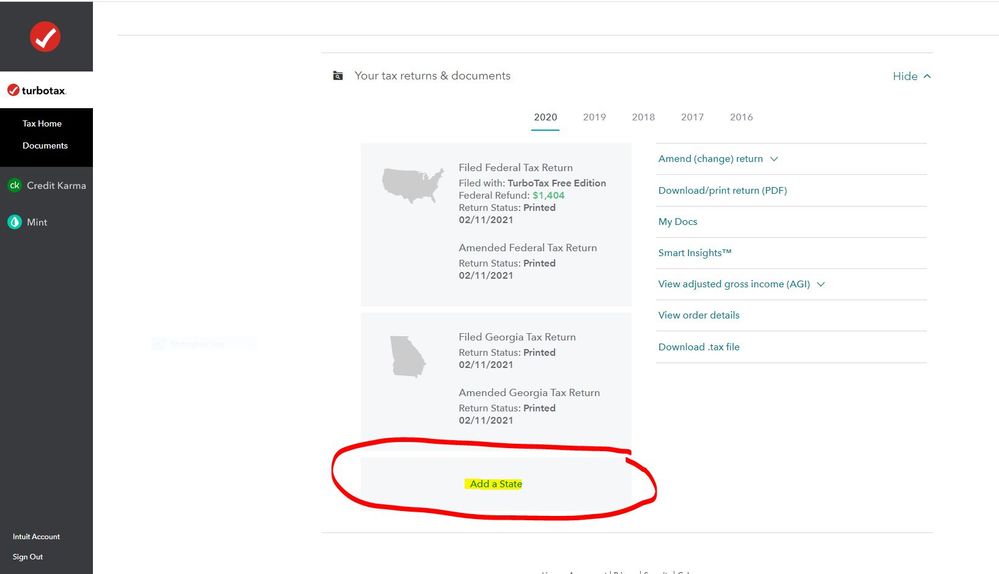
When you sign onto your online account and land on the Tax Home web page, scroll down and click on Add a state. 

This will take you back to the 2020 online tax return where you can make any changes before filing.

nleews
New Member

I have completed my forms but not filed. I printed them out and found mistakes. How do I go back to the forms and correct these mistakes?

There is no add a state

I have completed my forms but not filed. I printed them out and found mistakes. How do I go back to the forms and correct these mistakes?


@nleews wrote:

There is no add a state


Add a State 2020.JPG


nleews
New Member

I have completed my forms but not filed. I printed them out and found mistakes. How do I go back to the forms and correct these mistakes?

Ok, I found that.  But it only lets me review my tax forms.  I want to go back to where I originally entered the information to change it.  Like when you first start the program.

I have completed my forms but not filed. I printed them out and found mistakes. How do I go back to the forms and correct these mistakes?


@nleews wrote:

Ok, I found that.  But it only lets me review my tax forms.  I want to go back to where I originally entered the information to change it.  Like when you first start the program.


That takes you right back into your 2020 online tax return where you can go to any section of the program to make changes.

Just click on Federal and then select Wages & Income or Deductions & Credits.  Go through any of those sections and edit the section that needs to be changed.

Unlock tailored help options in your account.

message box icon

Get more help

Ask questions and learn more about your taxes and finances.

Post your Question