


- Community
- Topics
Turn on suggestions
Auto-suggest helps you quickly narrow down your search results by suggesting possible matches as you type.
Showing results for
- Community
- :
- Discussions
- :
- Taxes
- :
- After you file
- :
- I am trying to amend my 2020 Federal return using Desktop Premier 2020. TurboTax is failing to register the edit I made to the W-2. How do I get past this?
Announcements


- Mark as New
- Bookmark
- Subscribe
- Subscribe to RSS Feed
- Permalink
- Report Inappropriate Content
I am trying to amend my 2020 Federal return using Desktop Premier 2020. TurboTax is failing to register the edit I made to the W-2. How do I get past this?
My individual W-2 worksheet shows the corrected amount, but the total amount being withheld is not updating.
Topics:
posted
March 17, 2023
10:21 AM
last updated
March 17, 2023
10:21 AM
Connect with an expert

Do you have an Intuit account?
You'll need to sign in or create an account to connect with an expert.
7 Replies


- Mark as New
- Bookmark
- Subscribe
- Subscribe to RSS Feed
- Permalink
- Report Inappropriate Content
I am trying to amend my 2020 Federal return using Desktop Premier 2020. TurboTax is failing to register the edit I made to the W-2. How do I get past this?
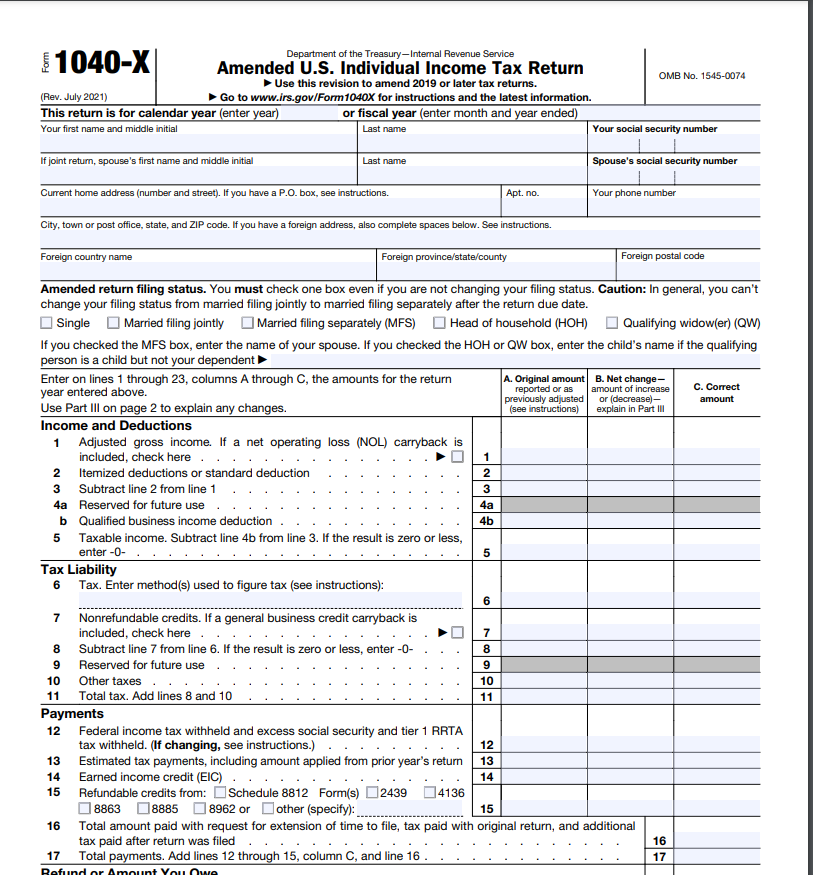
Check the amounts on Form 1040X in FORMS mode. You should see an Original Amount, Net Change and Correct Amount in the Income section, and also in the Payments section.
If you had other income/payments, you may need to compare the 1040X to your original 1040 to see that the amounts changed correctly.
Here's more info on How to Amend a Prior Year Federal Return.
**Say "Thanks" by clicking the thumb icon in a post
**Mark the post that answers your question by clicking on "Mark as Best Answer"
**Mark the post that answers your question by clicking on "Mark as Best Answer"
March 17, 2023
10:40 AM
- Mark as New
- Bookmark
- Subscribe
- Subscribe to RSS Feed
- Permalink
- Report Inappropriate Content
I am trying to amend my 2020 Federal return using Desktop Premier 2020. TurboTax is failing to register the edit I made to the W-2. How do I get past this?
Thank you for the reply MarilynG1.
That is the problem. I used the Step-byStep Amend process and made the change to my W-2 and that shows up correctly, but new amount and the difference are not being transferred to the 1040X. I also got a message at the end of Step-by-Step saying it did not find the difference from the original 1040.
March 17, 2023
10:48 AM

- Mark as New
- Bookmark
- Subscribe
- Subscribe to RSS Feed
- Permalink
- Report Inappropriate Content
I am trying to amend my 2020 Federal return using Desktop Premier 2020. TurboTax is failing to register the edit I made to the W-2. How do I get past this?
You may have missed a step in the amending process where TurboTax does not know the original values. If so you can go to Forms mode and enter the original figures column from your original tax return. TurboTax will make the adjustments appropriately with the correct figures in column A.
Please update if you have additional questions or need more assistance.
**Say "Thanks" by clicking the thumb icon in a post
**Mark the post that answers your question by clicking on "Mark as Best Answer"
**Mark the post that answers your question by clicking on "Mark as Best Answer"
March 17, 2023
11:06 AM
- Mark as New
- Bookmark
- Subscribe
- Subscribe to RSS Feed
- Permalink
- Report Inappropriate Content
I am trying to amend my 2020 Federal return using Desktop Premier 2020. TurboTax is failing to register the edit I made to the W-2. How do I get past this?
I tried to check the W-2 withholding in other locations and it appears that the corrected value is present in the 'Form W-2' (blue font) and in 'Forms W-2 & W-2G Summary'.
The original amount is displayed in Column A of the 1040X; 0 (zero) is displayed in Column B; the original amount is displayed in Column C.
March 17, 2023
11:08 AM
- Mark as New
- Bookmark
- Subscribe
- Subscribe to RSS Feed
- Permalink
- Report Inappropriate Content
I am trying to amend my 2020 Federal return using Desktop Premier 2020. TurboTax is failing to register the edit I made to the W-2. How do I get past this?
Hi DianneW777,
I went through several times with the same result. I'm not sure what I'm missing. I finally dropped the amendment and am starting over again. Perhaps you can tell me if I'm beginning correctly?
I answered the initial questions (Yes, already filed return and I need to amend my 2020 return). TurboTax then takes me to the 'Do you need to change anything else, Select Update to add, correct or remove something on your original return'. I checked the 1040X (not done) at this point and Column A has all the original 1040 values, zero for all the Column B values and Column C has all the original 1040 values (same as Column A).
I then clicked the W-2 Edit button on the 'Do you need to change...' screen. And then clicked Edit for my W-2, where I made the correction to item 4. Is this not the correct way to make corrections?
March 17, 2023
11:50 AM
- Mark as New
- Bookmark
- Subscribe
- Subscribe to RSS Feed
- Permalink
- Report Inappropriate Content
I am trying to amend my 2020 Federal return using Desktop Premier 2020. TurboTax is failing to register the edit I made to the W-2. How do I get past this?
Yes, it seems you are starting out correctly. Here are some instructions that may help.
- Sign in to TurboTax
- On the home screen, scroll down to Your tax returns & documents and select the year you want to amend
- Select Amend (change) return, then Amend using TurboTax Online
- If you're told to amend your return via TurboTax Desktop, follow the steps for TurboTax CD/Download below instead
- On the screen OK, let's get a kickstart on your amended return, select the reason(s) you're amending and Continue
- When you reach Here's the info for your amended federal return, select Start next to the info you need to change
- Continue through the screens, make the changes you need to make, and carefully answer the remaining questions to finish amending your return
**Say "Thanks" by clicking the thumb icon in a post
**Mark the post that answers your question by clicking on "Mark as Best Answer"
**Mark the post that answers your question by clicking on "Mark as Best Answer"
March 17, 2023
1:13 PM
- Mark as New
- Bookmark
- Subscribe
- Subscribe to RSS Feed
- Permalink
- Report Inappropriate Content
I am trying to amend my 2020 Federal return using Desktop Premier 2020. TurboTax is failing to register the edit I made to the W-2. How do I get past this?
OK. I finally found the answer on this forum using Google and different search criteria.
Even though I received a corrected W-2, there is no need to file an amended return because 'Social Security Taxes Withheld' is not considered to be a payment or credit. The change won't affect the amount of tax owed.
Thanks anyway to those who responded!
March 17, 2023
2:20 PM
Still have questions?
Questions are answered within a few hours on average.
Post a Question*Must create login to post


Unlock tailored help options in your account.


Get more help
Ask questions and learn more about your taxes and finances.
Related Content

h86those7taxes84ever
Level 3

lkamerbeek
New Member

Raph
Community Manager
in Events
Raph
Community Manager
in Events
Raph
Community Manager
in Events