
Level 2
March 1, 2025
Question

TD Ameritrade 1099 not importing

  • March 1, 2025
  • 1 reply
  • 0 views

I am unable to import my 1099 from TD-Ameritrade.

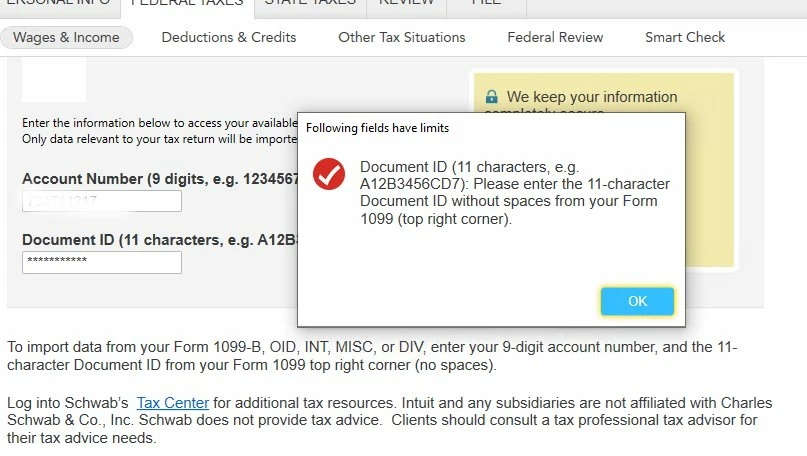
It gives me a Document ID message saying the following fields have limits.

I am using Desktop; its Premier; its up to date; I am not typing the wrong characters; I have tried on different days.  It DID import my 1099-R w/o issue.


    1 reply

    MarilynG
    Level 15
    March 3, 2025

    I'm using Premier also, but my Sign In page looks a bit different than yours.  It has 'Sign In to TD Ameritrade' at the top.


    On the institution search page, I double-clicked on TD Ameritrade in the search results.  Don't know if this makes a difference, since you were successful previously importing your 1099-R.


    If you downloaded a PDF copy of your 1099's, double check the Document ID on your form.  Some brokers require you to allow 'third party access' in your account settings.


    Try turning off all anti-virus software, and running a Manual Update.


    You can Contact TurboTax Support for more help.


    @ronsolve 


    **Say "Thanks" by clicking the thumb icon in a post. **Mark the post that answers your question by clicking on "Mark as Best Answer"
    ronsolveAuthor
    Level 2
    March 5, 2025

    Hi MarilynG1,

    Thank you for responding.  My page also says "Sign into TD Ameritrade", I just didn't screen print the entire page only the part where you put in you account and document ID and the resultant error message.

    I downloaded and ran the manual updater - and then ran Turbotax again.

    No LUCK!  Same error message.

    I also turned off Malwarebytes antivirus software.

    Still no luck.

    I have used Turbotax for over 10 years with TD Ameritrade as my broker and it has always worked.


    Thank you for your assistance - I guess I will follow up the the support number.

    Do I use your name when I call them to tell them you referred me?


    Best,

    Ron


    ronsolveAuthor
    Level 2
    March 5, 2025

    Hi MarilynG1,


    I figured it out.  


    Because I used TDA in previous years - Turbotax asked during the step by step if I still used TDA.  Since I did the boxes were checked that I used TDA.


    Now - when I got to the place to download the data - there was a TDA box all set up and I used that.  That is the one that failed.


    I trashed all the TDA boxes on the download page and added TDA back in as a new account.  That one then worked just fine and generated 3 downloads - one each for interest, dividends and stocks.


    All is good now.


    Thank you for your help.


    Ron




