
Level 2
February 21, 2022
Solved

SECTION 199A INFORMATION FOR TAX YEAR 2021

  • February 21, 2022
  • 4 replies
  • 0 views

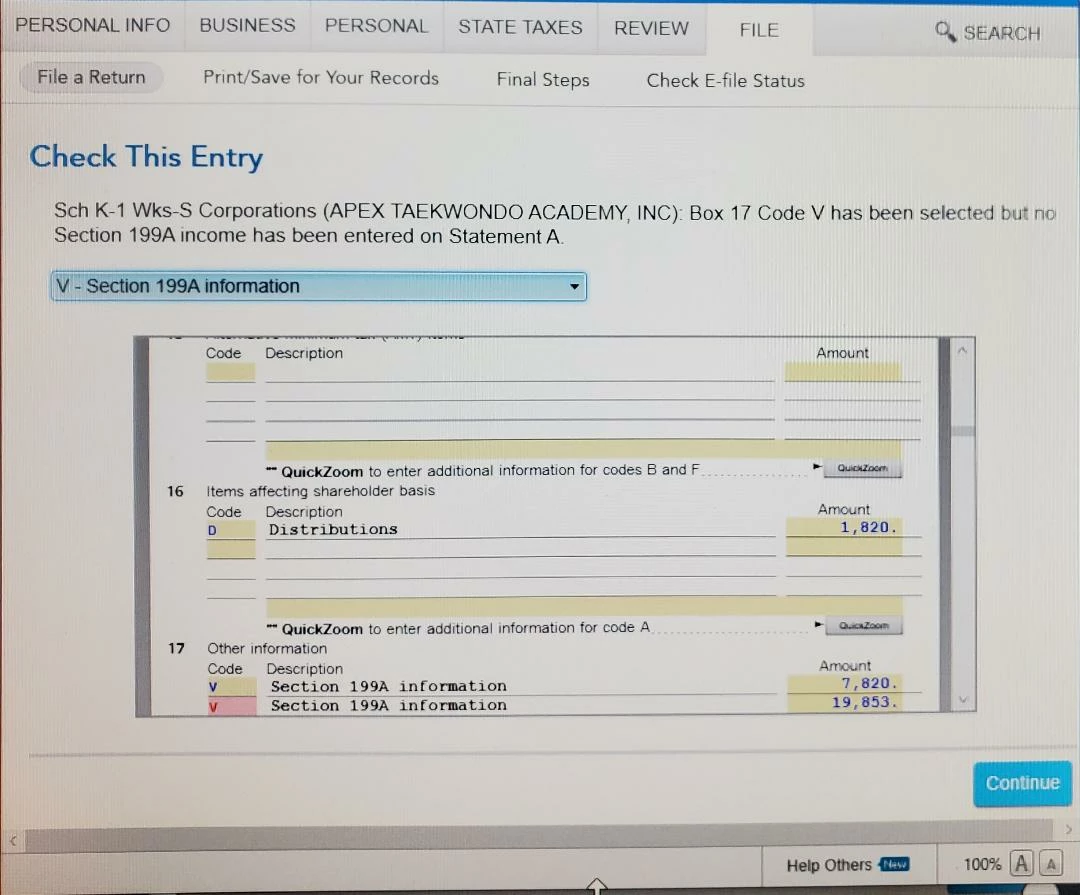
When trying to submit my taxes thru Turbotax Home & Business Tax Year 2021, I am getting a Check This Entry message that tells me that Box 17 Code V has been selected, but no Section 199A income has been entered on Statement A.  I have put in the amounts of 2 entries I have on my K-1, but the input is not being accepted and I cannot file the return. Please advise on how I can override this entry message.
Best answer by AliciaP1

You have missed checking the box, "xxx has business income (loss)" when entering the 199A income information.  To correct this you need to follow these steps in TurboTax Home & Business:


  1. Within your return in Step-by-Step mode,  under the Personal tab and the Personal Income sub-tab click  Continue
  2. Click I'll choose what I work on
  3. Scroll down to Business Investment and Estate/Trust Income and click Update on the Schedule K-1 line
  4. Click Update on the S corporations line
  5. Click Edit for the S corporation K-1
  6. Answer any questions that reset blank and Continue until you get to the We need some information about your 199A income screen
  7. Check the first box for xxx has business income (loss) and enter the amount of your Ordinary Business Income from the matching line on your "Statement A - QBI Pass-through Entity Reporting" that is page 2 of your K-1.

This corrects the error and allows the QBI deduction to calculate on your returns.


@DANGYKICKR

4 replies

AliciaP1
Level 13
February 21, 2022

It would be helpful to have a TurboTax ".tax2021" file that is experiencing this issue.


You can send us a “diagnostic” file that has your “numbers” but not your personal information.  If you would like to do this, here are the instructions: 


Go to the black panel on the left side of your program and select Tax Tools. 

  1. Then select Tools below Tax Tools. 
  2. A window will pop up which says Tools Center.  
  3. On this screen, select Share my file with Agent. 
  4. You will see a message explaining what the diagnostic copy is.  Click okay through this screen and then you will get a Token number. 
  5. Reply to this thread with your Token number. This will allow us to open a copy of your return without seeing any personal information.  

We will then be able to see exactly what you are seeing and we can determine what exactly is going on in your return and provide you with a resolution.

**Say "Thanks" by clicking the thumb icon in a post. **Mark the post that answers your question by clicking on "Mark as Best Answer"
Level 2
February 21, 2022

Thank you for the prompt attention to this matter.


Token# 931385

Level 15
February 21, 2022

v in box 20 is meaningless. it goes nowhere. for the 199A deduction you need the supporting schedule for that info and that gets entered in the 199A section of the k-1. in forms mode open the K-1 and scroll down to the section labeled D1 and D2. that's whee the info gets entered to generate the QBI deduction and form 8995 


Level 2
October 17, 2022

This solved a different but related problem for me. One of my K-1s had Box 20 Code Z with "[See] Statement" but the statement had several items.


I first tried inserting the most meaningful (yes, I know it's taxation...) with no success.


This excellent answer led me to delete the Box 20 Z code, and it now passes the error check with no changes to the tax treatment.


Level 2
June 14, 2022

I received a K-1 that includes section 199A info on line 20. I can't seem to input the info properly into my return since my attempts to E-file are rejected because of this entry. I don't think the info affects my  tax liability should I just delete it from my return ?

Level 3
February 12, 2023

Schedule K-1 doesn't show the 199A Deduction, except a V on line 17.  Is my income going to be reduced when I do my personal taxes, entering the information from the K-1 ???? 

Thanks!

Level 15
February 13, 2023

No.  You should have a statement that provides the amounts for Box 17. This would have been provided with the K1. Review your documents and if necessary contact the person or agency that provided you with the K1.

  • Form 1120S-K1 Instructions (page 16)  
    • Code V. Section 199A information. Generally, you may be allowed a deduction of up to 20% of your net qualified business income (QBI) plus 20% of your qualified REIT dividends, also known as section 199A dividends, and qualified publicly traded partnership (PTP) income from your S corporation. The S corporation will provide the information you need to figure your deduction.

@wdegaude 

**Say "Thanks" by clicking the thumb icon in a post. **Mark the post that answers your question by clicking on "Mark as Best Answer"




