turbotax icon
cancel
Showing results for 
Search instead for 
Did you mean: 
Announcements
Close icon
Do you have a TurboTax Online account?

We'll help you get started or pick up where you left off.

mheiders
New Member

Schedule 1A

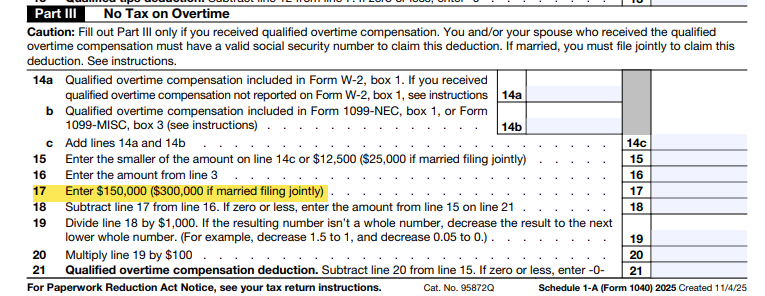
I believe TurboTax has an error on Schedule 1A.  On my return line 18 has a negative.  The instructions indicate that you should not input a negative but the amount from line 15.  I can't seem to over write this in forms.  What should I do?

x
Do you have an Intuit account?

Do you have an Intuit account?

You'll need to sign in or create an account to connect with an expert.

3 Replies
JohnB5677
Employee Tax Expert

Schedule 1A

That calculation on line 18 of the Sch 1A is not incorrect.

It instructs 


"Subtract line 17 from line 16. If zero or less, enter the amount from line 15 on line 21"

  • It does not say it can't be a negative number. 
  • It says if it's less than zero, post line 15 to line 21.

It would seem in your case that the value on line 15 is posted to line 21.


**Say "Thanks" by clicking the thumb icon in a post
**Mark the post that answers your question by clicking on "Mark as Best Answer"

Schedule 1A

Line 17 says to enter the number IF  'married filing jointly' but I am filing as Single (unmarried).  Will this entry be a problem for the IRS?

How would I remove the numbers?

Thank you.

LeticiaF1
Employee Tax Expert

Schedule 1A

Those are just the instructions for line 17, you would enter $150,000 if you are not married filing jointly, for married filing joint returns you would enter $300,000.  In your case, since you are single the entry for this line should be $150,000.  


You should not need to change any numbers on the Schedule 1-A because TurboTax calculates this line on the schedule based on your filing status.  If you have a different amount, you will need to go back through your My info section and check what your filing status is.  


Unlock tailored help options in your account.

message box icon

Get more help

Ask questions and learn more about your taxes and finances.

Post your Question