


- Community
- Topics
Turn on suggestions
Auto-suggest helps you quickly narrow down your search results by suggesting possible matches as you type.
Showing results for
- Community
- :
- Discussions
- :
- Taxes
- :
- Get your taxes done
- :
- Re: Qualified Business Income Deduction
Announcements
Attend our Ask the Experts event about Tax Law Changes - One Big Beautiful Bill (OBBBA) on Jan 14! >> RSVP NOW!

Connect with an expert

Do you have an Intuit account?
You'll need to sign in or create an account to connect with an expert.


- Mark as New
- Bookmark
- Subscribe
- Subscribe to RSS Feed
- Permalink
- Report Inappropriate Content
Qualified Business Income Deduction
In Forms mode (icon top right in blue bar) in the left column find the ation directly into Section D1 of the "K-1 S Corp" for the K-1 you received. Click on it, and it will open in the window.
Scroll down until you find Section D1 and D2 of that K-1 S Corp. Check the entries in Section D1 compared to the box 17 code V Statement or STMT you received with the K-1. Follow the QBI calculation from Section D1 to Section D2, and then (in the left column) the linked QBI Component for that K-1, and the QBI Ded Summary. This may diagnose what is "happening" in your QBI deduction calculation.
**Say "Thanks" by clicking the thumb icon in a post
**Mark the post that answers your question by clicking on "Mark as Best Answer"
**Mark the post that answers your question by clicking on "Mark as Best Answer"
March 27, 2020
10:25 AM

- Mark as New
- Bookmark
- Subscribe
- Subscribe to RSS Feed
- Permalink
- Report Inappropriate Content
Qualified Business Income Deduction
I clicked on "Forms" (towards the right on the blue bar on top of TT Home & Business) to open my Return in "Foms" mode. Scrolled down to "K-1 S-Corp" and found that there was an "Error!" mark. I had my amount entered, but still it said the amount is missing. I was puzzled to see that.
Then, I scrolled down to D-1 section and updated the same S-Corp income on the first line. The error went away and the QBI deduction was calculated and applied correctly.
Based on my personal experience this is what the bug is:
If you miss entering K-1'Box-17 V-Code info first (so, QBI deduction is not calculated), and later realize it and enter it using the GUI user entry, it seems to take it. But, doesn't update the "D-1" section. So, QBI is not applied. But, later when you update it using the "Forms" mode, it takes it and then calculates the QBI deduction. This bug must be fixed to make Users not keep wondering what is wrong.
March 29, 2020
2:12 PM
- Mark as New
- Bookmark
- Subscribe
- Subscribe to RSS Feed
- Permalink
- Report Inappropriate Content
Qualified Business Income Deduction
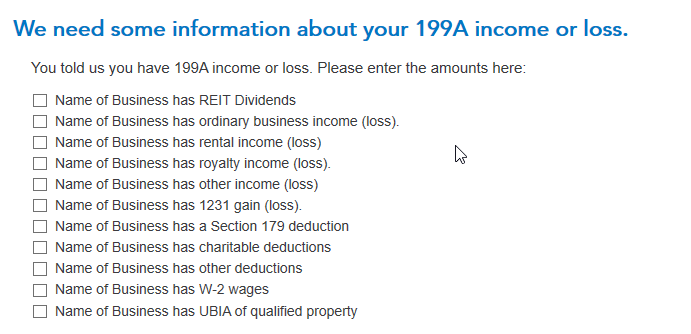
Note that the applicable lines on these Step-by-Step interview screens must be entered in order for that information to populate Section D1 of your "Forms mode" K-1:

**Say "Thanks" by clicking the thumb icon in a post
**Mark the post that answers your question by clicking on "Mark as Best Answer"
**Mark the post that answers your question by clicking on "Mark as Best Answer"
March 30, 2020
5:52 AM

- Mark as New
- Bookmark
- Subscribe
- Subscribe to RSS Feed
- Permalink
- Report Inappropriate Content
Qualified Business Income Deduction
I think my deduction is zero but when I put zero in it changes my return amount? Should it?
April 8, 2020
2:55 PM

- Mark as New
- Bookmark
- Subscribe
- Subscribe to RSS Feed
- Permalink
- Report Inappropriate Content
Qualified Business Income Deduction
Don't enter a "0". Leave it blank. Check your K1 and see if there is an amount listed in Box 17 with a code V if a S-Corp K1 or Box 20 code Z if your K1 is from a partnership .If there is then you need to look at Statement A in your supplementary statements that has additional information to report in your return. let me know if any of this pertains to your situation and I will advise further how to report this.
**Say "Thanks" by clicking the thumb icon in a post
**Mark the post that answers your question by clicking on "Mark as Best Answer"
**Mark the post that answers your question by clicking on "Mark as Best Answer"
April 8, 2020
7:09 PM

- Mark as New
- Bookmark
- Subscribe
- Subscribe to RSS Feed
- Permalink
- Report Inappropriate Content
Qualified Business Income Deduction
TurboTax shows that I have a Qualified Business Income deduction of $19 which seems to be an imaginary item. Where did this come from?
April 10, 2020
9:44 PM
- Mark as New
- Bookmark
- Subscribe
- Subscribe to RSS Feed
- Permalink
- Report Inappropriate Content
Qualified Business Income Deduction
I found where the QBI deduction came from. It is 20% of income on Line 5 on some 1099-DIV forms. Never saw this before. TurboTax does a poor job of explaining some of these strange items.
April 10, 2020
10:15 PM

- Mark as New
- Bookmark
- Subscribe
- Subscribe to RSS Feed
- Permalink
- Report Inappropriate Content
Qualified Business Income Deduction
I'm using TT Home & Business... need to understand why TT doesn't think I qualify for QBI in 2019 when I had a similar return in 2018 and my Schedule C income qualified for QBI... one difference is 2019 is a higher AGI...
Please explain where I can find the reason I don't qualify for QBI in 2019...
April 12, 2020
2:06 PM
- Mark as New
- Bookmark
- Subscribe
- Subscribe to RSS Feed
- Permalink
- Report Inappropriate Content
Qualified Business Income Deduction
Did you have a net profit showing after the expenses were deducted?
**Say "Thanks" by clicking the thumb icon in a post
**Mark the post that answers your question by clicking on "Mark as Best Answer"
**Mark the post that answers your question by clicking on "Mark as Best Answer"
April 12, 2020
2:10 PM

- Mark as New
- Bookmark
- Subscribe
- Subscribe to RSS Feed
- Permalink
- Report Inappropriate Content
Qualified Business Income Deduction
I've entered a K-1 with code A in box 20. My 2019 Turbotax Home and Business form view shows QBI Components for this and another K-1, but the numbers in them appear to have been carried over from my 2018 return. The K-1's from my partnership included Statement A - QBI Pass-through Entity Reporting, but the numbers in the statement cannot be entered directly into the TurboTax QBI forms. How do I get TT to compute the numbers for 2019? Do I need to delete the QBI components?
April 13, 2020
6:17 PM
- Mark as New
- Bookmark
- Subscribe
- Subscribe to RSS Feed
- Permalink
- Report Inappropriate Content
Qualified Business Income Deduction
No, you don't necessarily need to delete the QBI Component forms linked to your K-1s. And, it sounds like one on the K-1 businesses passed you QBI in 2018 that was not "used" and is being carried forward to 2019.
If your partnership Form 1065 Schedule K has a box 20 with code Z and an associated Section 199A Statement or STMT (sometimes labelled Statement A), enter the code Z when you enter the K-1 box 20 screen, but you don't need to enter an amount. Continue on, and you'll find two screens: "We need some information about your 199A income or loss" and "Let's check for some uncommon adjustments". When you check the box next to a category on those screens, a place will open up to enter your amounts. These screens (if applicable to the amount(s) on your Statement/STMT) must be completed in order for your box 20 code Z information to be correctly input into TurboTax.
To get back to the K-1 summary screen and find the Schedule K-1 to edit, click the "magnifying glass Search" icon on the top row, enter "k-1" in the search window and press return or enter, and then click on the "Jump to k-1" link to find the K-1 you need to edit.
**Say "Thanks" by clicking the thumb icon in a post
**Mark the post that answers your question by clicking on "Mark as Best Answer"
**Mark the post that answers your question by clicking on "Mark as Best Answer"
April 14, 2020
10:48 AM

- Mark as New
- Bookmark
- Subscribe
- Subscribe to RSS Feed
- Permalink
- Report Inappropriate Content
Qualified Business Income Deduction
Same with the 2019 Turbo Tax software... very frustrating. I entered the information from my K-1 Form 1065, which is a qualified business, and it won't calculate the deduction even though I clearly meet all income limitations. The 2018 worked fine for me, but now the 2019 won't calculate it no matter what and it won't tell me why... lost with no human at Turbo Tax/Intuit to talk to.
April 18, 2020
10:23 AM
- Mark as New
- Bookmark
- Subscribe
- Subscribe to RSS Feed
- Permalink
- Report Inappropriate Content
Qualified Business Income Deduction
Has a proper update been released??? it is now the middle of April and it is still not calculating the deduction. Are you providing refunds since the software is not working properly?
April 18, 2020
10:25 AM
- Mark as New
- Bookmark
- Subscribe
- Subscribe to RSS Feed
- Permalink
- Report Inappropriate Content
Qualified Business Income Deduction
I am using the Home and Business 2019 and it is not calculating the deduction.....in the middle of April.
April 18, 2020
10:26 AM
- Mark as New
- Bookmark
- Subscribe
- Subscribe to RSS Feed
- Permalink
- Report Inappropriate Content
Qualified Business Income Deduction
Did all of the above and still not calculating on the 2019 Home and Business version....
April 18, 2020
10:28 AM
Still have questions?
Questions are answered within a few hours on average.
Post a Question*Must create login to post


Unlock tailored help options in your account.


Get more help
Ask questions and learn more about your taxes and finances.
Related Content

wmunk146
New Member

noursaleh98
New Member

dcx
Returning Member

diddymanpedigo1
New Member
qshtax
Returning Member