turbotax icon
cancel
Showing results for 
Search instead for 
Did you mean: 
Close icon
Do you have a TurboTax Online account?

We'll help you get started or pick up where you left off.

Moving Reimbursement W2 Error?

My new employer (W2) wrote me a check for moving expense reimbursement, separate from my payroll direct deposits.  This amount was not accounted for in my W2 for the year.  My understanding is that I still owe tax on the reimbursement (both federal and FICA since nothing was withheld).  Can I pay this through TurboTax somehow or do I need to request an amended W2 from my employer?

x
Do you have an Intuit account?

Do you have an Intuit account?

You'll need to sign in or create an account to connect with an expert.

1 Best answer

Accepted Solutions
DianeW777
Expert Alumni

Moving Reimbursement W2 Error?

It would be best to obtain a corrected W2 from your employer.  However if that does not occur, there is a way for you to report it and pay only your share of medicare and social security tax.  The IRS will go back to your employer for their share.  Here are the steps to report your moving expense reimbursement with your W-2.


You cannot deduct moving expenses unless you are a member of the Armed Forces on active duty and, due to a military order, you move because of a permanent change of station.


On the dotted line to the left of the amount on line 1 there will be a notation "F8919" and the amount. Form 8919 will be included in the return, with reason code H in column (c). Form 8919 will calculate the Social Security and Medicare taxes that your employer should have withheld from the bonus. The total of these taxes will appear on Schedule 2, line 6,  and will be included in your total tax liability.

  1. Click the Federal Taxes tab. (In TurboTax Self-Employed or Home & Business click the Personal Tab.)
  2. Click Wages & Income. (In TurboTax Self-Employed or Home & Business click Personal Income.)
  3. Scroll all the way down to the last section "Less Common Income." Click the Start button for the last topic, "Miscellaneous Income, 1099-A, 1099-C."
  4. On the next screen click the Start button for "Other income not already reported on a Form W-2 or Form 1099."
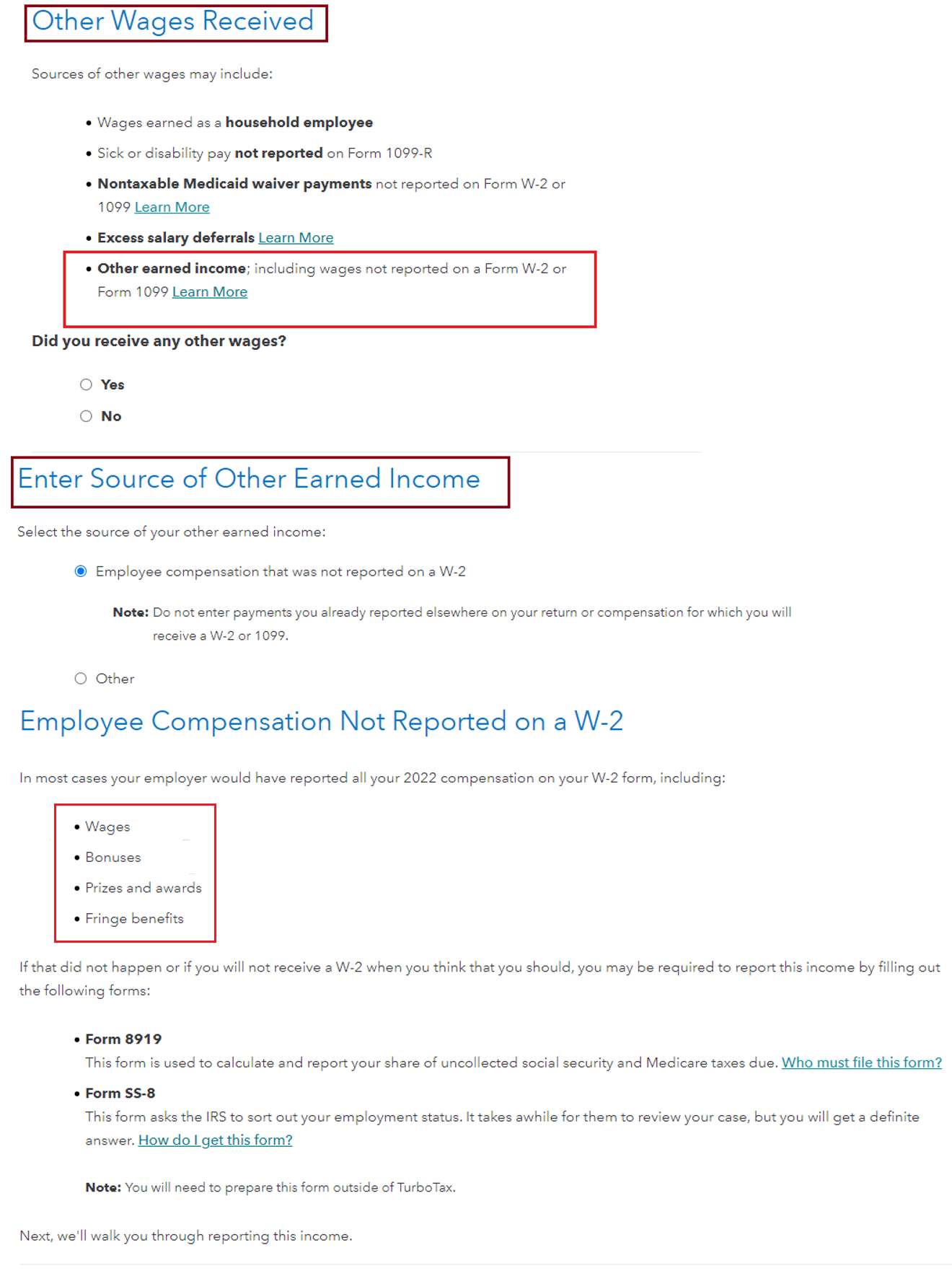
  5. The next screen asks "Did you receive any other wages?" Select Yes and click Continue.
  6. The next two screens ask about household employee wages and sick or disability pay. Click Continue on these two screens without entering anything.
  7. The next screen asks "Did you earn any other wages? Select Yes and click Continue.
  8. The next screen asks the source of the other earned income. Select "Employee compensation that was not reported on a W-2."  Ignore the note that says not to enter compensation for which you will receive a 1099. Click Continue.
  9. On the next screen, "Employee Compensation Not Reported on a W-2," click Continue.
  10. If you are filing a joint return, you will get a screen asking which one of you the income is for. Select your name and click Continue.
  11. On the next screen, "Report Your Wage Income," enter the employer's name and EIN from your W-2. When entering the EIN, you must enter the hyphen after the first two digits. For Total Wages Received, enter the amount on the amount (with or without a 1099-NEC or 1099-MISC). Select Reason Code H. Click Continue.
  12. On the next screen, "Report as Wages," click  Done.
  13. This returns you to the Miscellaneous Income screen. Click Continue.
  14. A few screen images below for assistance.
**Say "Thanks" by clicking the thumb icon in a post
**Mark the post that answers your question by clicking on "Mark as Best Answer"

View solution in original post

1 Reply
DianeW777
Expert Alumni

Moving Reimbursement W2 Error?

It would be best to obtain a corrected W2 from your employer.  However if that does not occur, there is a way for you to report it and pay only your share of medicare and social security tax.  The IRS will go back to your employer for their share.  Here are the steps to report your moving expense reimbursement with your W-2.


You cannot deduct moving expenses unless you are a member of the Armed Forces on active duty and, due to a military order, you move because of a permanent change of station.


On the dotted line to the left of the amount on line 1 there will be a notation "F8919" and the amount. Form 8919 will be included in the return, with reason code H in column (c). Form 8919 will calculate the Social Security and Medicare taxes that your employer should have withheld from the bonus. The total of these taxes will appear on Schedule 2, line 6,  and will be included in your total tax liability.

  1. Click the Federal Taxes tab. (In TurboTax Self-Employed or Home & Business click the Personal Tab.)
  2. Click Wages & Income. (In TurboTax Self-Employed or Home & Business click Personal Income.)
  3. Scroll all the way down to the last section "Less Common Income." Click the Start button for the last topic, "Miscellaneous Income, 1099-A, 1099-C."
  4. On the next screen click the Start button for "Other income not already reported on a Form W-2 or Form 1099."
  5. The next screen asks "Did you receive any other wages?" Select Yes and click Continue.
  6. The next two screens ask about household employee wages and sick or disability pay. Click Continue on these two screens without entering anything.
  7. The next screen asks "Did you earn any other wages? Select Yes and click Continue.
  8. The next screen asks the source of the other earned income. Select "Employee compensation that was not reported on a W-2."  Ignore the note that says not to enter compensation for which you will receive a 1099. Click Continue.
  9. On the next screen, "Employee Compensation Not Reported on a W-2," click Continue.
  10. If you are filing a joint return, you will get a screen asking which one of you the income is for. Select your name and click Continue.
  11. On the next screen, "Report Your Wage Income," enter the employer's name and EIN from your W-2. When entering the EIN, you must enter the hyphen after the first two digits. For Total Wages Received, enter the amount on the amount (with or without a 1099-NEC or 1099-MISC). Select Reason Code H. Click Continue.
  12. On the next screen, "Report as Wages," click  Done.
  13. This returns you to the Miscellaneous Income screen. Click Continue.
  14. A few screen images below for assistance.

**Say "Thanks" by clicking the thumb icon in a post
**Mark the post that answers your question by clicking on "Mark as Best Answer"

Unlock tailored help options in your account.

message box icon

Get more help

Ask questions and learn more about your taxes and finances.

Post your Question




