


- Community
- Topics
Turn on suggestions
Auto-suggest helps you quickly narrow down your search results by suggesting possible matches as you type.
Showing results for
- Community
- :
- Discussions
- :
- Taxes
- :
- Get your taxes done
- :
- Inherited 1099-B


- Mark as New
- Bookmark
- Subscribe
- Subscribe to RSS Feed
- Permalink
- Report Inappropriate Content
Inherited 1099-B
I inherited two different investment vehicles from my mother when she passed. I closed both and took cash payouts (<$3k total). I have both 1099-B documents stating the amounts of the sales with very few other boxes filled in. I am unable to get the information I enter to pass the TurboTax check. Help!
Topics:
posted
January 26, 2021
1:42 PM
last updated
January 26, 2021
1:42 PM
Connect with an expert

Do you have an Intuit account?
You'll need to sign in or create an account to connect with an expert.
8 Replies


- Mark as New
- Bookmark
- Subscribe
- Subscribe to RSS Feed
- Permalink
- Report Inappropriate Content
Inherited 1099-B
Did you say "Inherited" when asked about how you received them? You may be able to avoid some of those questions.
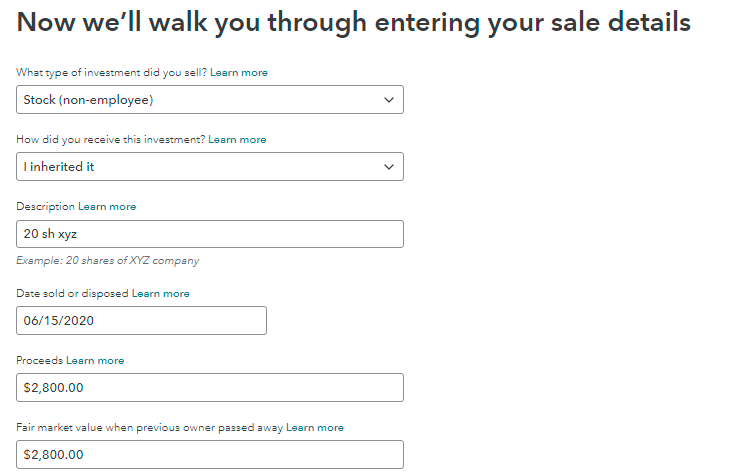
January 26, 2021
1:57 PM
- Mark as New
- Bookmark
- Subscribe
- Subscribe to RSS Feed
- Permalink
- Report Inappropriate Content
Inherited 1099-B
I don't see the same screen you see, nor the same questions being asked. Is this from an updated version of TT?
January 26, 2021
3:55 PM
- Mark as New
- Bookmark
- Subscribe
- Subscribe to RSS Feed
- Permalink
- Report Inappropriate Content
Inherited 1099-B
- You will be asked was it a stock.
- Which bank or brokerage sent you a 1099-B for these sales?
- Do these sales include any employee stock? Etc.
Then you will encounter, "Did you purchase all of these investments? Any inherited or gifted investments are not considered purchased. Answer "no"
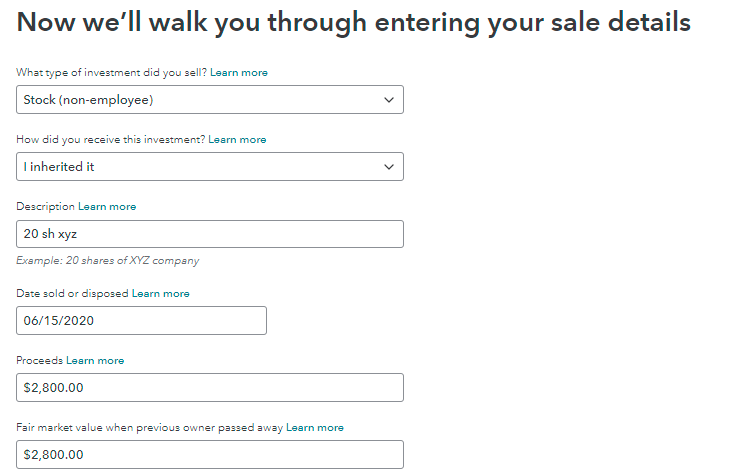
January 27, 2021
7:20 AM
- Mark as New
- Bookmark
- Subscribe
- Subscribe to RSS Feed
- Permalink
- Report Inappropriate Content
Inherited 1099-B
I have TurboTax basic...at the end when I select "Run Smart Check", the response window indicates
"We found 4 areas on your federal return where we'll need to review your entries.
We'll handle them one at a time"
I press 'Check Entries' and I get a new window that indicates:
Form 1099-B Worksheet (MetLife) : Sales Price does not match the value on the Capital Gain (Loss) Adjustment Worksheet. Leave this value blank when using the Capital Gain (Loss) Adjustment Worksheet.4
Sales Price box shows 2,776.96
Form 8949 Reporting Exception Transactions worksheet is also displayed with the amount (2,776.96) outlined in red in the Sales Price box on the worksheet.
I attempt to 'fix' these errors by removing the amount as specified, but that only opens another error condition because it's now empty. I get the same error(s) for the second investment I enter.
Sorry about the long saga...I can't get SNIP to get the screen copy in here...
January 27, 2021
7:55 AM
- Mark as New
- Bookmark
- Subscribe
- Subscribe to RSS Feed
- Permalink
- Report Inappropriate Content
Inherited 1099-B
In order for TurboTax to know the stock is inherited we want to be sure you have all the right selections when you enter these investment sales. The cost will be the same as the selling price if the sale occurred close to the time you inherited because inherited value on the date of death becomes the cost basis for you. Inherited investment assets are always considered held long term.
Sign into your TurboTax account, then follow the steps below.
- Select Wages & Income > Scroll to Stocks, Mutual Funds, Bonds, Other > Review
- Select Edit beside the inherited stock
- Continue to Review your (description of inherited stock) sales > click the pencil to edit this stock sale
- Now you can follow the screen image provided with the additional details next:
- When we get to this screen shown above, be sure to select at the top > Long term basis not reported to IRS,
- Select the check box beside The cost basis is incorrect or missing on my 1099-B
- On the next screen you can choose None of these apply > Select I don't want to make any changes to my cost basis right now
- You can choose to get a call from an expert if it pops up, otherwise you can say No thank you
- Continue through the rest of the screens.
This should correct any issues and allow you to eliminate the errors.
**Say "Thanks" by clicking the thumb icon in a post
**Mark the post that answers your question by clicking on "Mark as Best Answer"
**Mark the post that answers your question by clicking on "Mark as Best Answer"
January 31, 2021
12:58 PM
- Mark as New
- Bookmark
- Subscribe
- Subscribe to RSS Feed
- Permalink
- Report Inappropriate Content
Inherited 1099-B
Thank you. For some reason, after installing updates, my return passed the check.
January 31, 2021
5:32 PM

- Mark as New
- Bookmark
- Subscribe
- Subscribe to RSS Feed
- Permalink
- Report Inappropriate Content
Inherited 1099-B
Hello ColleenD3,
In TurboTax desktop, I incorrectly answered the question "Did you purchase all of these investments? Any inherited or gifted investments are not considered purchased. " How do I return to that question after I've already answered it so that I can change it?
3 weeks ago
- Mark as New
- Bookmark
- Subscribe
- Subscribe to RSS Feed
- Permalink
- Report Inappropriate Content
Inherited 1099-B
Follow the instructions below (and above) to reach the location to change your inherited or gifted investment sales.
Sign into your TurboTax account, then follow the steps below.
- Select Wages & Income > Scroll to Stocks, Mutual Funds, Bonds, Other > Review
- Select Edit beside the inherited stock or the gifted investment
- Continue to Review your (description of inherited stock) sales > Edit
- This should take you to the investments you need to change and allow you to make the necessary changes.
Below is additional information for inherited investments. Gifts cost basis is the same as the giver plus any gift tax paid if applicable, but see some additional information about gift basis.
- Gain Basis: If you sell the gift for a gain, your basis is the same as the donor's adjusted basis just before the gift.
- Loss Basis: If the FMV at the time of the gift is less than the donor's basis, your basis for calculating a loss is the FMV. If you sell for a price between the FMV and the donor’s basis, you recognize neither gain nor loss.
Your cost basis is the fair market value on the date of death of the decedent, plus the capital improvements (not repairs but improvements that are capital in nature). The expenses of sale will reduce any gain or increase any loss as well. This is entered as the sale of investment property and can be entered as follows.
Enter the inherited property sale in TurboTax using the steps provided.
- Open or continue your return: Choose the Search box and type 'sale of second home' then use the Jump to link to enter your inherited sale) or follow the menu. In TurboTax Online select 'See more' in the FAQ then click 'sold second home'.
- Under Wages & Income scroll to Stocks, Cryptocurrency, Mutual Funds, Bonds, Other (1099-B)
- Answer Yes on the Did you sell any stocks, mutual funds, bonds, or other investments in 2025? screen
- If you land on the Your investment sales summary screen, select Add More Sales
- On the OK, let's start with one investment type screen, select Other, then Continue
- On the Tell us more about this sale screen, enter the name of the person or institution that brokered the sale
- On the next screen, select Other (choose this also for inherited homes) then select I inherited it under How did you receive this investment? (For TurboTax Desktop you can enter a description of 'Inherited Home' and long term holding period).
**Say "Thanks" by clicking the thumb icon in a post
**Mark the post that answers your question by clicking on "Mark as Best Answer"
**Mark the post that answers your question by clicking on "Mark as Best Answer"
3 weeks ago
Still have questions?
Questions are answered within a few hours on average.
Post a Question*Must create login to post


Unlock tailored help options in your account.


Get more help
Ask questions and learn more about your taxes and finances.
Related Content

angela-johnson-23
New Member

jimnovitsky
New Member

donleykirsten
New Member

rkwheeler22
New Member

karenkwas
New Member