
Level 1
February 29, 2020
Solved

HSA Over Contribution

  • February 29, 2020
  • 2 replies
  • 14 views

TurboTax Premier 2019 is telling me that I have over contributed by $1,600.

I'm over 60 and worked all year for same employer with HSA plan. I am married.

My HSA statement from employer shows that my 2019 limit is $8,000. I contributed $4,800, which also shows on 5498-SA.

My wife is retired and covered by my employers high deductible family health plan with me for all of 2019.  Neither of us receive Medicare.

Is my max limit for 2019 really $3,200?
    Best answer by linaj20201

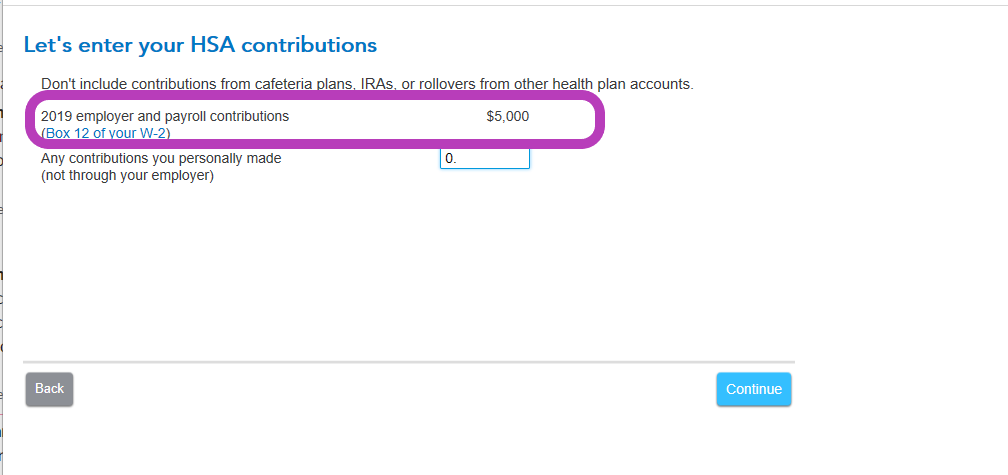
    Your total HSA contribution limit should be $8,000.  Click here to verify: 2019 HSA contribution limit.  If your employer has reported the contribution amount on your W-2, you should have it coded as W box 12 on your W-2.  You do not enter any additional amount in the program.  See the image below:


    To re-visit the HSA section, here are the steps:


    @jimsochor57


    • After sign in to your account, select Pick up where you left off
    • At the right upper corner, in the search box, type in HSA and Enter
    • Select Jump to HSA 
    • Follow the prompts
    • On-screen, Let's enter your HSA contributions
    • Follow prompts

    2 replies

    Level 15
    February 29, 2020

    Your employer and employee contributions are listed together in your W-2 and picked up automatically buy TurboTax. Later in the program, you are asked to provide additional deposits not made through the payroll system. You should not enter your payroll deposits again. Based on your figures, the error is exactly what we would be expected if you entered $4800 a second time when you should not have. Go back and run that interview again.

    Level 14
    February 29, 2020

    Your total HSA contribution limit should be $8,000.  Click here to verify: 2019 HSA contribution limit.  If your employer has reported the contribution amount on your W-2, you should have it coded as W box 12 on your W-2.  You do not enter any additional amount in the program.  See the image below:


    To re-visit the HSA section, here are the steps:


    @jimsochor57


    • After sign in to your account, select Pick up where you left off
    • At the right upper corner, in the search box, type in HSA and Enter
    • Select Jump to HSA 
    • Follow the prompts
    • On-screen, Let's enter your HSA contributions
    • Follow prompts




