turbotax icon
cancel
Showing results for 
Search instead for 
Did you mean: 
Close icon
Do you have a TurboTax Online account?

We'll help you get started or pick up where you left off.

Check This Entry

I'm filing for self-employed as an Uber Eats driver. The "Check This Entry" section is preventing me from moving forward.

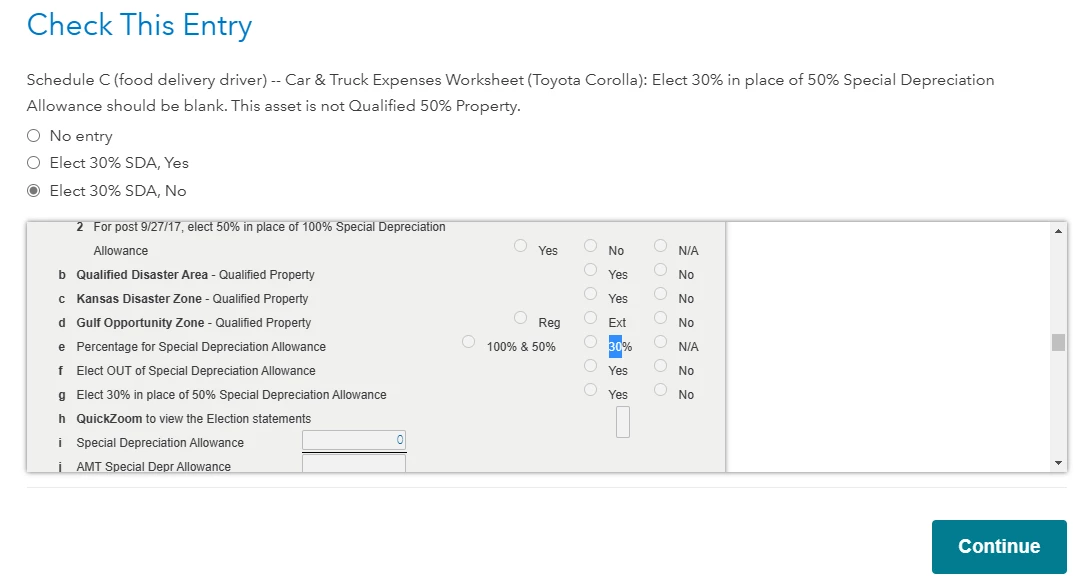
For example, the image attached shows the digital form but I am unable to check the boxes. It only lets me select the options above the form, but something must be wrong because after I hit continue it takes me back to the review page.

Screenshot (29).png

x
Do you have an Intuit account?

Do you have an Intuit account?

You'll need to sign in or create an account to connect with an expert.

1 Best answer

Accepted Solutions
ThomasM125
Expert Alumni

Check This Entry

A Section 179 election and bonus depreciation allowances allow you to deduct up to the cost of a vehicle or other business assets, proprated for the business use of it, in the year you put it into service in the business. This is in place of the more traditional method of depreciating an asset over several years, thereby spreading the cost of it over years as opposed to deducting it in the first year. The special depreciation allowances may give you a  bigger tax deduction in the year you put the vehicle into service.


In reference to the error messages, the first one says you can't enter anything in the special depreciation allowance box, but it looks like you entered a $0. So, you need to delete that entry so that the entry is blank. The second message says you don't qualify for the special depreciation allowance, so you need to change your entry by clicking the "No Entry" box.


To qualify for the section 179 allowance, you need to use the vehicle more than 50% for the business and you can't use the deduction in the current year to the extent it generates a loss for the company. The rules are the same for the bonus depreciation, but you can use that even if it generates a loss in the current year.


To see if you can use the special depreciation allowances, you may need to go back through your asset entries and make sure you answered the questions properly.


**Say "Thanks" by clicking the thumb icon in a post
**Mark the post that answers your question by clicking on "Mark as Best Answer"

View solution in original post

10 Replies
DaveF1006
Expert Alumni

Check This Entry

To clarify, I can't read the screen. Could you possibly send us a larger screenshot?

**Say "Thanks" by clicking the thumb icon in a post
**Mark the post that answers your question by clicking on "Mark as Best Answer"

Check This Entry

Screenshot (29).png

Check This Entry

It takes me back to this page after I finish.

Screenshot (30).png

DaveF1006
Expert Alumni

Check This Entry

To clarify, when you check continue, what does the next screen look like?

**Say "Thanks" by clicking the thumb icon in a post
**Mark the post that answers your question by clicking on "Mark as Best Answer"
Check This Entry

When I click continue, the "Let’s take care of these details now" page is displayed. (this is the same page as the image I posted above)

Check This Entry

In order:

1st page:  "Let’s take care of these details now"

2nd page: 

Screenshot (34).png

3rd page: 

Screenshot (35).png


4th page: loops back to "Let’s take care of these details now"


DaveF1006
Expert Alumni

Check This Entry

To clarify, are you claiming actual expenses and claiming a 179 deduction for the car? If so, it seems like there is a problem with the percentage of business use for the car. Also if you sell or trade in the car, all this depreciation needs to be recaptured as a income and could result in a capital gain for you to pay back later, especially if you sell it in the next year or two. Capital gains mean more income taxes you may have to pay.


let me suggest that you use mileage instead of actual expenses.  There is a depreciation component built in the mileage rate that needs to be captured but the impact is not as great as claiming the the entire 179 deduction. Besides, if you use actual expenses the first year, you will need to use this the entire period you own the vehicle and use it for business. 


The first year may seem like a good return with the 179 deduction but the mileage expense will yield a better deduction over the long run. For this, I suggest that you may consider changing to mileage. This way, you might avoid these nasty error messages.


To change  to federal>wages and income>Self-Employment>Self-employment income and expenses. Look under vehicle in your business expenses and select the edit button. Scroll through the sections until it asks you if you would rather take actual expenses or mileage.

**Say "Thanks" by clicking the thumb icon in a post
**Mark the post that answers your question by clicking on "Mark as Best Answer"

Check This Entry

Thank you Dave for taking the time to help me with this issue! I'm not sure what the 179 deduction is. I am claiming actual expenses because I deliver full-time and put thousands of miles on my car monthly, which is more than standard mileage. I'm looking for the biggest deduction this year; I don't plan on selling the car any time soon.

ThomasM125
Expert Alumni

Check This Entry

A Section 179 election and bonus depreciation allowances allow you to deduct up to the cost of a vehicle or other business assets, proprated for the business use of it, in the year you put it into service in the business. This is in place of the more traditional method of depreciating an asset over several years, thereby spreading the cost of it over years as opposed to deducting it in the first year. The special depreciation allowances may give you a  bigger tax deduction in the year you put the vehicle into service.


In reference to the error messages, the first one says you can't enter anything in the special depreciation allowance box, but it looks like you entered a $0. So, you need to delete that entry so that the entry is blank. The second message says you don't qualify for the special depreciation allowance, so you need to change your entry by clicking the "No Entry" box.


To qualify for the section 179 allowance, you need to use the vehicle more than 50% for the business and you can't use the deduction in the current year to the extent it generates a loss for the company. The rules are the same for the bonus depreciation, but you can use that even if it generates a loss in the current year.


To see if you can use the special depreciation allowances, you may need to go back through your asset entries and make sure you answered the questions properly.


**Say "Thanks" by clicking the thumb icon in a post
**Mark the post that answers your question by clicking on "Mark as Best Answer"

Check This Entry

Thank you! That solved the issue with the review section.

Unlock tailored help options in your account.

message box icon

Get more help

Ask questions and learn more about your taxes and finances.

Post your Question




