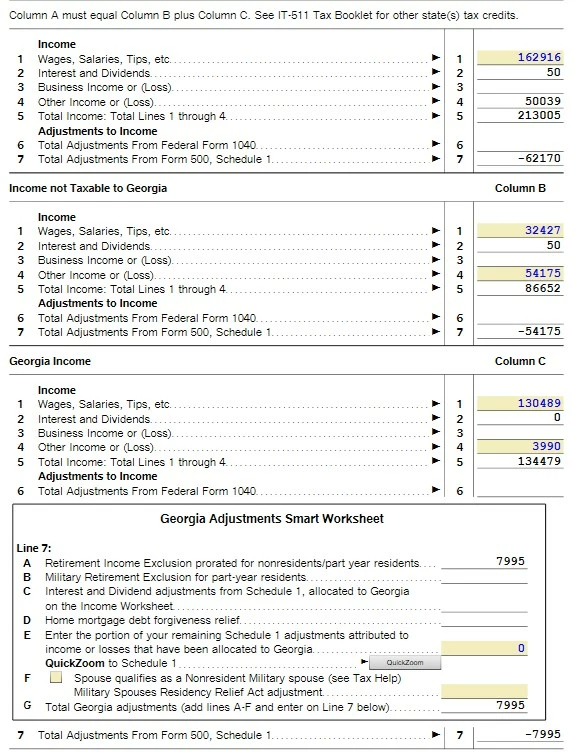
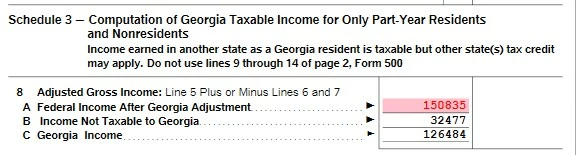
I, too, am seeing inaccurate results in my Georgia 500 Nonresident Schedule 3. I was on with Support for over an hour and then the call dropped, but she couldn't see any reasons, either.
Here are the source fields from the form followed by the TT-Flagged error where Column A does not equal Columns B + C:
I can't Override because eFile won't let me and I've gone over the source files many times. I'll be glad to submit a token once I have a thread to submit it on.
You'll need to sign in or create an account to connect with an expert.
Yes, you're correct that there's a software issue, and I'm going to be submitting it today, but thankfully you can make the change manually on your end; here are the steps:
1. Open the return, switch to Forms view
2. Select Federal Form 1040
3. Scroll down to Line 6b, taxable S.S. income, and write down that number (not the Line 6a amount -- the smaller taxable amount)
4. Scroll down to Georgia Individual forms
5. Select Inc/Ret Wks
6. Scroll down to worksheet line 9 S.S. income, look at columns C and D - there's an amount in both columns
7. Change Line 9 column C to 33,553
8. Change Line 9 column D to 12,496
9. Verify C + D = the taxable number you wrote down in step 3
10. Select Schedule 3 from the GA Individual forms
11. Double check that Line 8 A - B - C = 0
The red text should have disappeared automatically
12. Select Errors and verify that the error has been cleared
13. Complete and e-file the return as normal
14. Select GA Schedule 1 from the forms list
15. Scroll to Line 8 S.S. Benefits and change this number to the taxable number from Step 3
16. Select Errors to verify that nothing has gone haywire
17. Double check the math on Schedule 3 and select Errors to verify the error check is still clear
18. Complete and e-file the return as normal
I apologize for any confusion; I assumed updating the GA Inc/Ret Wks would flow the number correctly to every GA schedule as it did so for Schedule 3, and then I checked Schedule 1 after posting this. Please manually change the number in both places, and you may also review the PDF printout of your state return.
[Edited 03/16/26|1:16pm PST]
Please do not hesitate to tag me @MelindaS1 if you have any issues or different results with clearing this up.
You win. Your picture shows:
line 8a is line 5 plus or minus lines 6 and 7. When I take line 5 $213005 and add ( a negative) 62170 the total is $150,835.Which matches your picture/program.
Line 8b is nontaxable GA income of $32477 - numbers match
Line 8c is GA taxable income - numbers subtract and match
I would like to take a deeper look at this. However, I need a diagnostic file which is a copy of your tax return that has all of your personal information removed. Please notify me by adding @AmyC to your response. If I discover a solution, I will reply. Otherwise, it will be moved on to an investigation team.
You can send a token to me by following the directions below:
TurboTax Online:
Sign into your online account.
Locate the Tax Tools on the left-hand side of the screen.
A drop-down will appear. Select Tools
On the pop-up screen, click on “Share my file with agent.”
This will generate a message that a diagnostic file gets sanitized and transmitted to us.
Please provide the Token Number that was generated in the response.
TurboTax Desktop/Download Versions:
Open your return.
Click the Online tab in the black bar across the top of TurboTax and select “Send Tax File to Agent”
This will generate a message that a diagnostic copy will be created. Click on OK and the tax file will be sanitized and transmitted to us.
Please provide the Token Number that was generated in the response.
Here's the token. Sure hope you can help, I'd really like to get this filed an TT won't let me!
Here's one of the data sources for the form that's causing problems, and it seems that it's also wrong, as shown by the highlighted fields:
@AmyC: I'm getting a little concerned that I won't be able to file my Georgia return on time, solely because of these errors. I've identified that they're off by $8126 of the Georgia total, but I can't see anywhere to force this into the calculations so that TT will see a correct total and let me file.
For the past few years, Georgia has always corrected my TT-filed return (in my favor), so I've been trying to find a way to introduce this $8126 into the TT calculations, even though they don't seem to be wrong in the first place, knowing that Georgia will simply correct it. HOWEVER, I don't understand why they're wrong in TurboTax in the first place.
Have you been able to do anything with all the screenshots and the token that have been sent?
Yes, you're correct that there's a software issue, and I'm going to be submitting it today, but thankfully you can make the change manually on your end; here are the steps:
1. Open the return, switch to Forms view
2. Select Federal Form 1040
3. Scroll down to Line 6b, taxable S.S. income, and write down that number (not the Line 6a amount -- the smaller taxable amount)
4. Scroll down to Georgia Individual forms
5. Select Inc/Ret Wks
6. Scroll down to worksheet line 9 S.S. income, look at columns C and D - there's an amount in both columns
7. Change Line 9 column C to 33,553
8. Change Line 9 column D to 12,496
9. Verify C + D = the taxable number you wrote down in step 3
10. Select Schedule 3 from the GA Individual forms
11. Double check that Line 8 A - B - C = 0
The red text should have disappeared automatically
12. Select Errors and verify that the error has been cleared
13. Complete and e-file the return as normal
14. Select GA Schedule 1 from the forms list
15. Scroll to Line 8 S.S. Benefits and change this number to the taxable number from Step 3
16. Select Errors to verify that nothing has gone haywire
17. Double check the math on Schedule 3 and select Errors to verify the error check is still clear
18. Complete and e-file the return as normal
I apologize for any confusion; I assumed updating the GA Inc/Ret Wks would flow the number correctly to every GA schedule as it did so for Schedule 3, and then I checked Schedule 1 after posting this. Please manually change the number in both places, and you may also review the PDF printout of your state return.
[Edited 03/16/26|1:16pm PST]
Please do not hesitate to tag me @MelindaS1 if you have any issues or different results with clearing this up.
Thank you! Your instructions worked perfectly and I just filed my Georgia state return. Thanks a million @MelindaS1 and FYI for @AmyC.
Still have questions?
Questions are answered within a few hours on average.
Post a Question*Must create login to post
Ask questions and learn more about your taxes and finances.
gfwalker7
Returning Member
zsper
New Member
tt2025issues
New Member
tt2025issues
New Member
jennscole01
Returning Member