


- Community
- Topics
Turn on suggestions
Auto-suggest helps you quickly narrow down your search results by suggesting possible matches as you type.
Showing results for
- Community
- :
- Discussions
- :
- Taxes
- :
- Get your taxes done
- :
- 8995 form showing wrong spuse name and SSN


- Mark as New
- Bookmark
- Subscribe
- Subscribe to RSS Feed
- Permalink
- Report Inappropriate Content
8995 form showing wrong spuse name and SSN
The 8995 form is showing the wrong spouse's name and SSN for the business name and taxpayer ID. There appears to be no way to link back to where this information is coming from. I've tried deleting the form but when it recreates it still has the wrong information. The business is income is coming from a 1099-MISC that has the correct information. (Why does TurboTax make simple things so difficult?)
Traced back to the QBI Component worksheet having the wrong name. But again, can't find where the source comes from. If I delete that worksheet, it immediately gets recreated with the same wrong name and SSN.
Topics:
posted
April 13, 2026
4:39 PM
last updated
April 13, 2026
4:49 PM
Connect with an expert

Do you have an Intuit account?
You'll need to sign in or create an account to connect with an expert.
7 Replies


- Mark as New
- Bookmark
- Subscribe
- Subscribe to RSS Feed
- Permalink
- Report Inappropriate Content
8995 form showing wrong spuse name and SSN
It depends. Form 8995 should have the name and social security number (SSN) of the business owner on Schedule C, or if Schedule E then either spouse may be used if the joint owner is selected. It's not a concern for your tax return or the IRS.
I realize your entered Form 8225, and assumed you meant Form 8995. Please add any additional question is you need further assistance.
**Say "Thanks" by clicking the thumb icon in a post
**Mark the post that answers your question by clicking on "Mark as Best Answer"
**Mark the post that answers your question by clicking on "Mark as Best Answer"
April 13, 2026
4:52 PM
- Mark as New
- Bookmark
- Subscribe
- Subscribe to RSS Feed
- Permalink
- Report Inappropriate Content
8995 form showing wrong spuse name and SSN
"It's not a concern for your tax return or the IRS." -- Is there something official I can refer to that says it's not an IRS concern?
Seeing an entry that I know is incorrect is a concern to me, especially when I should be able to fix it with a simple edit. (But then I can't e-file.)
April 13, 2026
4:58 PM

- Mark as New
- Bookmark
- Subscribe
- Subscribe to RSS Feed
- Permalink
- Report Inappropriate Content
8995 form showing wrong spuse name and SSN
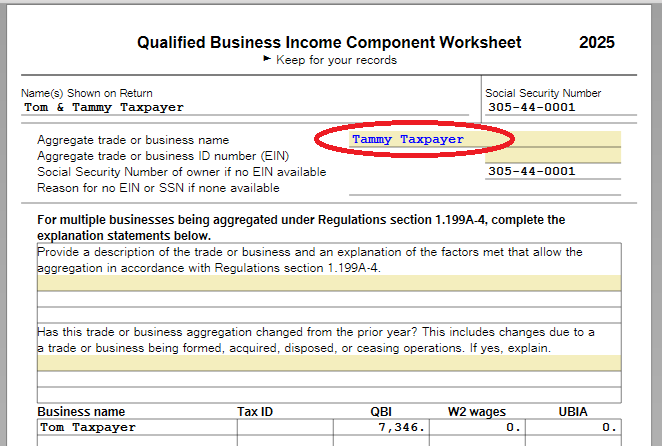
Are you using TurboTax Desktop? If so, in FORMS mode, 'Open Form' QBI Business Income Component Worksheet. You can change the name on this form to match the SSN. This name will then appear on related QBI forms; QBI Deduction Summary and Form 8995.
**Say "Thanks" by clicking the thumb icon in a post
**Mark the post that answers your question by clicking on "Mark as Best Answer"
**Mark the post that answers your question by clicking on "Mark as Best Answer"
April 13, 2026
6:19 PM
- Mark as New
- Bookmark
- Subscribe
- Subscribe to RSS Feed
- Permalink
- Report Inappropriate Content
8995 form showing wrong spuse name and SSN
That field is not editable (or even overrideable). Down below in Business name I can select Override, but as mentioned above, that stops the ability to e-file. (Neither one allows me to select Data Source.)
April 14, 2026
10:03 AM

- Mark as New
- Bookmark
- Subscribe
- Subscribe to RSS Feed
- Permalink
- Report Inappropriate Content
8995 form showing wrong spuse name and SSN
Assuming this is for a Schedule C business, you may need to return to the QBI topic in the step-by-step interview, which is found after the Business Summary page (click Continue at the bottom). Follow the interview to the page "Should [name of business] be treated as part of a combined business?"
If you checked the name of another business on your return, that information would flow to the QBI worksheet for this business. If you checked "This business is independent of any other activities," TurboTax should provide boxes to enter the Business name and EIN of the business on the next page.
Also check the entries under General Business Information to confirm the correct taxpayer is entered for "Business is owned by" with either no EIN or the correct EIN for the taxpayer.
**Say "Thanks" by clicking the thumb icon in a post
**Mark the post that answers your question by clicking on "Mark as Best Answer"
**Mark the post that answers your question by clicking on "Mark as Best Answer"
April 14, 2026
1:52 PM
- Mark as New
- Bookmark
- Subscribe
- Subscribe to RSS Feed
- Permalink
- Report Inappropriate Content
8995 form showing wrong spuse name and SSN
It's from Schedule E, not Schedule C, so no, those directions don't seem to work. (But that still begs the question, why can't I just click on the entry and edit it, or get back to the source where it came from?)
April 15, 2026
7:18 PM

- Mark as New
- Bookmark
- Subscribe
- Subscribe to RSS Feed
- Permalink
- Report Inappropriate Content
8995 form showing wrong spuse name and SSN
Getting back to the source of the data is exactly what you need to do. If it is coming from the schedule E then you need to change that schedule E in order to change to the proper spouse.
**Say "Thanks" by clicking the thumb icon in a post
**Mark the post that answers your question by clicking on "Mark as Best Answer"
**Mark the post that answers your question by clicking on "Mark as Best Answer"
April 16, 2026
10:34 AM
Still have questions?
Questions are answered within a few hours on average.
Post a Question*Must create login to post


Unlock tailored help options in your account.


Get more help
Ask questions and learn more about your taxes and finances.
Related Content

reneesnyder445
New Member

weaslebabe
Returning Member

jimmyinhmb
Level 1

garry
New Member

lameboogz
New Member