
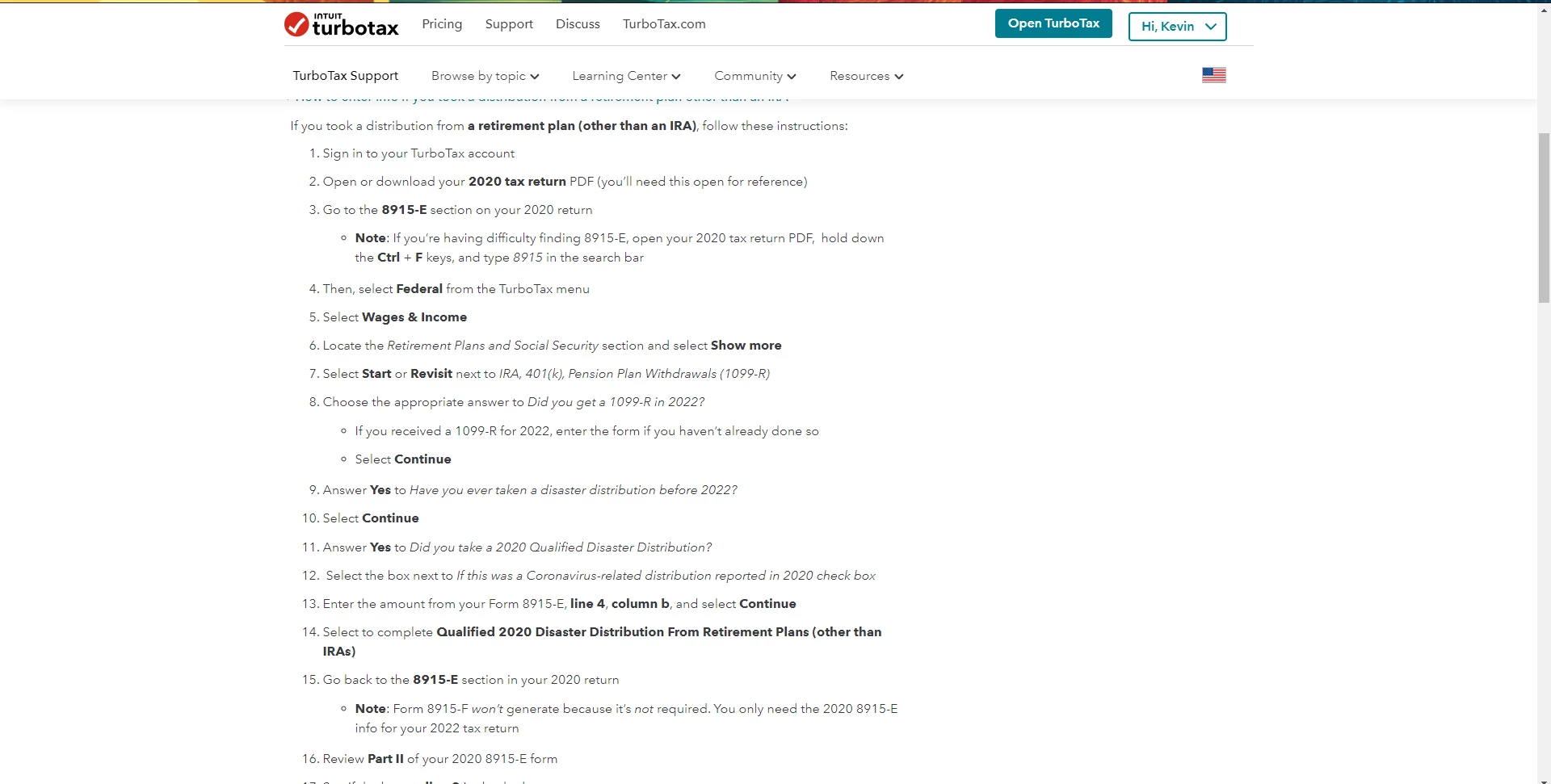
Tried to enter my information for the 2020 Covid distribution from my 401k. I had deferred the taxes over three years, and so needed to report them for this year. However the TT online form asks for 8915-F. A help document provided by help button leads to directions to enter the 8915-E information, but I fear isn't correct. There is a step, #13, that doesn't exist online. That step says to enter the amount from 8915-E line 4 Column B and select continue. The online form does not allow this to happen. If I skip that step and complete the rest of the amount inputs, once complete it shows a value of $0 for the 401K, IRA income selection. The online help directions
What I see after entering the requested information
You'll need to sign in or create an account to connect with an expert.
Please follow the guidelines provided below instead: Let us know if you are still having issues.
Another option is to delete "Form 8915-F" and "Qualified 2020 Disaster Retirement Distr" and then go back to the retirement section and reenter the information:
See the Link Below for Additional Information:
I tried both of your directions and still haven't fixed the issue. It is asking for 8915-F and I only have 8915-E. Following the help for entering that data, leads to step 13 that can't be completed.
The 8915-E is the form for the 2021 tax year. Are you working inside your 2022 return? Once you enter the 1099-R information the system should report the amount you have to pay back and generate the 8915-F.
If you are working in 2022 and you have an 8915-E form (not the worksheet that shows the carryover from 2021 then you need to delete the 8915-E in order to generate an 8915-F. This may require deleting your return and starting over since the 8915-E form is not supposed to be able to be added to the 2021 return.
I am using the information from my 8915-E from my 2020 return, and following the instructions given by the TT help, to enter the information into my 2022 return. Step 13 has no where for me to input so I have to skip this step. The other steps can be followed. Once I complete entering that information and "Continue" and the review, I get a question from TurboTax, asking if I have taken a Qualified Disaster from 2018-2020, which I click yes and it tells me to revisit the selection.
I have tried to restart the whole thing, but may try once again after deleting everything I can.
As you can see there is nowhere to enter the information for Step 13.
No, please See step 13 below. If you follow all these steps and you are still having issues, then you should delete Form 8915-F and start fresh. Clear your Cache before logging back into TurboTax.
Click on this link and follow the instructions on how to clear Cache
If you took a distribution from a traditional, SEP, SIMPLE or Roth IRA retirement plan, follow these instructions:
For a more comprehensive instruction see the link below:
I will try to delete the file and dump cache again, however when I COMPLETE step 11, click yes for 2020 disaster, my screen automatically jumps to the image I posted above., Once I complete 12, checking the box for Coronavirus, there is no where to enter the value for step 13. The screen shot I posted above is what I get IMMEDIATELY AFTER step 11 is completed.
I's TT Premium 2022 online, if that helps at all.
Please try these instructions to report the 3rd portion of your 2020 Covid distribution:
I have no form 9815-F from my 2021 return. The only thing showing is a Qualified 2020 Disaster Relief Worksheet.
You can just enter 1/3 of the 2020 Covid distribution on lines 12 and 13 on the "Did you take a 2020 Qualified Disaster Distribution?" screen to report the 3rd portion on your 2022 tax return.
Please be aware, the distribution won't show on the Income & Wages Summary screen but you can check your 2022 Form 1040 to make sure it is included on line 5b.
To preview Form 1040 in TurboTax Online:
You might want to verify that 1/3 of the distribution shows on your 2021 Form 1040 line 5b.
Still have questions?
Questions are answered within a few hours on average.
Post a Question*Must create login to post
Ask questions and learn more about your taxes and finances.
user17718157531
Level 1
msmo8386
New Member
rpollock87
Level 2
bbolsm82
Returning Member
cuddlykitties4
Level 1





