


- Community
- Topics
Turn on suggestions
Auto-suggest helps you quickly narrow down your search results by suggesting possible matches as you type.
Showing results for
- Community
- :
- Discussions
- :
- Taxes
- :
- Deductions & credits
- :
- Re: Cannot delete or edit charitable donation


- Mark as New
- Bookmark
- Subscribe
- Subscribe to RSS Feed
- Permalink
- Report Inappropriate Content
Cannot delete or edit charitable donation
Using Turbotax deluxe 2025 desktop edition. I have no option to edit or delete any of my charitable contributions within the software. If I choose delete form from the View Forms option, it leaves the donation as "Untitled" and still cannot delete.
posted
January 24, 2026
4:26 PM
last updated
January 24, 2026
4:26 PM
Connect with an expert

Do you have an Intuit account?
You'll need to sign in or create an account to connect with an expert.
12 Replies


- Mark as New
- Bookmark
- Subscribe
- Subscribe to RSS Feed
- Permalink
- Report Inappropriate Content
Cannot delete or edit charitable donation
If Donation Form is labeled as "Untitled", all of the information has been removed from the form, and it will not print in your return.
You can proceed with confidence, or use that "Untitled Form" to post new information.
**Say "Thanks" by clicking the thumb icon in a post
**Mark the post that answers your question by clicking on "Mark as Best Answer"
**Mark the post that answers your question by clicking on "Mark as Best Answer"
February 1, 2026
8:55 AM

- Mark as New
- Bookmark
- Subscribe
- Subscribe to RSS Feed
- Permalink
- Report Inappropriate Content
Cannot delete or edit charitable donation
I have the same issue. I cannot edit my charitable donations in Deluxe step by step forms. Going into the actual worksheets is a real pain. Why can't I just edit my donations as I have in past years. I don't want to delete forms and then have them sitting there. I paid for a product and I want to have it be fully functional.
February 6, 2026
11:40 AM

- Mark as New
- Bookmark
- Subscribe
- Subscribe to RSS Feed
- Permalink
- Report Inappropriate Content
Cannot delete or edit charitable donation
I have the same issue in Premier Desktop
February 7, 2026
6:08 AM
3,855

- Mark as New
- Bookmark
- Subscribe
- Subscribe to RSS Feed
- Permalink
- Report Inappropriate Content
Cannot delete or edit charitable donation
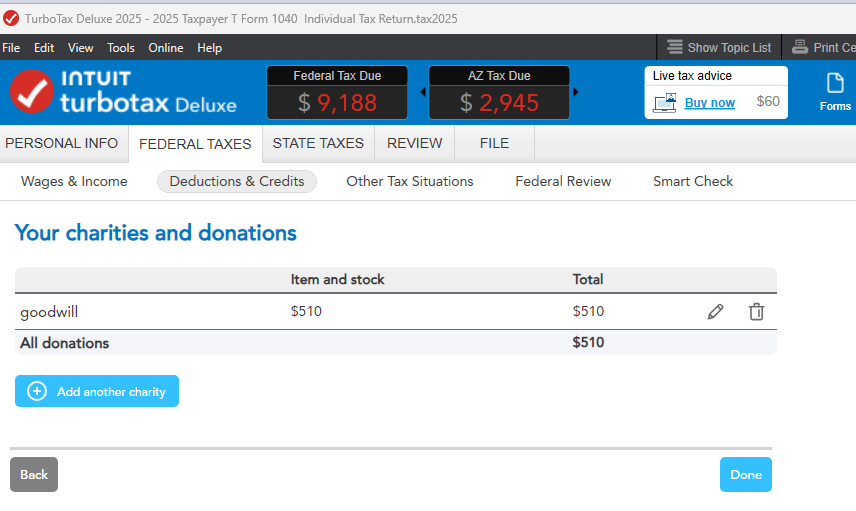
I'm using Deluxe and am able to Edit my Charitable Donations. There's a couple of edit screens; I started with 'Update' from the Deductions topics page, then clicked the Pencil icon on the next page showing the charity name. On the next screen I can change the donation type (cash, goods, vehicle use).
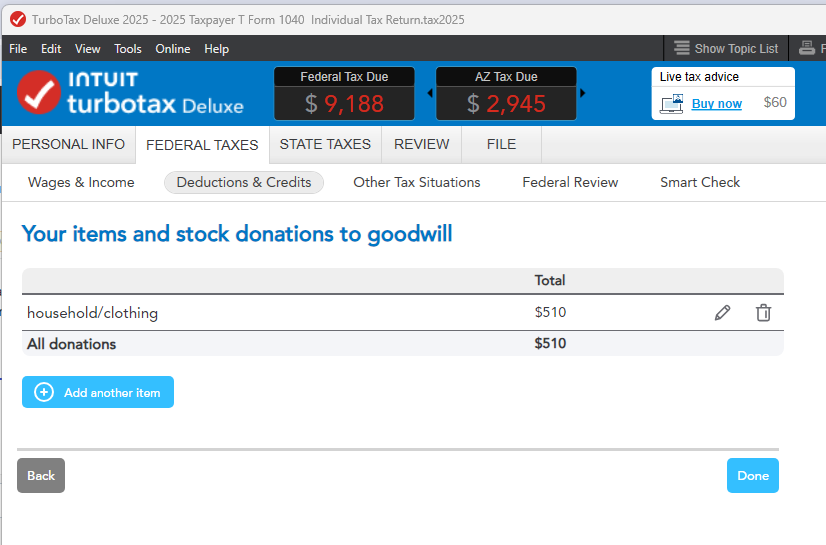
Choose the Pencil icon on the next screen (for items). There's several screens to go through to the end of this section.
You may need to Update your program through the ONLINE link at the top.
**Say "Thanks" by clicking the thumb icon in a post
**Mark the post that answers your question by clicking on "Mark as Best Answer"
**Mark the post that answers your question by clicking on "Mark as Best Answer"
February 7, 2026
12:00 PM
- Mark as New
- Bookmark
- Subscribe
- Subscribe to RSS Feed
- Permalink
- Report Inappropriate Content
Cannot delete or edit charitable donation
I am using 2025 Desktop Premier with Windows 11. My TurboTax is up to date. I check for updates daily at this time of year.
I do not see a Pencil icon (nor the trash can) anywhere on my "Your Charities and Donation" screen. I do see the pencil icon and trash can on your screen. Whether the charity was imported by TT from my last year's return, or newly added via the "Add Another Charity" button, the only way I can to edit (or delete) any charity on the "Your Charities and Donation" screen is to switch to forms mode.... I'd appreciate any help you can offer.
February 7, 2026
2:30 PM
- Mark as New
- Bookmark
- Subscribe
- Subscribe to RSS Feed
- Permalink
- Report Inappropriate Content
Cannot delete or edit charitable donation
When you choose 'Update' from the Deductions Topics page, the Summary screen should be the first screen you see. It's perfectly acceptable to make your changes in FORMS mode, too.
**Say "Thanks" by clicking the thumb icon in a post
**Mark the post that answers your question by clicking on "Mark as Best Answer"
**Mark the post that answers your question by clicking on "Mark as Best Answer"
February 9, 2026
1:51 PM
- Mark as New
- Bookmark
- Subscribe
- Subscribe to RSS Feed
- Permalink
- Report Inappropriate Content
Cannot delete or edit charitable donation
| |||||
|
Ok. I have issues with this response.
- The Edit (pencil) and Delete (Trash Can) icons should appear on the “Your Charities and Donations” screen for every donation as soon as they are recorded (whether via import from last year’s return or manually added). You shouldn’t have to go through the interview question process to get them.
- Based on your recommendation, I went through the interview process anyway and touched all ten sections. Then I selected “Done with Deductions”. I continued to “Other Tax situations” and then did the federal review. I went back to “Deductions and Credits” and the “Donations to Charity in 2025” line still says “Available Now” instead of the total. When I select Update for this line I am taken to the “Your Charities and Donations” screen. The pencil and Trash Can icons are still nowhere to be found.
- So, problem not solved. Disappointed? Yes.
I have used TurboTax for many years and have never experienced a software issue until now. I understand there were quite a few tax law changes made in 2025 but the display of Edit and Delete icons is basic stuff and should not be affected by the tax law changes.
Since we’re not getting anywhere with this issue, I’ll just use the ugly forms option to do my edits and hope there aren’t any other software issues that will affect my return when I submit it later this week.
February 10, 2026
4:43 AM

- Mark as New
- Bookmark
- Subscribe
- Subscribe to RSS Feed
- Permalink
- Report Inappropriate Content
Cannot delete or edit charitable donation
One thing you might try, is to save that file with a different file name
...so that you can test the following the second file without disrupting your original.
1) In the second test file, switch to Forms Mode,
2) Then open each Charitable Org worksheet you find, and delete each one
3) Then return to the interview and see if you can now enter Charities and donations using the normal process.
__________________
Shouldn't have to do that, but if it works, you are now good to go.
If it doesn't work, I've got nothing easy.
A) If on a windows computer...download and install the Manual Update? Takes a long time to load so you have to be patient.
Manually Update TurboTax for Windows Software
B) If on a windows computer....Checking to insure you have toe most recent Visual C+++ installed from Microsoft. (Not supposed to happen anymore ...BUT see the discussion):
Turbotax 2024 Desktop installation
C) Drastic: Uninstall TTX 2025, then download the most recent updated installation file and re-install. (i.e. don't re-install using your old installation file copy)
____________*Answers are correct to the best of my knowledge when posted, but should not be considered to be legal or official tax advice.*
February 10, 2026
6:05 AM
2,851
- Mark as New
- Bookmark
- Subscribe
- Subscribe to RSS Feed
- Permalink
- Report Inappropriate Content
Cannot delete or edit charitable donation
Update: For a brief moment (1 day), the EDIT button appeared and I was able to make some edits to my Charitable Donations worksheet in the Step by Step form. The EDIT buttons have disappeared again. VERY FRUSTRATING!
February 12, 2026
3:29 PM
2,620
- Mark as New
- Bookmark
- Subscribe
- Subscribe to RSS Feed
- Permalink
- Report Inappropriate Content
Cannot delete or edit charitable donation
Thank you for responding to my note about being unable to edit my charitable donations in the Step by Step. There is no pencil or trash icon on my screen for that worksheet. These icons did appear briefly the last time I opened TurboTax, but have now disappeared again. Every time I open TurboTax, it updates automatically. Is that what you mean by "update my program"? If not, I don't see the link above that you're referring to. Thanks again.
February 12, 2026
3:34 PM
2,619
- Mark as New
- Bookmark
- Subscribe
- Subscribe to RSS Feed
- Permalink
- Report Inappropriate Content
Cannot delete or edit charitable donation
For those using TurboTax 2025 I discovered the solution. In my situation only the Needs Review showed with a brown background. The Pencil Icon and Trash Can Icon should appear after the Needs Review but they are hidden. If you slowly move your cursor to the right of the Needs Review your cursor icon will change to a hand icon. Now click to edit your charitable contributions. Likewise, if you need to delete a charity keep moving the cursor further to the right until another hand icon appears. If you now click it will delete the charity.
February 25, 2026
8:12 PM

- Mark as New
- Bookmark
- Subscribe
- Subscribe to RSS Feed
- Permalink
- Report Inappropriate Content
Cannot delete or edit charitable donation
I have the same problem. List from last year with Yes/No choices to include tells you to add 2025 amounts, but no way to do this. I had the same problem earlier with the 1099-R forms, which had no edit/pencil way to make any changes or enter the individual payers from last year. That was Saturday. After getting help to use the forms to enter amounts, no ability to enter QCDs for another two days. Then, after sharing screen with expert, with no change, it suddenly showed the pencil/update buttons.
I conclude that there is a problem with the software I downloaded, as updating it daily still isn't working with the Charities section. And, earlier in the week, all my entered data in retirement income and SS disappeared completely.
Some kind of subtle glitches that techies should have solved before sending out the software. Could be some Microsoft 11/Intuit interaction? Something else? Who knows? But I've wasted over six hours dealing with stuff that should have worked to begin with, and now will waste more having yet another problem, similar to the last 'no pencil' one.
March 19, 2026
9:51 PM
Still have questions?
Questions are answered within a few hours on average.
Post a Question*Must create login to post


Unlock tailored help options in your account.


Get more help
Ask questions and learn more about your taxes and finances.
Related Content

jhfoltz
New Member

Cris
Level 3

smbmighty
Level 1

keithschaffler
New Member
crystaljames2118
New Member