


- Community
- Topics
Turn on suggestions
Auto-suggest helps you quickly narrow down your search results by suggesting possible matches as you type.
Showing results for
- Community
- :
- Discussions
- :
- Taxes
- :
- Deductions & credits
- :
- Form 8962 with allocation of zero not handled properly
Announcements


- Mark as New
- Bookmark
- Subscribe
- Subscribe to RSS Feed
- Permalink
- Report Inappropriate Content
Form 8962 with allocation of zero not handled properly
I need to allocate my ACA premium tax credit with another tax family on form 8962, and am having a problem. For 8 months of 2025 I shared my ACA policy with someone else who has their own tax family. Per IRS instruction for form 8962, the two of us can agree to any allocation between 0 and 100%. We have agreed that I will use 0% and they will use 100% for the allocation for those 8 months.
But when I enter 0 as my allocation for those 8 months, Turbotax decides to zero out the entire year, not just those 8 months. Only 8 months should be zero, the other months should simply be the amounts I entered from my 1095-A.
Is there a workaround for this bug?
posted
a week ago
last updated
February 20, 2026
4:57 PM
Connect with an expert

Do you have an Intuit account?
You'll need to sign in or create an account to connect with an expert.
7 Replies


- Mark as New
- Bookmark
- Subscribe
- Subscribe to RSS Feed
- Permalink
- Report Inappropriate Content
Form 8962 with allocation of zero not handled properly
To enter a 0% allocation for Form 8962 in TurboTax without zeroing out the entire form, you must use the Shared Policy Allocation section to assign 100% of the policy to the other taxpayer and 0% to yourself.
Before taking any other steps, you might try exiting the return. Clear cache and cookies, and restart your computer.
When you enter your 1095-A into TurboTax, there will be an option (a box to check) that says I shared this policy with someone not on my tax return. After checking that box, you will get the option to name someone else as recipient of the amounts in Boxes A and C
In the 1095-A entry screen, select "Yes" to shared policy, enter the other person's SSN, and enter "0" for your percentage in Part IV.
Steps to Enter 0% Allocation (Shared Policy):
- Enter 1095-A Data: Enter your Form 1095-A details as shown.
- Shared Policy Question: When asked if you shared this policy, answer Yes.
- Allocate Percentage: When asked for your allocation percentage, enter 0 for all months.
- Other Taxpayer Info: Enter the SSN of the person who is taking 100% of the policy allocation.
- Verify Part IV: This tells TurboTax that while you have a 1095-A, your share of the premium tax credit is 0%, thus not zeroing out the entire form, but rather correctly reporting a 0% allocation in Part IV of Form 8962
**Say "Thanks" by clicking the thumb icon in a post
**Mark the post that answers your question by clicking on "Mark as Best Answer"
**Mark the post that answers your question by clicking on "Mark as Best Answer"
Wednesday
- Mark as New
- Bookmark
- Subscribe
- Subscribe to RSS Feed
- Permalink
- Report Inappropriate Content
Form 8962 with allocation of zero not handled properly
Thank you for the response. I actually tried all of that but it still zeroed out the entire 8962.
Yes to sharing, entered the SSN of other person, January as month shared coverage started, August as month shared coverage ended, 0% for share of enrollment premium as well as SLSCP and PTC.
But, I did not see the final step that you mention, "Verify Part IV ..." If it matters, I did this using the desktop version of Premier. Is "verify" available on desktop version?
Wednesday
- Mark as New
- Bookmark
- Subscribe
- Subscribe to RSS Feed
- Permalink
- Report Inappropriate Content
Form 8962 with allocation of zero not handled properly
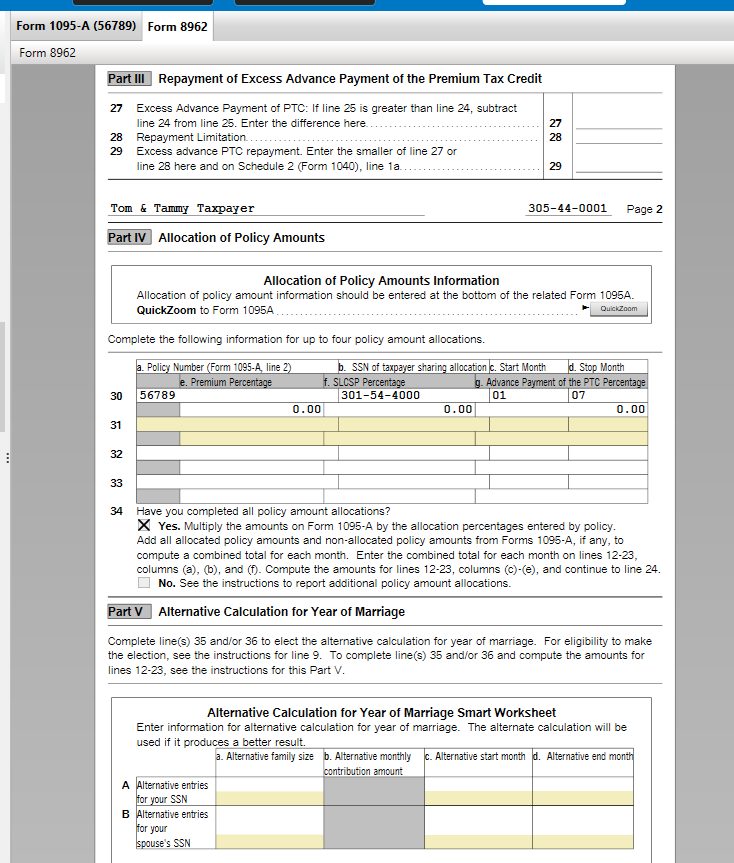
And just to be clear, by "... zeroed out the entire 8962" I mean that it sets the "tax family size" (line 1) to 0 and all of the other lines are blank except for line 30 which has the policy number, SSN, start month (1), end month (8) and premium, SLCSP, and PTC percentages (0.00) filled in.
Wednesday

- Mark as New
- Bookmark
- Subscribe
- Subscribe to RSS Feed
- Permalink
- Report Inappropriate Content
Form 8962 with allocation of zero not handled properly
Enter your 1095-A as received. When you state the Allocation Percentage of 0% in the interview, TurboTax will do the calculations for you on 8962. You don't need to make any adjustments to the amounts on the form itself.
If your form only has amounts in months from January through August, leave the other areas blank. If it has amounts in months for January through December, but you only shared January through August, you should still state the policy months as being January through December, as the 1095-A shows.
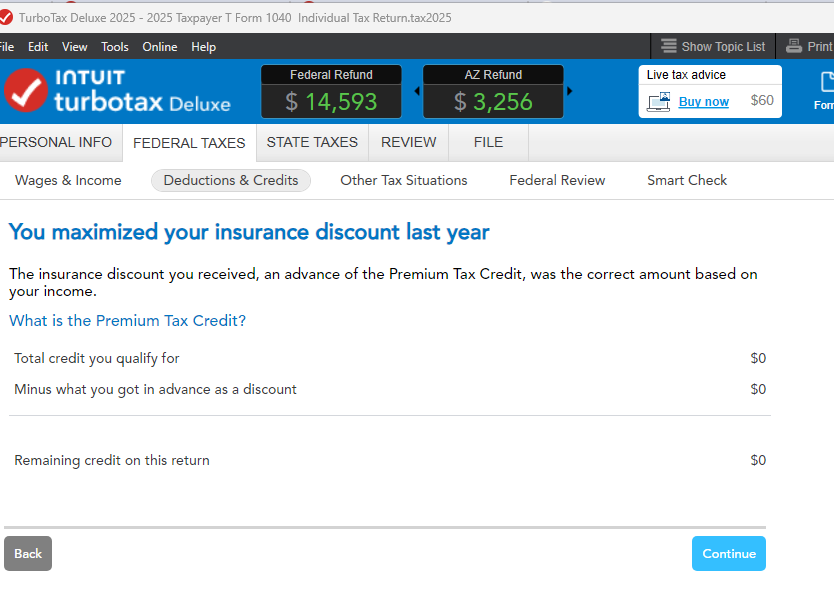
I tested this in TurboTax Desktop by indicating 0% and entering 1095-A data for months January through June. I received a window stating 'You Maximized your Insurance Discount Last Year', with 'Total Credit you qualify for' as $0, 'Minus what you got in advance' $0, 'Remaining Credit on this Return' $0.
My Form 8962 has Family Size 0 on Line 1, Line 9 has box checked' Yes', and in Part IV, Line 30, more 0's. This is correct, as the IRS just wants to see Form 8962 and 1095-A in your return and you neither owe or get a refund with a 0% allocation. You could delete your 1095-A and 8962 and step through the interview again.
**Say "Thanks" by clicking the thumb icon in a post
**Mark the post that answers your question by clicking on "Mark as Best Answer"
**Mark the post that answers your question by clicking on "Mark as Best Answer"
Thursday
- Mark as New
- Bookmark
- Subscribe
- Subscribe to RSS Feed
- Permalink
- Report Inappropriate Content
Form 8962 with allocation of zero not handled properly
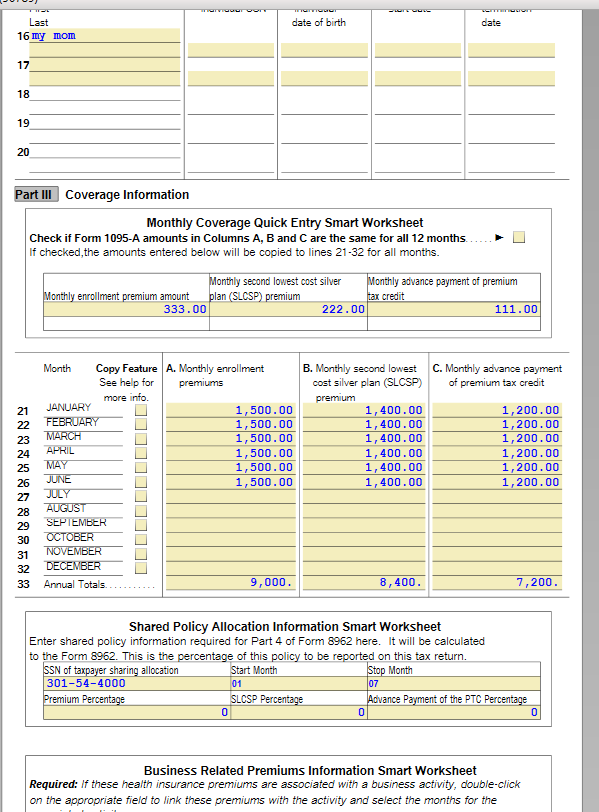
Thanks for looking into this. My situation is a bit different than the scenario you mocked up in that I did have coverage for the entire year, but the shared coverage with the member of different tax family was only for Jan to Aug. For the remaining months, Sept to Dec, I was on my own. Due to an unforeseen underestimate of my income, I need to repay most of the premium tax credit that I received for those four months (Sept to Dec). But when I set the allocation for Jan to Aug, it zero's out the entire form and does not include the amount that I need to repay for Sept to Dec.
I also noticed a weird glitch. If I set the allocation to 1% rather than 0%, it fills out the form properly (for a 1% allocation) and correctly calculates the amount of the advanced PTC that I need to repay. I also checked other allocation percentages and TT gets those correct also. Only when it sees a 0% does it glitch and zero out the entire form.
===
In the mock up that I did below, assume that my allowed monthly PTC was only $300, so for Sept to Dec I would need to repay 4 x ($800 - $300) = $2000. For Jan to Aug everything should be allocated to the other tax family so I would not have to repay for those months. But setting the allocation to 0% for Jan to Aug causes TT to zero out the form 8962 and incorrectly say that I owe no repayment.

yesterday
- Mark as New
- Bookmark
- Subscribe
- Subscribe to RSS Feed
- Permalink
- Report Inappropriate Content
Form 8962 with allocation of zero not handled properly
The calculations for Form 8962 don't look separately at individual shared months. It only considers your total household income, and the % of allocation you received and applies it to all months on the 1095-A. If choosing a 1% allocation works out as you intended in your situation, you can use that amount. Advise the other taxpayer to elect 99% for their allocation on their return.
Here's the IRS Instructions for For 8962.
**Say "Thanks" by clicking the thumb icon in a post
**Mark the post that answers your question by clicking on "Mark as Best Answer"
**Mark the post that answers your question by clicking on "Mark as Best Answer"
yesterday
- Mark as New
- Bookmark
- Subscribe
- Subscribe to RSS Feed
- Permalink
- Report Inappropriate Content
Form 8962 with allocation of zero not handled properly
Sorry if my point about using 1% was distracting. I only pointed it out to show that TT is able to correctly handle non-zero allocations (even non-zero allocations very close to 0%), but makes a mistake when it encounters a zero allocation. I do not in fact want to use a 1% allocation as it ends up costing us money. I simply want the correct values for a 0% allocation.
If I use a 1% allocation for Jan - Aug, TT calculates small PTC repayment amounts for those months, and the correct (larger) repayment amounts for Sept to Dec. In that case the 8962 amounts are calculated at a 1% allocation for Jan to Aug and a 100% allocation for Sept to Dec.
But changing to a 0% allocation for Jan to Aug zero's out all months of the PTC repayment, including the PTC repayment for Sept to Dec. This is incorrect as I do owe the Sept to Dec PTC repayment. (Since the other tax family was not covered by this plan from Sept to Dec, the Sept to Dec PTC repayment would not be repaid by them.)
This can be tried in the scenario you tested by including premiums for all twelve months and then adjusting the income to be high enough so that the maximum premium assistance is less than the monthly advanced PTC. At a 1% allocation for Jan to Aug, the repayment would be small for Jan to Aug and larger for Sept to Dec. Here's what that looks like:
1095-A:

Adjusting income so that my monthly contribution is $645, this generates the following 8962. Notice that Jan to Aug results in small PTC repayment amounts, while Sept to Dec results in larger PTC repayment amounts:

If I then change the Jan to Aug allocation from 1% to 0%, the following is the resulting 8962. Note that there is no repayment shown (and is blank for all values):

What I expected for the 0% allocation was zero's for Jan to Aug, and non-zero numbers for rest of the year (the Sept to Dec numbers for 0% should be the same as the Sept to Dec numbers for 1%).
yesterday
Still have questions?
Questions are answered within a few hours on average.
Post a Question*Must create login to post


Unlock tailored help options in your account.


Get more help
Ask questions and learn more about your taxes and finances.
Related Content

Vanjam12
Level 2

hannahdparker
Returning Member

tibbons2
Level 2
rccall
Level 1
Ricky C
New Member