turbotax icon
cancel
Showing results for 
Search instead for 
Did you mean: 
Close icon
Do you have a TurboTax Online account?

We'll help you get started or pick up where you left off.

pauldbloom
Returning Member

TurboTax Deluxe error on second state non-resident form

My wife gets a University pension payment from Wisconsin where we are no longer residents. Every year we get the same refund for taxes withheld for these pension payments.  This year the typical refund was zeroed out and we owed $2 according to TurboTax.  No levels of income have changed for either of us - filing jointly.

I found an entry that TurboTax made automatically this year. I am not sure why TurboTax filled anything into Wisconsin Schedule U.  It seems like a mistake and should not apply to our situation.

It is titled, "Underpayment of Estimated Tax by Individuals, Partnerships, and Fiduciaries".  We do not pay the tax that way with an estimated payment.  This income is a pension from University of Wisconsin, and is paid to her as a monthly amount. It seems to be treating this as if we have a penalty for not paying the taxes on this income on time.

How do I tell the turboTax program not to fill in this part (Schedule U) of the Wisconsin Tax forms? Or is there some tax law change that would explain this large change?  

x
Do you have an Intuit account?

Do you have an Intuit account?

You'll need to sign in or create an account to connect with an expert.

3 Replies
DavidD66
Expert Alumni

TurboTax Deluxe error on second state non-resident form

Schedule U would not be the problem, rather it is a symptom of the problem.  It is assessing a penalty on tax you don't owe.  If you eliminate the tax, the penalty (and Schedule U) will go away.  It sounds like you have some of your income allocated as Wisconsin income in the Wisconsin tax return.  Return to your tax return and go to the Wisconsin State return.  Click through the interview until you come to the page where you enter the amount of different types of income to the state of Wisconsin - make sure it is zero.  You might also want to contact the University and ask them to stop withholding Wisconsin state tax so that you don't have to file a WI state tax return.


**Say "Thanks" by clicking the thumb icon in a post
**Mark the post that answers your question by clicking on "Mark as Best Answer"
pauldbloom
Returning Member

TurboTax Deluxe error on second state non-resident form

There is zero income reported from wages or salary.  But it does not give a choice on the Wisconsin form to modify something that is causing this 'penalty' on Schedule U to be corrected.  Is there any other possibility in any of the fed or state forms that could be causing this to be recorded as failure to pay estimated taxes (which we don't pay as a retiree and myself as a W2 worker?

ReginaM
Expert Alumni

TurboTax Deluxe error on second state non-resident form

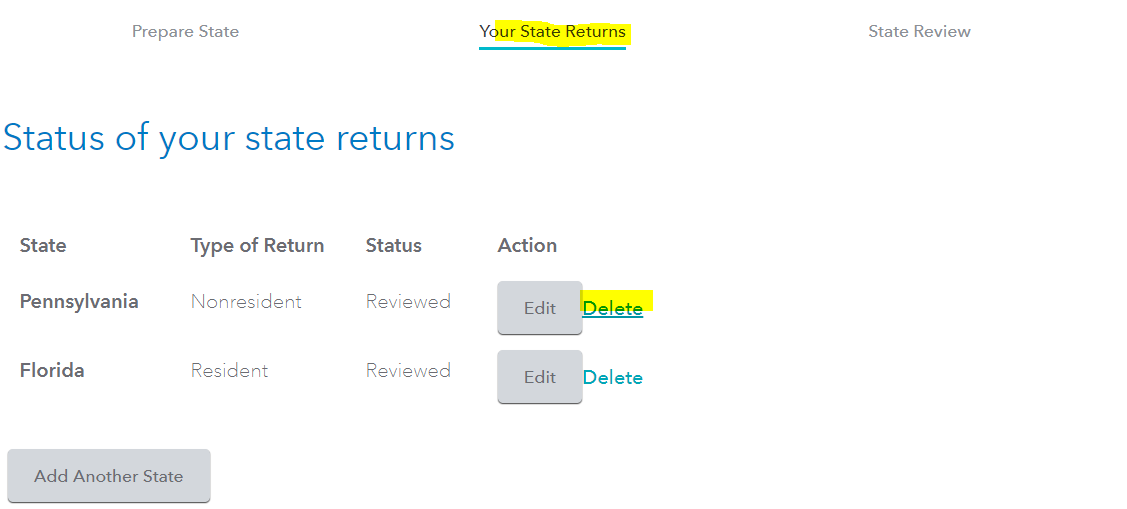
The easiest fix would be just to delete your Wisconsin State Return since you are no longer residents there and have no filing requirement for that state.  

  1. While in your Tax Home,
  2. Select from tabs across the top of your screen State Returns,
  3. Select the Trash Can next to the state.

**Say "Thanks" by clicking the thumb icon in a post
**Mark the post that answers your question by clicking on "Mark as Best Answer"

Unlock tailored help options in your account.

message box icon

Get more help

Ask questions and learn more about your taxes and finances.

Post your Question