
Level 2
March 11, 2023
Solved

Bug: Massachusetts 2022 Form 3 Line 30 does not allow override based on state interest manually entered on line 29

  • March 11, 2023
  • 2 replies
  • 0 views

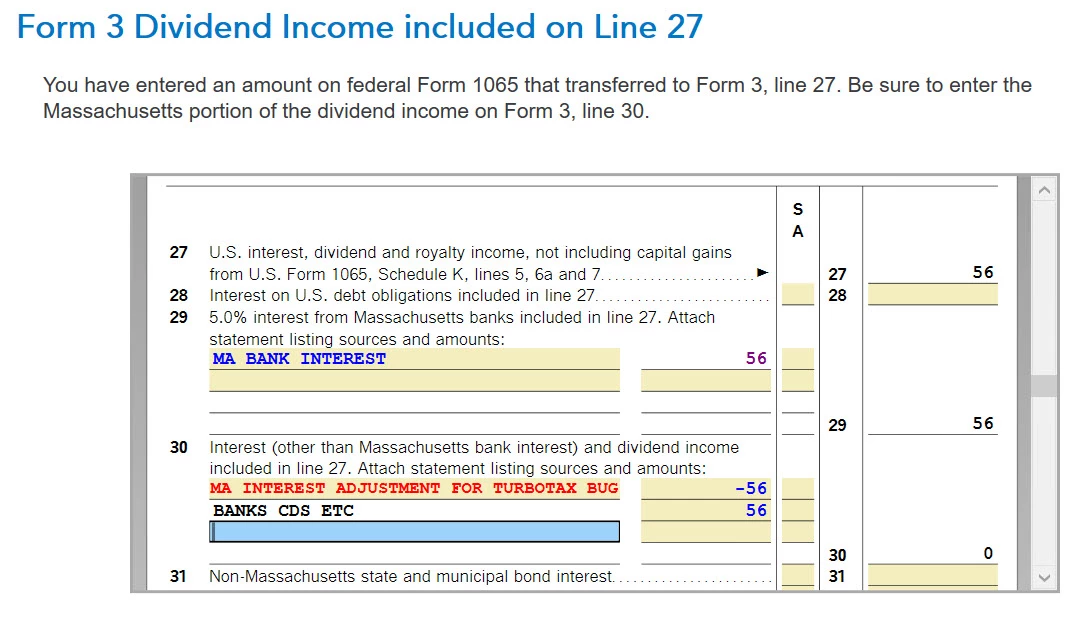
Massachusetts bank interest is reported separately on Form 3 line 29, but the auto-filled value on line 30 does not take this into account and cannot be overridden.   I have tried multiple means of deleting and changing and the value always persists nor does it provide a link to a data source that might be changed.


This is similar to an issue reported last year: 
https://ttlc.intuit.com/community/state-taxes/discussion/bug-turbotax-desktop-business-ma-part-tax-year-2021-does-not-exclude-ma-interest-from-form-3-line-30/01/2532346#M118457


Best answer by BakerStreetMuse

Added a negative correction to the line 30 detail that canceled the amount that was manually added on line 29.  This seems to deal with the issue.  Is there a better way?


2 replies

Level 2
March 12, 2023

Added a negative correction to the line 30 detail that canceled the amount that was manually added on line 29.  This seems to deal with the issue.  Is there a better way?


PatriciaV
Level 15
March 20, 2023

Your best option is to manually enter the MA Bank Interest on Line 29 then enter an equal adjustment as a negative amount on Line 30. Since you cannot change the amount on Line 30, adjusting the total is the only option.


These entries result in correct allocations to the partners for Line 29 and the total of Line 30. You can review this on the Schedule 3K-1 Reconciliation worksheet (Sch 3K-1 Recon), which displays the allocations of both MA Bank interest and Other Interest and Dividends.


Your entry on Line 29 also creates a Supplemental Information entry on Schedule 3K-1 for each partner that refers to Line 10 MA Bank Interest.


@LatchMobile 

**Say "Thanks" by clicking the thumb icon in a post. **Mark the post that answers your question by clicking on "Mark as Best Answer"
Level 2
March 22, 2023

Unfortunately, that does not work either.  Overriding line 30 still leaves two duplicative entries on the 3K-1s even though the supplemental information is correct.  The only way to fix this that I've found is to override line 30 *and* add an override in the sublist (see both circled items below).  This generates the correct totals on the 3K-1s and produces the right supplemental information. 


Level 2
March 17, 2023

Unfortunately, that doesn't fully solve the problem: the 3K-1s get generated with 2x the total.  Looks like the manually entered field for MA bank interest gets added to its own total.  What does it take to get product support from Intuit around here?


/Chris




