turbotax icon
cancel
Showing results for 
Search instead for 
Did you mean: 
Announcements
Close icon
Do you have a TurboTax Online account?

We'll help you get started or pick up where you left off.

1099-NEC

I have a 1099-NEC.  It is entered on my Federal Taxes but when Turbotax carry's it over to my Pennsylvania return it places the amount on line 1a. Gross Compensation and again on line 4 Net Income or Loss.  This is doubling the taxes owed.  Any idea why this is happening?


Thank you

x
Do you have an Intuit account?

Do you have an Intuit account?

You'll need to sign in or create an account to connect with an expert.

5 Replies
KrisD15
Expert Alumni

1099-NEC

To Clarify:


When you reported (entered) the 1099-NEC, did you enter it both on the Personal Income side and also on your Schedule C? 


Is the amount on line 1 and 4 of the PA-40 the same number? Didn't you have any expenses on your schedule C? 


**Say "Thanks" by clicking the thumb icon in a post
**Mark the post that answers your question by clicking on "Mark as Best Answer"

1099-NEC

My 1099-NEC income was only reported on Sch. C.  


Yes....the 1099-NEC income is added into line 1a with my W income and also on line 4 (minus W-@ income).  I have no expenses on my Sch. C


Thank you.

ColeenD3
Expert Alumni

1099-NEC

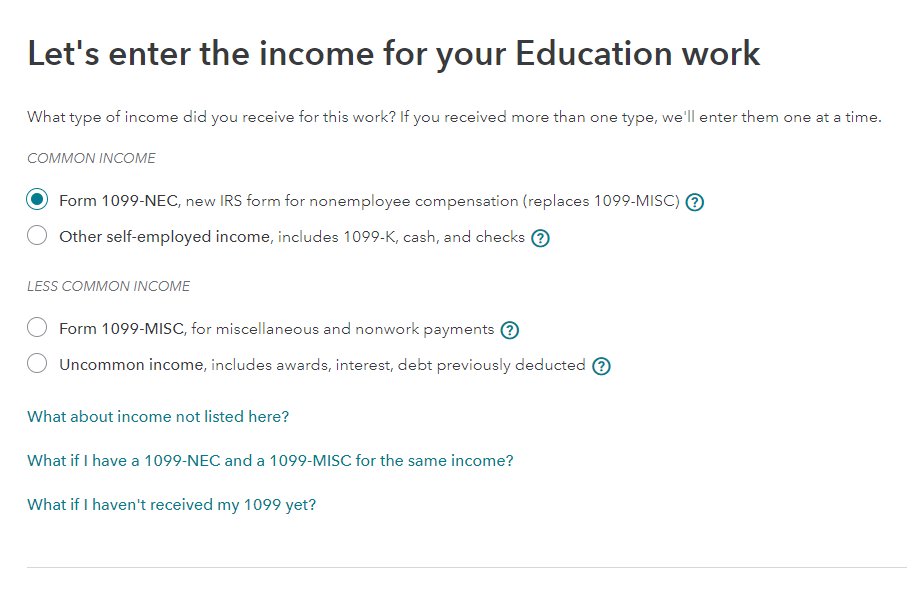
Double-check all your entries in the federal program. Make sure your 1099-NEC is entered on the screen shown in the screenshot below.


1099-NEC

I have not seen a screen like that.  When I put in my 1099-NEC income in the 1099 section and do a review I get an error message to link it to Sch. C but they do not link.  I have to manually delete the 1099-NEC information in the 1099 section and put it in the Sch C section.  Does that make sense?

ColeenD3
Expert Alumni

1099-NEC


The information must be entered in the Schedule C section. There are several types of 1099s and this will ensure that you enter them in the right place.


Under Wages and Income, scroll down to the Self-employment income and expenses tab. Enter your 1099 NEC there.

Unlock tailored help options in your account.

message box icon

Get more help

Ask questions and learn more about your taxes and finances.

Post your Question