
Level 3
January 31, 2026
Solved

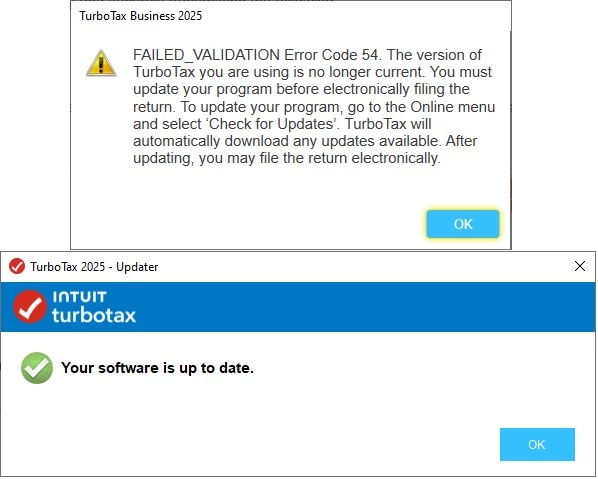
TurboTax Business VALIDATION ERROR Code 54 so we cannot efile

  • January 31, 2026
  • 16 replies
  • 314 views

I am not able to eFile my return even though I have all updates.  I tried restarting TurboTax, the computer, turning off Norton firewall, and making sure I have all updates.  I still get this:
Best answer by user17700860538

THANK YOU fellow users!!!  Based on the comments/inquiries regarding Form 8453-FE potentially being the problem, I removed the Form 8453-FE and reattached (following the instructions for changing the form even though I reattached the same form with no changes).  I'm happy to report that the Trust return has been successfully transmitted and is awaiting IRS acceptance.  "No news is good news"....if you don't see another post from me it was also accepted.  THANKS AGAIN to my fellow users who looked for new solutions and didn't just keep repeating the same steps that were NOT working.

16 replies

Level 2
February 5, 2026

Thank you whoever found the solution: to remove the 8453-FE and reattach did the trick. 

The 1041 finally was able to efile.  I have received both the Transmission Successful and the Federal Business Filing Accepted emails.

Level 2
February 16, 2026

I have the same issue and have done the recommended solutions of reinstallation, no firewall, etc. Is there a fix available now?

Level 2
February 16, 2026

If you haven't tried already, remove your 8453-FE attachment and then reattach.  This worked for me and several other users have reported it worked for them.  Copying below my post from 2 weeks ago.


THANK YOU fellow users!!!  Based on the comments/inquiries regarding Form 8453-FE potentially being the problem, I removed the Form 8453-FE and reattached (following the instructions for changing the form even though I reattached the same form with no changes).  I'm happy to report that the Trust return has been successfully transmitted and is awaiting IRS acceptance.  "No news is good news"....if you don't see another post from me it was also accepted.  THANKS AGAIN to my fellow users who looked for new solutions and didn't just keep repeating the same steps that were NOT working.

CatinaT1
Level 15
February 19, 2026

Form 8453 is available for e-filing and printing. Print the form, sign, and attach to your return (ignore the warning message). The actual form is not sent to the IRS. Instead, TurboTax assures the IRS that you have provided the signed form when the return is e-filed.


Confirm the form is listed in the attachments before you e-file. That's all you need to do.


Note Form 8453-PE is not part of a printed/mailed tax return, it's part of an electronically transmitted return.


Here's prior year Community thread on how the 8453 is used in your return.

**Say "Thanks" by clicking the thumb icon in a post. **Mark the post that answers your question by clicking on "Mark as Best Answer"
Level 2
February 24, 2026


Restarting computer solved the problem for me (02/24/2026).

Level 2
March 2, 2026

Has anyone found a fix to this?  I am getting the same error message when trying to transmit and I"ve done the updates.

CatinaT1
Level 15
March 2, 2026

Please refer to this community thread. 

**Say "Thanks" by clicking the thumb icon in a post. **Mark the post that answers your question by clicking on "Mark as Best Answer"
Level 3
March 14, 2026

The problem is not fixed! I have spent hours trying to resolve. Have done all steps mentioned in this post. Finally at Gemini's suggestion, I e-filed my Federal 1041s only. I still get the error with the California state 1041s.


Intuit needs to fix this!

Level 2
March 16, 2026

I had the same problem today (3/15/26) and was finally able to transmit the Federal Return (form 1041) but the California Fiduciary Return (form 541) still fails transmitting with the Error Code 54, even after trying all recommended fixes (installing the TurboTax Business 2025 Super Patch; restarting Windows; clearing the browser cache; etc.).  I've got the same problem in both Windows 11 and Windows 10 (where it is still OK to use TT Business 2025).  Intuit, is there another possible fix in the works specifically for California Form 541 transmission failures?

Level 2
March 30, 2026

I am getting the same 54 error code and all updates have been done.


Level 12
March 30, 2026

If you already updated your software, try the other troubleshooting ideas:


  • Run as Administrator: 
    • Right-click the TurboTax icon
    • Choose Properties
    • Go to the Compatibility tab
    • Select Run this program as an administrator
  • Check System Time:
    •  Ensure your computer's date and time are accurate, as discrepancies can cause secure handshake failures with the IRS.
  • Clear Cache: 
    • For business products, try clearing the "Electronic Filing" cache
  • Firewall/VPN:
    •  Temporarily disable VPNs or antivirus software during the update and filing process. 

If the error continues, you can print your return and mail it.  How do I file my return by mail?


@user17748886286




