
Level 3
January 31, 2026
Solved

TurboTax Business VALIDATION ERROR Code 54 so we cannot efile

  • January 31, 2026
  • 16 replies
  • 21 views

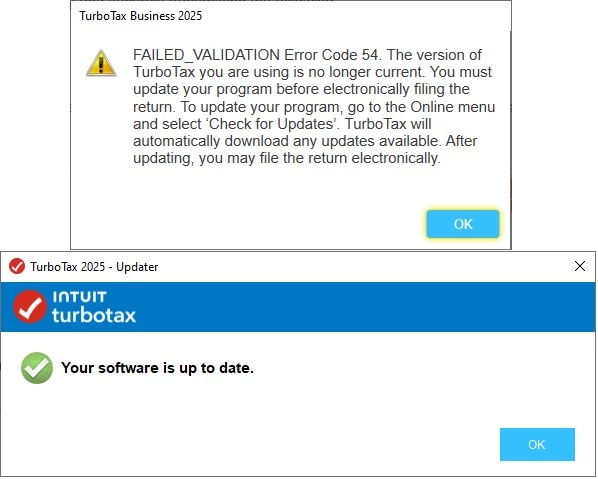
I am not able to eFile my return even though I have all updates.  I tried restarting TurboTax, the computer, turning off Norton firewall, and making sure I have all updates.  I still get this:
Best answer by user17700860538

THANK YOU fellow users!!!  Based on the comments/inquiries regarding Form 8453-FE potentially being the problem, I removed the Form 8453-FE and reattached (following the instructions for changing the form even though I reattached the same form with no changes).  I'm happy to report that the Trust return has been successfully transmitted and is awaiting IRS acceptance.  "No news is good news"....if you don't see another post from me it was also accepted.  THANKS AGAIN to my fellow users who looked for new solutions and didn't just keep repeating the same steps that were NOT working.

16 replies

Employee Tax Expert
January 31, 2026

Try manually updating the software. Here is a Help Article that will walk you through it. 

**Say "Thanks" by clicking the thumb icon in a post. **Mark the post that answers your question by clicking on "Mark as Best Answer"
Level 2
January 31, 2026

I downloaded and installed the manual update and got the same error.

Level 2
January 31, 2026

Same issue here.  

Level 2
January 31, 2026

Also uninstalled and re-installed TT For Business 2025 and still get error.  Latest update is today and supposedly installed successfully...


Level 2
February 3, 2026

I am having the exact same issue with the TurboTax Business.  Did you find an answer to resolve the problem you can share?

Level 2
February 2, 2026

Same for me, waiting to try on the next update 

Level 2
February 2, 2026

Same here. This really needs to be fixed asap.

Level 2
February 2, 2026

I have the same problem and have tried EVERYTHING recommended. 
Search for updates.
turn off antivirus and firewall.
reinstall turbotax from scratch.
do the forced update with the exe file provided by turbotax,
and even did a fresh install on a different computer.
The system still 1) says I need to update, and then 2) says I am already updated, and 3) still refuses to do the efile of the 1041.

Has anyone yet figured this out?  It seems like many of us are having this problem with the turbotax Business desktop version and cannot efile our 1041.

Level 3
February 2, 2026

Although it doesn't solve the main problem, I thought I'd report that I WAS able to e-file my California state return (541) even though the federal return fails every time with the error 54.  You can do that by submitting the state return separately (i.e. uncheck the box next to "E-file my federal return" and only select the state return.  That submission went through and was later accepted by the state.

Still waiting for a fix to this problem that prevents submission of the 1041.

PatriciaV
Level 15
February 2, 2026

If you're still having trouble validating your federal return, we recommend you try a manual update: Manually Update TurboTax for Windows Software.


We also recommend suspending any antivirus software and/or a VPN.

**Say "Thanks" by clicking the thumb icon in a post. **Mark the post that answers your question by clicking on "Mark as Best Answer"
Level 2
February 3, 2026

I'm having the exact same issue.  Tried to file for my trust in TurboTax Business 2025.  Getting FAILED_VALIDATION Error Code 54, but my installation is current.  

I've installed your manual patch that was posted back in December, but still no change.  

Need this fixed please!!!

johnp317Author
Level 3
February 3, 2026

Expert @KristinaK , can you provide an update on this?


Level 3
February 3, 2026

Pursuant to my original post, I tried installing on a clean install of Windows 11 on a different machine along with turning off firewalls in windows, modem,router and turning off anti virus, still no luck. Also tried hardwire network, wifi and wifi on phone hotspot. Nothing but error 54. Still hoping the weekly update on Feb 6 fixes the issues on the Intuit side.


Level 2
February 3, 2026

Got the same message and the program is up to date.  If I remember this problem happened last year or the year before.  It took forever for Turbo Tax to come up with a solution.   

Level 2
February 4, 2026

Still not working despite a combination of restarting, install/uninstalling, updating, manual updating which took many days and hours. Still faced Validation Error Code 54. 


Not worth the effort with many hours wasted just on this one return with many more to go. Will evaluate whether to use TurboTax Business again for next year. Very disappointed.


Going paper file instead. 

Level 3
February 4, 2026

After much more research, I am wondering if Error 54 has to do with fed form 8453-FE.  On the TurboTax form availability site, it mentions  form (8453-FE(E) ) is unsupported for E-Filing.  While the form I have is just 8453-FE without the additional (E), and worked no problem last year, perhaps the underlying programming code is incorrect or filing rules changed.


https://care-cdn.prodsupportsite.a.intuit.com/forms-availability/turbotaxbusiness_fed_windows_fiduciary.html


@catina can you clarify?


Level 3
February 4, 2026

@CatinaT1  please see above post regarding fed form 8453-FE. Thank you


johnp317Author
Level 3
February 4, 2026

I WAS ABLE TO EFILE AFTER REATTACHING FORM 8453-FE!  In my case, even though nothing changed in my return, I decided to go through the entire process of printing, signing, scanning and then reattaching just to make sure and IT WORKED!!!


THANK YOU to the INTUIT CUSTOMERS who solved it.  


NOTE TO INTUIT: Even though the tech team did not figure out the problem and it was customers who eventually figured this out, thank you to @KristinaK who collected logs and brought them to the tech team for help.  The only advice on that would have been to post updates so people know Intuit is looking into it.


ADVICE TO INTUIT: You really need to point your AI to this community forum and have it report to you on threads where customers are struggling and asking for your help.  It could even report HIGH PRIORITY BUGS (which this is) so the tech team could be notified immediately.  The feedback loop is broken here and AI could help on that.




