
TurboTax Error cannot be corrected
Hello,
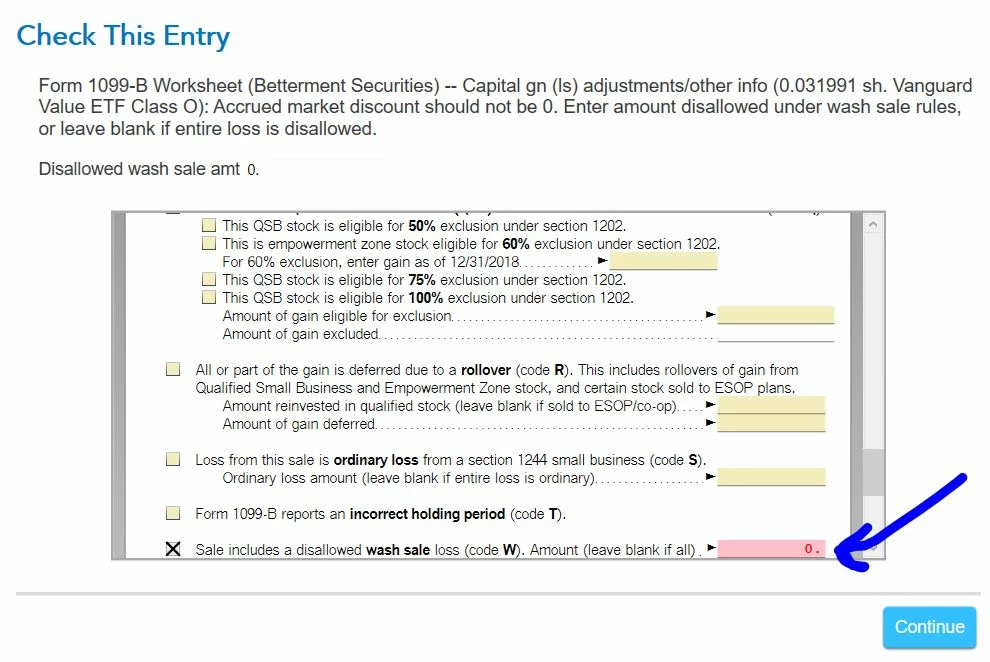
I am getting this error and I cannot fix it. It will not let me empty the cell (see image below).
Thanks;
Leo
Un expert vous aide à faire vos impôts
Nous vous guiderons étape par étape
Obtenez plus de conseils pour les gros changements dans votre vie
Explorez les outils fiscaux, obtenez des conseils et lisez les commentaires
An expert helps with your taxes, or does them for you
We'll guide you step-by-step
Get your T2 corporate return done right, your way
Find extra guidance for your big life moves
Explore tax tools, get tips, and read reviews
Hello,
I am getting this error and I cannot fix it. It will not let me empty the cell (see image below).
Thanks;
Leo

The error messaging you are seeing with regard to the wash sale entries is a result of automatic rounding of the number imported from your broker or typed in by you. If the wash sale adjustment is $0.49 or less, then it is automatically rounded to zero. This type of rounding is allowed by the IRS. Unfortunately, zero is not a valid value for this field -- thus the error message.
To resolve the issue, you can edit each individual transaction (although not from the screen in the review process) and delete the amount entered in the wash sale adjustment if it is $0.49 or less. This will clear the error message.
To do this, you will need to revisit the input section for the Form 1099-B transactions. Use the following steps:
If you have too many transactions that would require editing, you can consider deleting your imported information and entering a summary of the different categories of transactions reported on your Form 1099-B (short-term covered, short-term not covered, long-term covered, long-term not covered). This would require you to mail a copy (not the original) of your Form 1099-B from your brokerage to the IRS within three days of filing your return. The Form 1099-B would be attached to Form 8453, which will print with your return.
Our experts are available on-demand, no appointment needed. Get help all year long with TurboTax Expert Assist.
Explore your optionsEnter your E-mail address. We'll send you an e-mail with instructions to reset your password.

©1997-2026 Intuit, Inc. All rights reserved.
Intuit, QuickBooks, QB, TurboTax, Credit Karma, and Mailchimp are registered trademarks of Intuit Inc. Terms and conditions, features, support, pricing, and service options subject to change without notice.
Security Certification of the TurboTax Online application has been performed by C-Level Security.
By accessing and using this page you agree to the Terms of Use.
© 2026 Intuit Canada ULC or its affiliated companies. All rights reserved. Intuit, QuickBooks, QB, TurboTax and ProFile are registered trademarks of Intuit Inc. Terms and conditions, features, support, pricing, and service options subject to change without notice.
Copyright © Intuit Canada ULC, 2026. All rights reserved.
© 2026, Entreprises Intuit Canada ULC ou ses sociétés affiliées. Tous droits réservés. Intuit, QuickBooks, QB, TurboImpôt et ProFile sont des marques déposées d’Intuit Inc. Les modalités, prix, fonctions et options de service et de soutien peuvent changer sans préavis.
© 2026, Entreprises Intuit Canada ULC. Tous droits réservés.



