Level 3
March 6, 2020
Solved

Passive loss carryover form boxes

  • March 6, 2020
  • 2 replies
  • 72 views

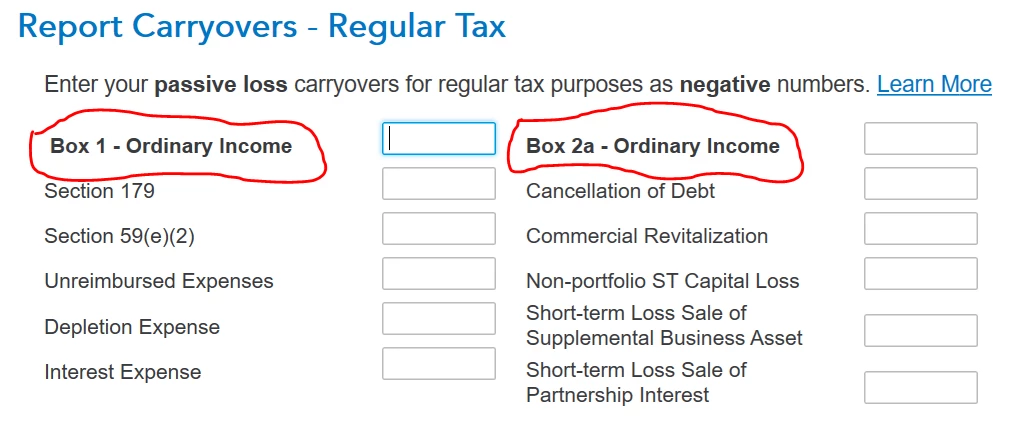
My wife and I have a partnership LLC owning our sailboat, which is in commercial charter fleet. Under the boat management agreement, the charter company manages all aspects of the boat and pays us a set monthly fee. This is clearly a passive hobby activity. The LLC K-1 shows a loss every year due to interest on the boat loan and depreciation. In entering the LLC K-1 into our personal return, the interview asks for passive loss carryovers. See attached. Just what are the "Box 1 - Ordinary Income", "Box 2a - Ordinary Income" and other information requested by this screen? Where do I find them? There is a similar screen for AMT passive carryover.  The built in help doesn't offer any useful guidance.


Best answer by MarilynG

If you used TurboTax last year, the carryover should be entered for you, but check your Schedule E Wks - Carryforward from last year for an amount. 


If you didn't use TurboTax last year, check last year's Form 8582, Page 2 for an amount.


Click this link for info on How to Enter Passive Loss Carryover.


2 replies

MarilynG
MarilynGAnswer
Level 15
March 6, 2020

If you used TurboTax last year, the carryover should be entered for you, but check your Schedule E Wks - Carryforward from last year for an amount. 


If you didn't use TurboTax last year, check last year's Form 8582, Page 2 for an amount.


Click this link for info on How to Enter Passive Loss Carryover.


**Say "Thanks" by clicking the thumb icon in a post. **Mark the post that answers your question by clicking on "Mark as Best Answer"
wrnoofAuthor
Level 3
March 9, 2020

😁Thanks. The link to another thread was especially helpful. I did not use TT last year and found a value in Form 8582, Page 3, Worksheet 6, column b. We had passive losses from more than one activity and the total for all of them was found there. Again, thanks for clarifying.

wrnoofAuthor
Level 3
March 15, 2020

After resolving the matter regarding our boat, I moved on to another K-1 for a PTP (publicly traded partnership). When addressing passive loss carryover for our boat, entering or not entering a value in the Box 2a - Ordinary Income field did not affect my tax liability/refund. However, for this PTP K-1 it matters whether I enter a value in the Box 2a field and our tax liability/refund changes significantly. Although I found a value on Form 8582, it was never made clear whether the interview fields for "Box 1 - Ordinary Income" and "Box 2a - Ordinary Income" actually referred to Form 8582 or, if so, to which part of that form. Can anyone tell me exactly to what the fields in the interview "Report Carryovers" page refer? An image of this page is attached to my OP. Form 8582 has no Box 1 or Box 2a and I am more than a bit confused.

Bob

Level 2
March 9, 2021

Hi, 


I have the exact same question.  What are the exact boxes from form 8582, worksheet 6 that are connected with "Box 1 - Ordinary income" and "Box 2a - Ordinary income" on turbo tax.  For last year's tax return I have numbers on worksheet 6 columns a, b, and c.  I'm still not clear what are the exact numbers that go into "Box 1 - Ordinary income" and "Box 2a - Ordinary income" on turbo tax.  I did not file my taxes on Turbo tax last year, so I don't trust the numbers that are being auto populated for me.  


Thanks for the help

ReneeM7122
Level 9
March 9, 2021

The amount from the total on Worksheet 6 carries over to the ordinary income Box 1 and 2a on form 8582.


Here is a link to instructions for Form 8582, Passive Activity Loss Limitations.


Worksheet 6

Use Worksheet 6 for any activity listed in Worksheet 5 if all the loss from that activity is reported on one form or schedule and no transactions need to be identified separately (as discussed in Worksheet 7, later). Also see Identification of Disallowed Passive Activity Deductions in Pub. 925 for more information.

Example.


You will report all the allowed loss from an activity listed in Worksheet 5 on Schedule E. Use Worksheet 6 to determine the allowed loss, even if part of the loss is a current year Schedule E loss and part of it is a prior year unallowed Schedule E loss.

On Worksheet 6, enter the name of each activity and the form or schedule and line number on which the loss is reported. See the Example for Worksheet 4. Identify each CRD from Worksheet 5 on a separate line and add "CRD" after the name of the activity.

Column (a).


For each activity entered in Worksheet 6, enter the net loss plus the prior year unallowed loss for the activity. Figure this amount by adding the losses in columns (b) and (c) of Worksheets 1 and 3 or enter the loss from column (c) of Worksheet 2.

Column (b).


For each activity entered in Worksheet 6, enter the amount from column (c) of Worksheet 5 for the activity. These are your unallowed losses for 2020. Keep a record of these amounts so the losses can be used to figure your PAL next year.

Column (c).


Subtract column (b) from column (a). These amounts are the losses allowed for 2020 under the passive loss rules. Report the amounts in this column on the forms and schedules normally used, subject to any further limitations described in Coordination With Other Limitations, earlier.


@aa50

Level 2
March 9, 2021

Hi, 


Thanks for the info.  I'm still not certain how the turbo tax interface populates Box 1 ordinary income and Box 2a ordinary income.  Please see the attached screen grab.  From my 2019 return i have numbers in worksheet 6 (in the screen grab they are flagged 1, 2, 3).  How do the numbers in the screen grab connect to the Turbotax interface?  For example, is number "1" connected to Box 1 Ordinary income?


Do I have this wrong?  Are Box 1 and Box 2a not populated based on the previous years tax return?