
turbotax icon
cancel
Showing results for 
Search instead for 
Did you mean: 
Announcements
Close icon
Do you have a TurboTax Online account?

We'll help you get started or pick up where you left off.

Inputting 1099-R

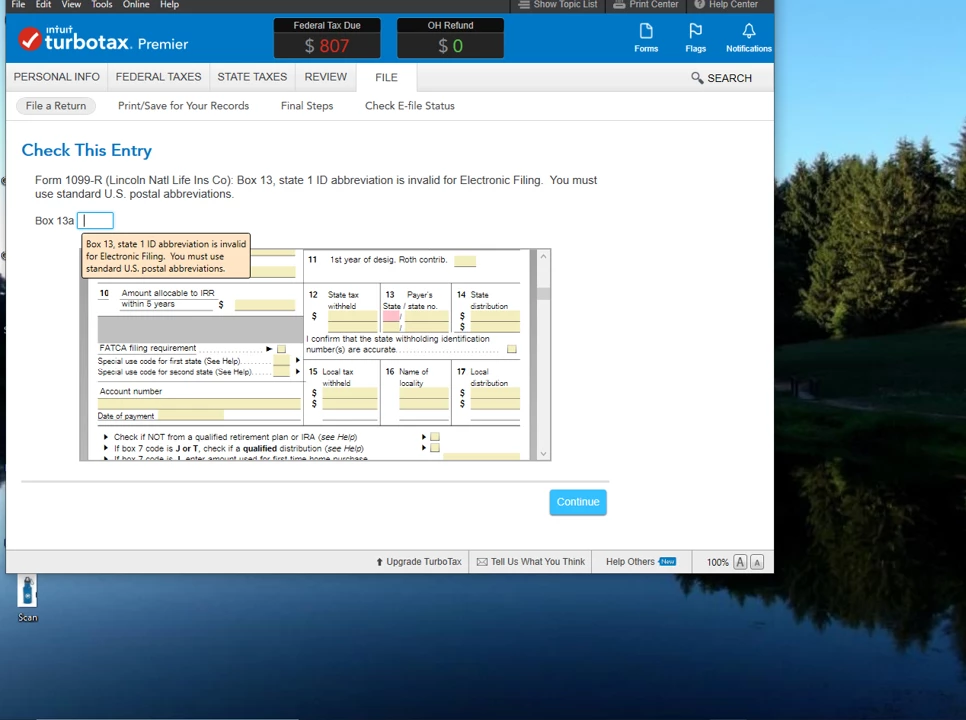
TurboTax will not allow me to e-file because box 13 on a 1099-R does not contain a USPS standard state abbreviation (in this case OH). When I attempt to insert OH in the correction box it tells me that I am inserting an invalid character. There was no Ohio withholding so the information is irrelevant for both Federal and Ohio tax purposes, yet I cannot bypass it. Turbotax Picture1 (2).png
x
Do you have an Intuit account?

Do you have an Intuit account?

You'll need to sign in or create an account to connect with an expert.

1 Best answer

Accepted Solutions
BillM223
Employee Tax Expert

Inputting 1099-R

I would say to do the following:


1. Make a copy of the 1099-R if you don't already have one

2. Search for 1099-r and click on the jump-to result

3. To the right of the appropriate line for your 1099-R, click on Delete or the trash can icon

4. Click on the Add A 1099-R button.

5. Manually add your 1099-R


My guess is that some garbage got into this field and while you can't see it, it is still there, upsetting TurboTax. If this is true, deleting and re-adding the 1099-R will fix it.


By the way, was this 1099-R auto-imported from your financial company?

**Say "Thanks" by clicking the thumb icon in a post
**Mark the post that answers your question by clicking on "Mark as Best Answer"

View solution in original post

5 Replies
LeonardS
Expert Alumni

Inputting 1099-R

Rather than making the change in the correction box follow these steps.

  1. With TurboTax open enter 1099-R in the search box
  2. Then select Jump to 1099-R in the results box. 
  3. Next select edit next to the 1099-R enter the correct state code in box 13.

  If this does not resolve your issue post a reply for additional help.

**Say "Thanks" by clicking the thumb icon in a post
**Mark the post that answers your question by clicking on "Mark as Best Answer"

Inputting 1099-R

Thanks. I had tried that before. I tried it again with the same result.Turbotax Picture 2 (2).png

BillM223
Employee Tax Expert

Inputting 1099-R

I would say to do the following:


1. Make a copy of the 1099-R if you don't already have one

2. Search for 1099-r and click on the jump-to result

3. To the right of the appropriate line for your 1099-R, click on Delete or the trash can icon

4. Click on the Add A 1099-R button.

5. Manually add your 1099-R


My guess is that some garbage got into this field and while you can't see it, it is still there, upsetting TurboTax. If this is true, deleting and re-adding the 1099-R will fix it.


By the way, was this 1099-R auto-imported from your financial company?

**Say "Thanks" by clicking the thumb icon in a post
**Mark the post that answers your question by clicking on "Mark as Best Answer"

Inputting 1099-R

Totally delete the 1099-R,  then re-enter.  If there is no dollar amount in box 12 the leave all boxes 12-14 BLANK - do not enter anything.    There should never be any enter in box 13 or 14 if box 12 has no tax withheld.


That should fix it.

**Disclaimer: This post is for discussion purposes only and is NOT tax advice. The author takes no responsibility for the accuracy of any information in this post.**

Inputting 1099-R

Thank you. That did the trick. This was not imported from my financial company.

Unlock tailored help options in your account.

message box icon

Get more help

Ask questions and learn more about your taxes and finances.

Post your Question




