Level 6
February 29, 2024
Question

How do I fix this TT Calculation problem?

  • February 29, 2024
  • 1 reply
  • 0 views

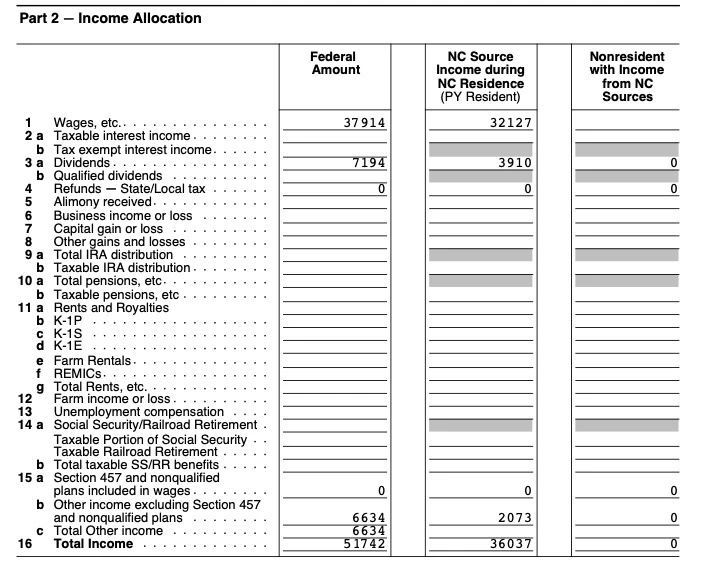
I was a part year resident in NC with $2073 of taxable ESA Coverdell income specifically allocated to NC. The problem is my Total Income for NC on line 16 in the worksheet below is not adding up correctly, it should be $38,110 which is $2073 more than what TT calculates.


There is also a missing entry on this worksheet on line 15C Total Other Income for NC which I believe should be 2073. I know this is a problem since the entry filled in by TT for the NC D400 Sch PN line 15 “Other Income” should be 2073 but its BLANK. TT is flowing $2073 into the state return as shown in the worksheet but the math is messed up and the $2073 is MISSING from D400 Sch PN.


I have deleted the NC state return several times and re-imported from Federal with the same result. The other State Return (MA Part Year) which TT completed is being handled properly for ESA distributions. I tried deleting the NC state forms but it won’t let me I think because it would require deleting Federal forms which I HATE to do since there is so much interaction calculating scholarship/education credit/taxable ESA income and I don’t want to go thru all that again when its finally correct in the Federal and MA returns.


I changed some of the numbers so its not my actual return but you get the idea.
Help please 😞

 

1 reply

AmyC
Level 15
February 29, 2024

I updated my computer for the second time today. I am following along with the same issue except my tax liability is changing when I add the missing information on the PY allocation and it is adding correctly. It is carrying over to the D-400 line 12b. Are you seeing the correct income on the D400 or is your income incorrect? If the actual tax form being sent in is correct, we don't need to worry about a worksheet.


Please update your computer, select online, check for updates, then go back to NC. You may have to do this several times. 

**Say "Thanks" by clicking the thumb icon in a post. **Mark the post that answers your question by clicking on "Mark as Best Answer"
Pip_12_mnAuthor
Level 6
February 29, 2024

Sorry I'm not sure what you mean by "update my computer". I am using TT Online which I thought was always updated and a desktop mac which has all updates installed for the current operating system. How do I update it ? 


My D-400 Line 12b generated by TT is correct but that number only takes into account Federal AGI, Exempted US Debt Obligations and the NC Standard Deduction. It should not include the $2073 ESA distribution.


The NC return is a bit confusing, the NC taxable income (D400 Line 14) is found by first calculating a ratio (D-400 line 13) and then multiplying it by line12b.


In my case, the D-400 Line 13 ratio is  Total NC Income/(Federal AGI minus Interest from Federal Obligations.  


My "Total NC Income after adjustments" (Line 33 of the previously attached worksheet, Line 33 not shown)  is INCORRECT in the worksheet and is being used to calculate the line 13 ratio. 


I ran a different online tax program and everything made sense, line 12 b agreed with TT but the Line 13 ratio was different. Their Line 13 calculated my Total NC income which properly included the $2073. TT Line 13 did not. 


The problem is that TT is not calculating the proper Total NC income, it's ignoring the $2073 even though it shows up on the worksheet,  but only in the rows leading up to the totaled amount, its not included in the TOTAL OTHER INCOME field.


Line 16 is then used to calculate Line 33 of the same worksheet which simply excludes US Govt. Obligations allocated for NC. Line 33 then becomes the true Total NC income after all adjustments and is used to calculate the D400 line 13 ratio.


CatinaT1
Level 15
March 5, 2024

Are you still experiencing this problem?


Make sure you have ran all updates. 


If using TurboTax Online: Clear your cache and cookies. See this FAQ, for your particular browser.

If using TurboTax Desktop: Please see this FAQ.

**Say "Thanks" by clicking the thumb icon in a post. **Mark the post that answers your question by clicking on "Mark as Best Answer"