turbotax icon
cancel
Showing results for 
Search instead for 
Did you mean: 
Close icon
Do you have a TurboTax Online account?

We'll help you get started or pick up where you left off.

Estimated tax payments for State

TurboTax has included my State estimated tax payment in both of my state filings.  They should only be used in the state where I am a resident.


I cannot delete those amounts from my second State form.

x
Do you have an Intuit account?

Do you have an Intuit account?

You'll need to sign in or create an account to connect with an expert.

1 Reply
LeticiaF1
Expert Alumni

Estimated tax payments for State

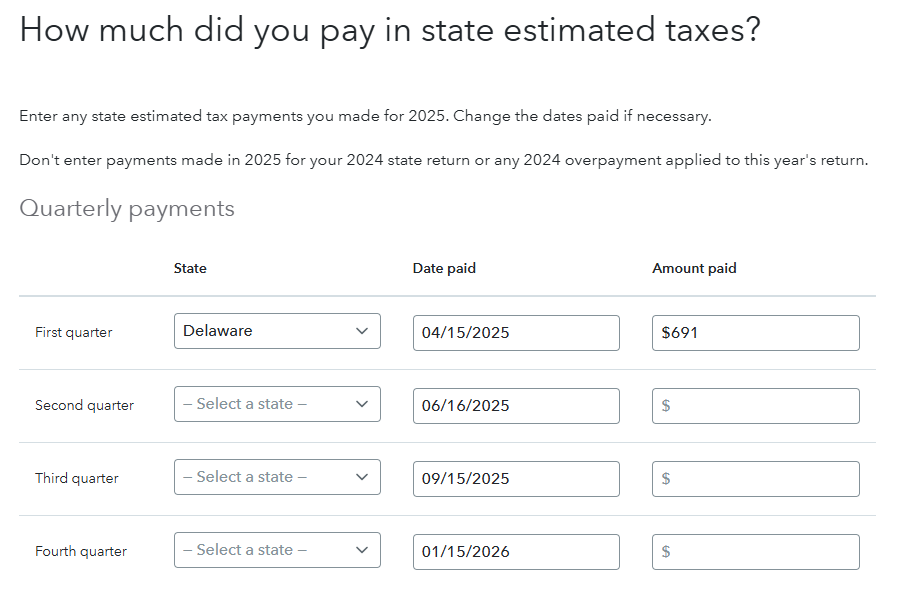
TurboTax transfers the information from your federal return to your state return.  To correct this you will need to fix this entry in your federal return, to get back to this section:


  1. Go to estimated tax payments under Deductions & Credits
  2. Select Start or Revisit next to the type of estimated tax payment you'd like to enter under Estimated Tax Payments
  3. You can select that you made state estimated payments
  4. You can select what state you made the payments to in the drop down menu

Click here for Where do I enter my estimated tax payments?


Once you make the correction in your federal return, the estimated payments will show in the correct state.  


Unlock tailored help options in your account.

message box icon

Get more help

Ask questions and learn more about your taxes and finances.

Post your Question