TurboTax for 2023 taxes has changed. The screen for the entry of stock sales (1099-B) no longer includes Add Supporting Details for the Total Proceeds or The Total Cost.
Very frustrating.
Has anyone found a work around??
TurboTax Premier, Downloaded Desktop version
You'll need to sign in or create an account to connect with an expert.
Thanks James G..
Yes, I see that and it does solve the problem. Thankyou
A backwards approach but it will work.
TTax revised the screen for stock sales for 2023 but the Capital Assets Screen is not new. I suspect the programmer didn't get the message to include the Add Supporting Details.
Message to TurboTax - Don't fix what isn't broken.
1. The 2022 version allowed one to switch from total to individual sales. I don't find that option with the new screen for 2023. Must delete all entries and start over if you want to switch.
2. Now must go to Forms then find the proper form to open the Add Supporting Details screen.
Are you entering stock sales One by one or by Sales section totals?

In TurboTax Desktop, if you are entering stock sales One by one, you may add transaction detail as well as Other boxes on my 1099-B. See here.

If you are entering stock sales by Sales section totals, you will not see the transaction detail that is available under the One by one option.
Thankyou James G
Yes, I see what you are describing but that doesn't address the problem.
In prior versions of the Premier TurboTax CD Desktop download for Windows, right clicking on the Proceeds and Cost cells would bring up the "Add Supporting Details" screen. That is no longer available in the Premier version for 2023 taxes.
I have tried entering total and individual. Same issue with both.
Are you able to do right click to open the Add Supporting Details screen?
In TurboTax Desktop Premier, in FORMS mode, I am able to click on Sales Price and Cost Basis on the Capital Asset Sales and generate Supporting Details.
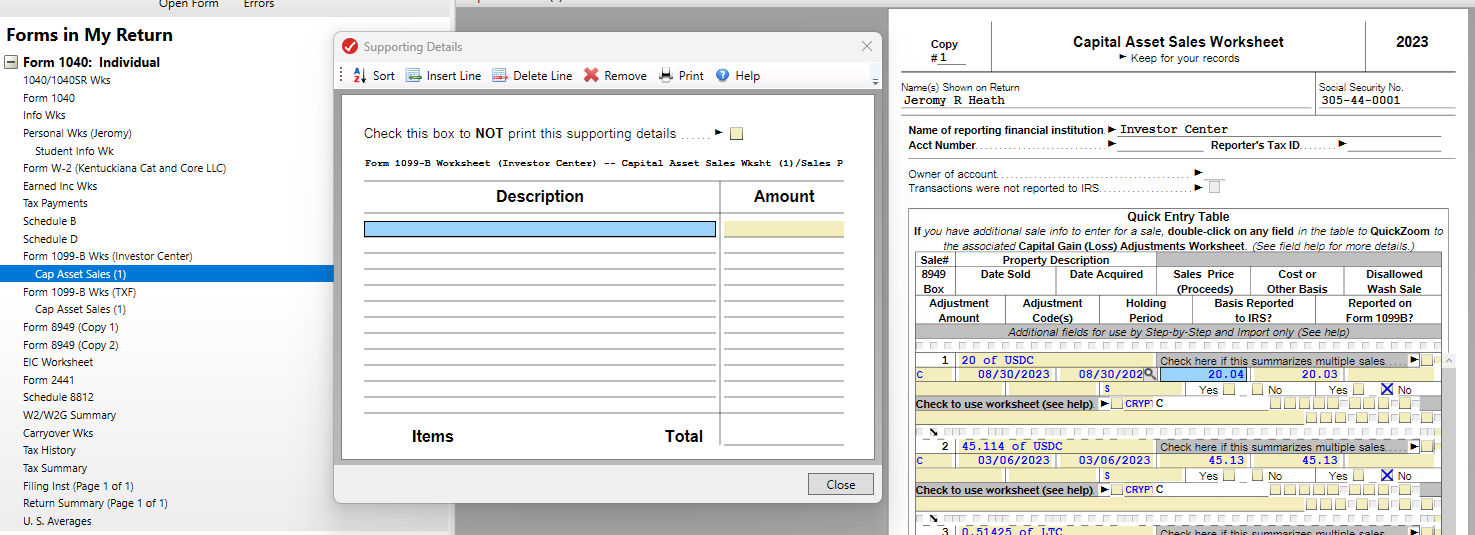
Thanks James G..
Yes, I see that and it does solve the problem. Thankyou
A backwards approach but it will work.
TTax revised the screen for stock sales for 2023 but the Capital Assets Screen is not new. I suspect the programmer didn't get the message to include the Add Supporting Details.
Message to TurboTax - Don't fix what isn't broken.
1. The 2022 version allowed one to switch from total to individual sales. I don't find that option with the new screen for 2023. Must delete all entries and start over if you want to switch.
2. Now must go to Forms then find the proper form to open the Add Supporting Details screen.

To James G...
Ref: Your comment "Stock sales by Sales section totals, verses the One by one option".
Something new I just encountered.
If I enter stock sales by Section Totals, the Forms View, Capital Assets Sales, at the bottom of the screen, it says I must mail my return. If I enter the sales One By One, Capital Asset Sales says No, I do not have to mail my return.
Are you seeing this?
I should probably search the Community for this or post it as a separate question.
TurboTax Premier For 2023 Taxes, CD Download Desktop For Windows.
I called TTax-Spoke to a "Tax Expert". She had not heard of this problem.
Still have questions?
Questions are answered within a few hours on average.
Post a Question*Must create login to post
Ask questions and learn more about your taxes and finances.
user17689300475
New Member
Struggling-w4
New Member
amanda-m-jackson
New Member
mrs-mdewitt
New Member
rpmm
Level 2




