Level 5
Mar 4, 2026 6:33 PM UTC
Solved

Can the forum search function search for a phrase?

Is it possible to search for a specific phrase?  (It seems the default is to return hits on any words within a phrase)


Also, is there any way to order the search results?  (For example newest first)


Thanks,


SE

    VolvoGirl
    VolvoGirlAnswer
    Level 15
    Mar 5, 2026 5:21 PM UTC

    Expert Reviewed

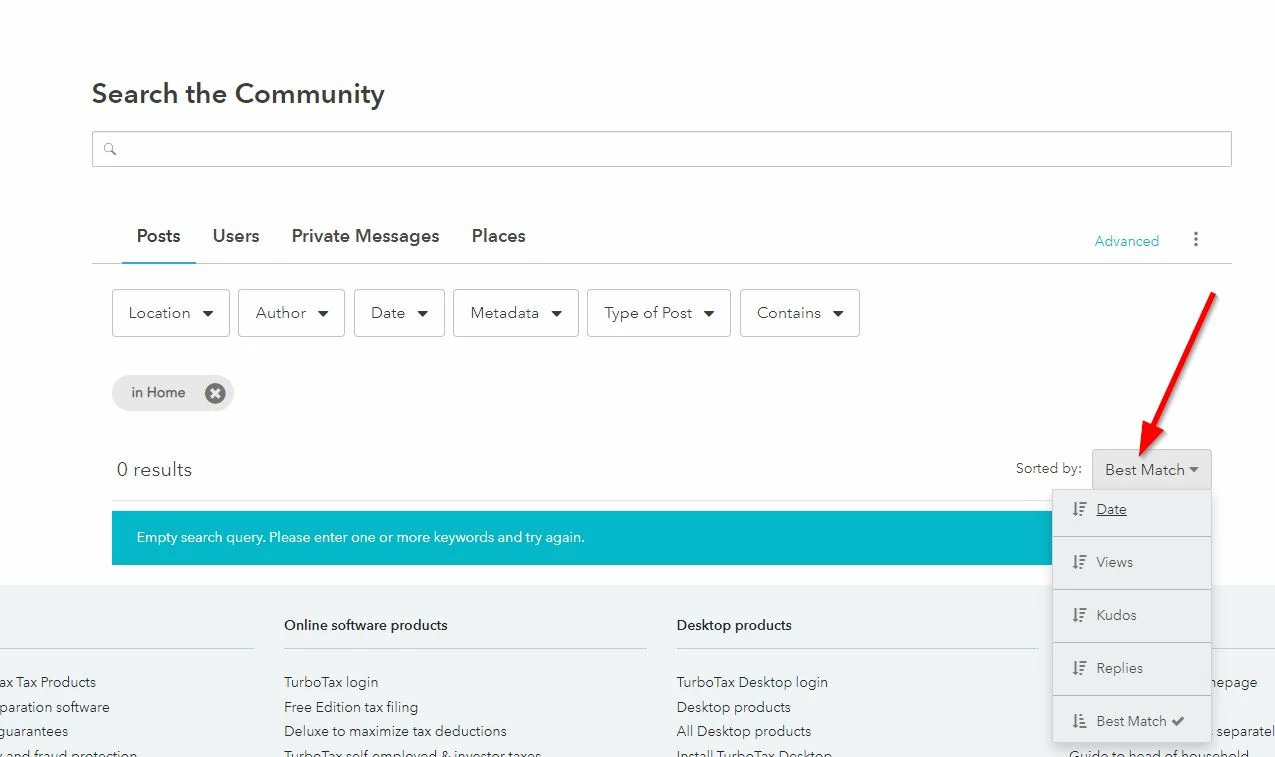
    I've found there are several ways to do a search.  And I find this year is much better at finding what I want.  If you want to sort or filter I use this link

    https://ttlc.intuit.com/community/forums/searchpage/tab/message?advanced=false&super_user=true&filter=location&location=category:en-us&allow_punctuation=false 


    It gives me this screen......

    5 replies

    JohnB5677
    Alumni - Intuit
    Mar 5, 2026 3:37 PM UTC

    Currently, the TurboTax Community forum search function can not do advanced, exact-phrase searching.


    The search feature does not have the capability of sorting in any particular order.


    **Say "Thanks" by clicking the thumb icon in a post. **Mark the post that answers your question by clicking on "Mark as Best Answer"
    VolvoGirl
    VolvoGirlAnswer
    Level 15
    Mar 5, 2026 5:21 PM UTC

    Expert Reviewed

    I've found there are several ways to do a search.  And I find this year is much better at finding what I want.  If you want to sort or filter I use this link

    https://ttlc.intuit.com/community/forums/searchpage/tab/message?advanced=false&super_user=true&filter=location&location=category:en-us&allow_punctuation=false 


    It gives me this screen......

    Level 5
    Mar 5, 2026 6:41 PM UTC

    @VolvoGirl  thanks for this!!  I will experiment with the search options.  But how did you locate that search link?? I don't see any way to get to it from the TT forum...


    SE

    VolvoGirl
    Level 15
    Mar 5, 2026 6:46 PM UTC

    I don't know.  I've had it bookmarked for a long time.  Actually I was using it on my iPad and couldn't find it on my Windows Desktop.  But I finally got tired of the old regular search so I copied the link from my iPad.  


    Now another thing....after you get the search results, if you want to see a post but don't want to lose that search, do a Right Click on the post to see and open it in another tab.  Then you can go back to the search results.  If you do a regular left click on one then when you go back it takes you to the old search layout.