


- Community
- Topics
Turn on suggestions
Auto-suggest helps you quickly narrow down your search results by suggesting possible matches as you type.
Showing results for
- Community
- :
- Discussions
- :
- Taxes
- :
- Get your taxes done
- :
- Can no longer upload .CSV file for cryptocurrency translations.
Announcements


- Mark as New
- Bookmark
- Subscribe
- Subscribe to RSS Feed
- Permalink
- Report Inappropriate Content
Can no longer upload .CSV file for cryptocurrency translations.
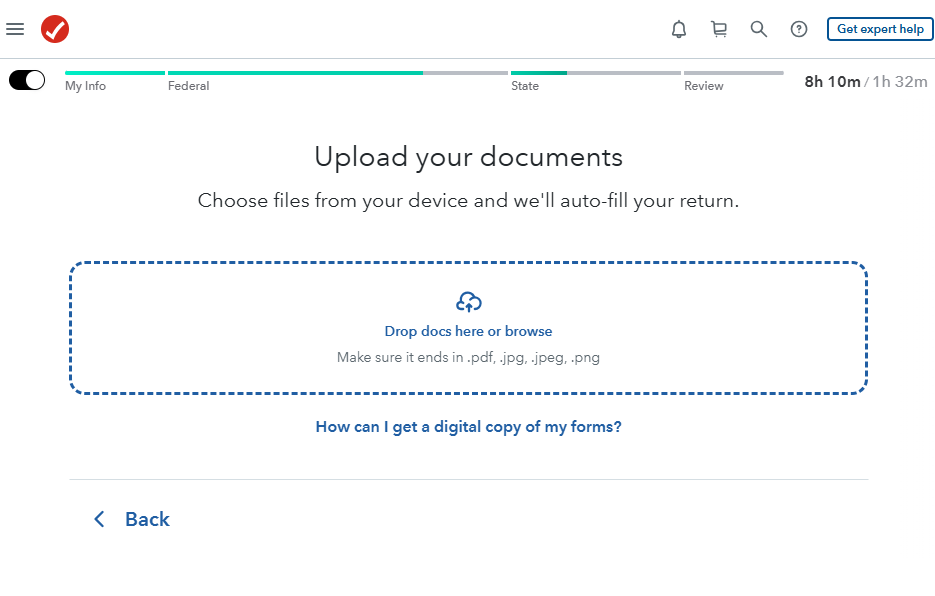
How do you add a .csv file for cyrpto transactions? Document upload only supports .pdf, jpg, and .png
Topics:
posted
January 21, 2026
9:00 AM
last updated
January 21, 2026
9:00 AM
Connect with an expert

Do you have an Intuit account?
You'll need to sign in or create an account to connect with an expert.
69 Replies


- Mark as New
- Bookmark
- Subscribe
- Subscribe to RSS Feed
- Permalink
- Report Inappropriate Content
Can no longer upload .CSV file for cryptocurrency translations.
Perhaps this explains what has happened. The way that you report your cryptocurrency activity is changing.
This tax year introduces a new IRS tax form 1099-DA Digital Asset Proceeds From Broker Transactions.
IRS Form 1099-DA is required to be filed by brokers dealing with digital assets like cryptocurrency and NFTs (non-fungible tokens). Brokers, digital trading platforms, payment processors, and hosted wallet providers have to issue this form for all digital asset sales or exchanges starting from January 1, 2025.
IRS Form 1099-DA will be used by brokers to report proceeds from (and in some cases, basis for) digital asset dispositions to you and the IRS.
For your 2025 tax return, the IRS form 1099-DA will report transactions where you disposed, sold, exchanged or transferred ownership of digital assets:
- For another digital asset
- For U.S. dollars or other currency
- In exchange or trade for property, goods or services in any amount
- To pay for broker transaction costs with digital assets
Use IRS form 1099-DA and your other records to report your income on your tax return. You may need to calculate basis before you file your tax return.
**Say "Thanks" by clicking the thumb icon in a post
**Mark the post that answers your question by clicking on "Mark as Best Answer"
**Mark the post that answers your question by clicking on "Mark as Best Answer"
January 21, 2026
9:32 AM
- Mark as New
- Bookmark
- Subscribe
- Subscribe to RSS Feed
- Permalink
- Report Inappropriate Content
Can no longer upload .CSV file for cryptocurrency translations.
Thank you James. It appears that the 1099-DA must be prepared by a broker and not an individual. Is there any workaround for getting a .CSV file uploaded to TurboTax (for both income and gains/losses)? Thank you.
January 22, 2026
12:42 PM

- Mark as New
- Bookmark
- Subscribe
- Subscribe to RSS Feed
- Permalink
- Report Inappropriate Content
Can no longer upload .CSV file for cryptocurrency translations.
Did you ever get this figured out? Because I'm stuck on this as well.
January 23, 2026
9:12 PM
2,991
- Mark as New
- Bookmark
- Subscribe
- Subscribe to RSS Feed
- Permalink
- Report Inappropriate Content
Can no longer upload .CSV file for cryptocurrency translations.
Perhaps all of the cryptocurrency upload software is not yet operational.
The TurboTax Help How do I upload a CSV file of my crypto transactions? states:
- Select +Add investments if you've already added some crypto info.
- On the Let's import your tax info screen, select Enter a different way, Cryptocurrency, and then Continue.
- Follow the onscreen instructions to upload your cryptocurrency.
In TurboTax Premium Online, if I select Enter a different way, I do not receive the Cryptocurrency prompt. Nor do I receive a prompt for a CSV file.
This tax year introduces a new IRS tax form 1099-DA Digital Asset Proceeds From Broker Transactions.
IRS Form 1099-DA will be used by brokers to report proceeds from (and in some cases, basis for) digital asset dispositions to you and the IRS.
**Say "Thanks" by clicking the thumb icon in a post
**Mark the post that answers your question by clicking on "Mark as Best Answer"
**Mark the post that answers your question by clicking on "Mark as Best Answer"
January 25, 2026
6:23 AM
- Mark as New
- Bookmark
- Subscribe
- Subscribe to RSS Feed
- Permalink
- Report Inappropriate Content
Can no longer upload .CSV file for cryptocurrency translations.
The broker would not know the cost basis though, or where the coins came from or if it came from wallets rather than brokers.
How do I ensure that it isn't treating everything as a 0 cost basis?
January 25, 2026
10:12 AM
- Mark as New
- Bookmark
- Subscribe
- Subscribe to RSS Feed
- Permalink
- Report Inappropriate Content
Can no longer upload .CSV file for cryptocurrency translations.
You are correct. Brokers may not know cost basis. In fact, you should expect them not to report basis and be prepared to determine basis from your personal records.
The IRS Instructions for Form 1099-DA report that brokers are not required to report basis information with respect to sales in 2025. It states:
2025 transactions
These instructions provide information for brokers to use to complete Form 1099-DA for each sale a broker has effected in 2025. Brokers are not required to report basis information with respect to sales effected in 2025.
**Say "Thanks" by clicking the thumb icon in a post
**Mark the post that answers your question by clicking on "Mark as Best Answer"
**Mark the post that answers your question by clicking on "Mark as Best Answer"
January 26, 2026
5:54 AM

- Mark as New
- Bookmark
- Subscribe
- Subscribe to RSS Feed
- Permalink
- Report Inappropriate Content
Can no longer upload .CSV file for cryptocurrency translations.
Do you have an update on when CVS files can be uploaded. You can't use a broker for defi transactions so an aggregator like Koinly provided the CVS file. Thanks
January 30, 2026
9:10 AM

- Mark as New
- Bookmark
- Subscribe
- Subscribe to RSS Feed
- Permalink
- Report Inappropriate Content
Can no longer upload .CSV file for cryptocurrency translations.
You can upload your crypto CSV now. In TurboTax Online, after your first upload (if you have more than one), close the program, clear your Cache and Cookies and proceed with the next one.
Go to Wages & Income > Investments and Savings, Add Investments. Select "Enter a Different Way" and choose "Upload ". Then drag and drop your CSV file.
**Say "Thanks" by clicking the thumb icon in a post
**Mark the post that answers your question by clicking on "Mark as Best Answer"
**Mark the post that answers your question by clicking on "Mark as Best Answer"
January 30, 2026
6:48 PM

- Mark as New
- Bookmark
- Subscribe
- Subscribe to RSS Feed
- Permalink
- Report Inappropriate Content
Can no longer upload .CSV file for cryptocurrency translations.
Your snapshot clearly says only pdfs or image files. No way to upload csv
January 30, 2026
11:16 PM
- Mark as New
- Bookmark
- Subscribe
- Subscribe to RSS Feed
- Permalink
- Report Inappropriate Content
Can no longer upload .CSV file for cryptocurrency translations.
Yea I am stuck at the same place at the moment Koinly provides a CSV of transactions and now I cannot find any way to import it. I tried converting the CSV to a PDF and it didn't help.
January 31, 2026
7:36 PM
- Mark as New
- Bookmark
- Subscribe
- Subscribe to RSS Feed
- Permalink
- Report Inappropriate Content
Can no longer upload .CSV file for cryptocurrency translations.
I have been able to convert a CSV file to a PDF file and upload the document.
In TurboTax Online Premium, at the screen Upload your documents, I uploaded the PDF file.
I was required to Review each of my entries. Consider trying to upload a smaller file to test the operations.
The TurboTax Help How do I upload a CSV file of my crypto transactions? states:
In TurboTax Online, enter 'cryptocurrency' in the search magnifying glass in the upper right hand corner of the screen. Then select 'Jump to cryptocurrency'.
- On the Did you have investment income in 2025? screen, select Yes.
- You may receive the Let's check again for crypto details screen. Answer the questions as they apply to you and select Continue.
- Select +Add investments if you've already added some crypto info.
- On the Let's import your tax info screen, select Enter a different way, Cryptocurrency, and then Continue.
- Follow the onscreen instructions to upload your cryptocurrency.
This tax year introduces a new IRS tax form 1099-DA Digital Asset Proceeds From Broker Transactions. IRS Form 1099-DA will be used by brokers to report proceeds from (and in some cases, basis for) digital asset dispositions to you and the IRS.
@user17699169186
**Say "Thanks" by clicking the thumb icon in a post
**Mark the post that answers your question by clicking on "Mark as Best Answer"
**Mark the post that answers your question by clicking on "Mark as Best Answer"
February 1, 2026
6:09 AM
- Mark as New
- Bookmark
- Subscribe
- Subscribe to RSS Feed
- Permalink
- Report Inappropriate Content
Can no longer upload .CSV file for cryptocurrency translations.
I am not getting the option to chose 'cryptocurrency'. Instead it only offers 'digital assets' and wants that new form. Since I use an aggregator there is no form. I could type in hundreds of transactions manually but no way. I used the AI help and it said online doesn't offer CVS import this year, only desktop. It's infuriating as I've been using online the last few years because it was the only one that worked for CVS file. Now I have wasted hours and hours trying to do something that is not clearly stated in the description of the products.
Thanks anyway.
February 1, 2026
6:59 AM
2,500
- Mark as New
- Bookmark
- Subscribe
- Subscribe to RSS Feed
- Permalink
- Report Inappropriate Content
Can no longer upload .CSV file for cryptocurrency translations.
No you cannot but thanks.
February 1, 2026
7:01 AM

- Mark as New
- Bookmark
- Subscribe
- Subscribe to RSS Feed
- Permalink
- Report Inappropriate Content
Can no longer upload .CSV file for cryptocurrency translations.
The bottom line here is that the documentation provided by TurboTax does not reflect the flow seen in the current version of the TurboTax software.
There is no way to upload a CSV as indicated in the support article titled "How do I upload a CSV file of my crypto transactions?" (Updated 1/28/2026) here: https://ttlc.intuit.com/turbotax-support/en-us/help-article/cryptocurrency/upload-csv-file-crypto-tr...
And there is also no "Cryptocurrency" in the current flow indicated either:
On the Let's import your tax info screen, select Enter a different way, Cryptocurrency, and then Continue.
The post initial wizard flow allows for this:
- Wages & Income
- Expand Investments and Savings
- Stocks, Cryptocurrency, Mutual Funds, Bonds, Other (1099-B, 1099-DA)
- Click Start / Revisit etc
- Enter a Different Way
- Upload from Device
- File uploads restricted to pdf, jpeg, jpg or png.
- File uploads restricted to pdf, jpeg, jpg or png.
Even using the Crypto CSV Upload from the "Save time and connect your financial accounts" > Connect selection results in the same file type upload restrictions.
If you are an Expert replying to this, please don't quote these TurboTax articles as they're clearly outdated / inaccurate. @JamesG1 @MarilynG1
FWIW, I converted my unchanged Coinbase transactions CSV download to PDF for upload to TurboTax and it failed.
February 1, 2026
12:26 PM
Still have questions?
Questions are answered within a few hours on average.
Post a Question*Must create login to post


Unlock tailored help options in your account.


Get more help
Ask questions and learn more about your taxes and finances.
Related Content

doug-gerow
New Member

shenedavis091
New Member

user17727382039
New Member
berniedeany
New Member

user17683230746
New Member