turbotax icon
cancel
Showing results for 
Search instead for 
Did you mean: 
Close icon
Do you have a TurboTax Online account?

We'll help you get started or pick up where you left off.

CA Capital Loss Carryover from 2021

TT is asking me to provide it with the CA Capital Loss Carryover from CA Form 540, Schedule D. Can you tell me which line I am supposed to use? Is that Line 8?


I used TT last year and imported my forms so I am at a loss as to why TT can't figure out whatever it needs itself. I do notice other postings about variations on this suggesting that lines 12A and 12B are involved in some way. I have an entry on line 12A but 12B is 0. Line 8 has an entry.


Thanks

x
Do you have an Intuit account?

Do you have an Intuit account?

You'll need to sign in or create an account to connect with an expert.

2 Replies

CA Capital Loss Carryover from 2021

Does anyone have a solution to this?

PatriciaV
Expert Alumni

CA Capital Loss Carryover from 2021

First, check for the California Carryover Worksheet (Carryover Wks) in your current 2022 return. Your prior year carryover is shown on Line 9a. It's possible the amount wasn't transferred to the correct form.


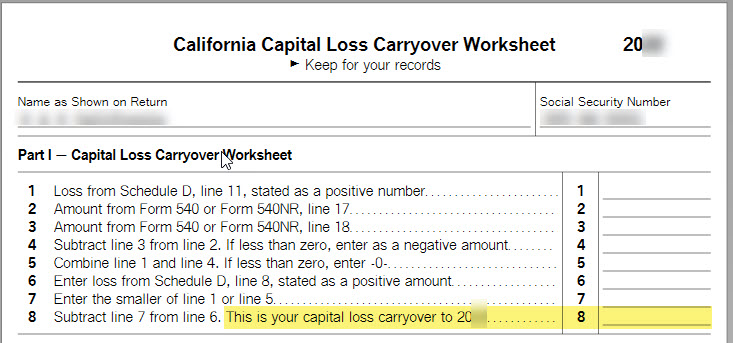
If you don't find this in your current return, look for the prior year California Capital Loss Carryover Worksheet (Cap Loss W/O Wk). This is a TurboTax worksheet, not an IRS or California tax form, that should be included in the forms of your prior year return. Capital Loss carryover is shown on Line 8.


Here's a screenshot of that worksheet.
 

**Say "Thanks" by clicking the thumb icon in a post
**Mark the post that answers your question by clicking on "Mark as Best Answer"

Unlock tailored help options in your account.

message box icon

Get more help

Ask questions and learn more about your taxes and finances.

Post your Question
