Level 2
April 1, 2026
Solved

3rd party designee

  • April 1, 2026
  • 2 replies
  • 2 views
Using Turbo Tax Deluxe 2025. I see 3rd party designee when I switch to "forms". It's at the bottom of the 1040. But I can't find it when using step-by-step. I went through the entire review process again and it never prompts me to add this. How do I find it?
    Best answer by VolvoGirl

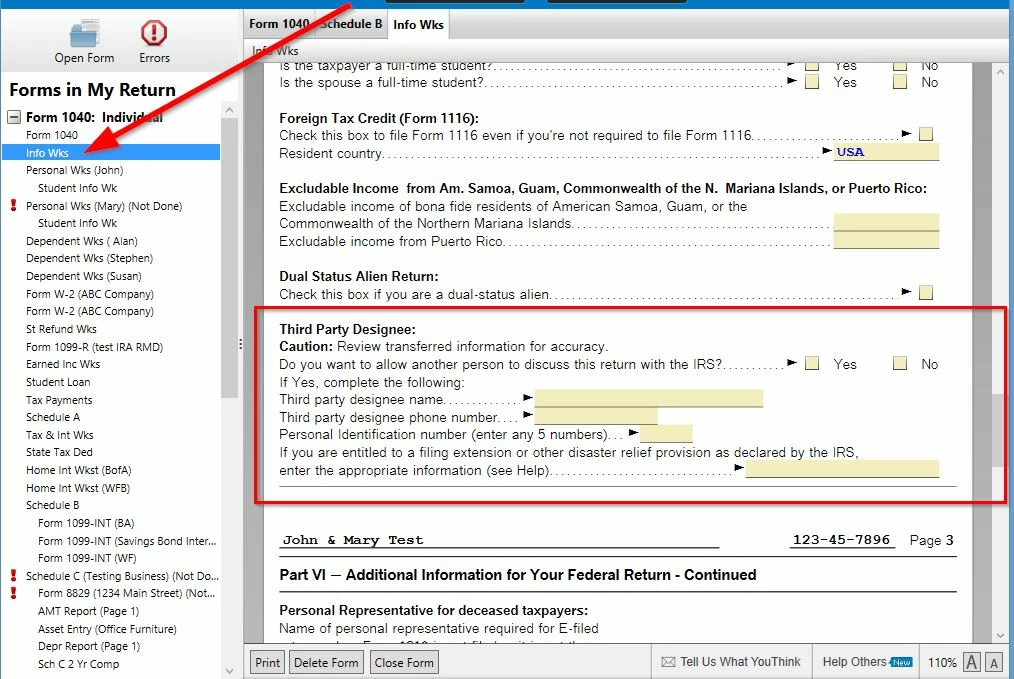
    Oh you need to find it on the Info Wks to fill in.  


    2 replies

    VolvoGirl
    Level 15
    April 1, 2026

    Right.  You can only fill in the 3rd party designee using the Desktop program in Forms mode.  You can't do it in the Online version.  


    You have to switch to Forms mode (click Forms in the upper right (left for Mac)) and select the Info Wks. Scroll down until you get to Part V Third Party designee: section. Check the YES box and then you can fill in the name, phone number and any 5 numbers for the PIN.

    VolvoGirl
    VolvoGirlAnswer
    Level 15
    April 1, 2026

    Oh you need to find it on the Info Wks to fill in.  


    belver12Author
    Level 2
    April 10, 2026

    Thank you to VolvoGirl.  That worked just fine.  I appreciate your response and your help.