
Level 2
April 7, 2024
Question

1099-Div Form Error / Issue / Glitch ?

  • April 7, 2024
  • 3 replies
  • 11 views

I linked our accounts and checked the details on all of our 1099 forms, including 1099-DIV. TurboTax is flagging two of these 1099-DIV forms for some reason as unnecessary, and I don't understand why, since both were uploaded for this year and reviewed by us. TurboTax won't let us proceed to the next step and is asking for more info (or asking us to delete), but I don't understand what it needs. I don't think I want or should delete these forms as they are current for 2023 from my understanding. 


This is the screen popping up:
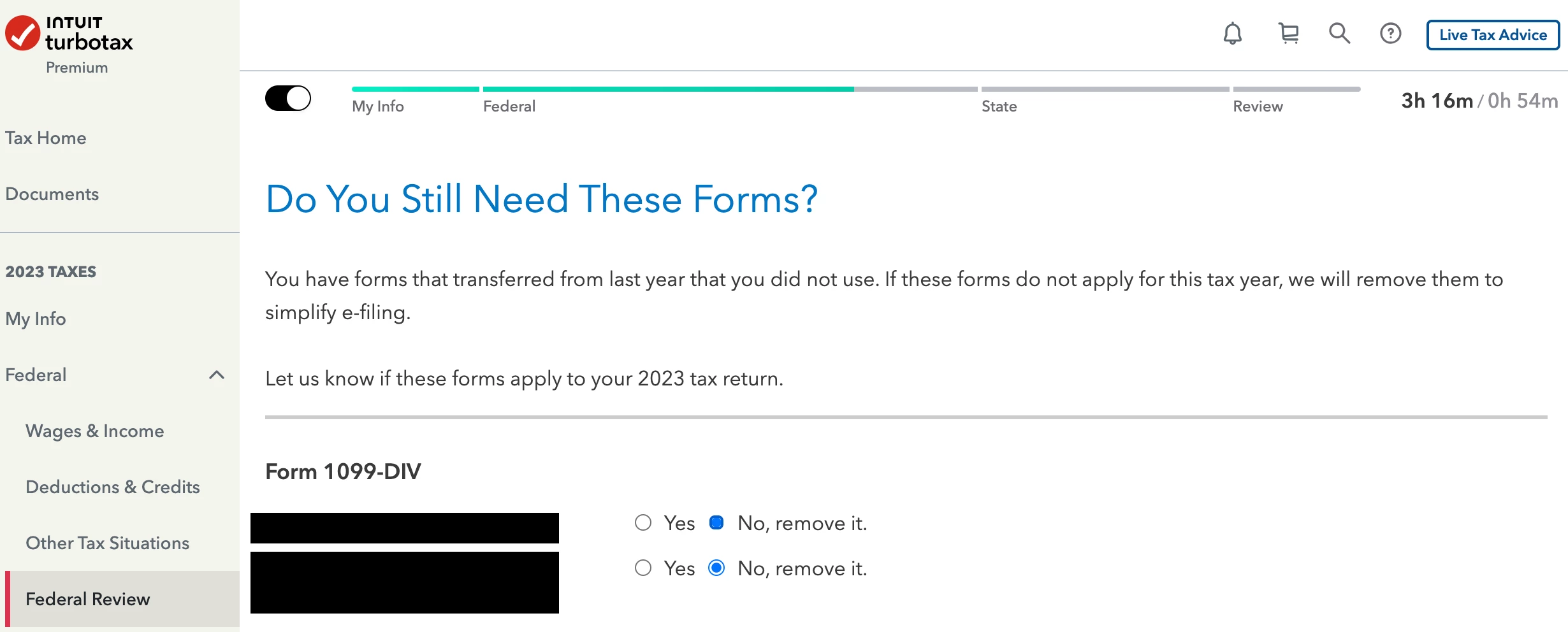
 

Does anyone have any idea what's going on? Is this some kind of glitch with TurboTax? I'd really like to avoid manually entering the info all over again.


Thanks in advance for any help folks can offer. 


    3 replies

    VolvoGirl
    Level 15
    April 7, 2024

    Did you import them this year?  They also transferred over from 2022 but didn't get filled in with the imported ones.  You can delete the extra transferred ones.  

    et1202Author
    Level 2
    April 7, 2024

    This is the confusing part for me. My understanding is these were all imported this year. I looked through the list of documents in the investments section and don't see any old ones from 2022 that didn't get filled in. I went through each individually and they all matched against imported forms from 2023. I'm not seeing any extra transferred forms as I go through the list right now.

    Level 2
    April 14, 2024

    I am having the same issue and I did try deleting the 1099-DIV that I had imported automatically and entering it manually, to no avail - I get the same error. I also tried clearing my cache/cookies per another thread's suggestion - this also didn't help. Did you manage to solve this? Or if not, did you go ahead and submit with the forms (overruling turbotax), and did it look correct?

    Level 2
    April 14, 2024

    Update: I tried clicking "No, remove it" and following that workflow. After I did this, my correct 2023 1099-DIV was still there, but it let me continue to the end of the federal tax workflow. I'm guessing this means there was some form they had on the backend that wasn't showing up in the UI - super disappointed in Turbotax with this; I spent over an hour trying to figure this out - what a waste of time!

    et1202Author
    Level 2
    April 14, 2024

    Yes! This is what I ended up doing too, with the same results.




