Help! Stuck trying to fix CA Schedule E Worksheet error
Hi,
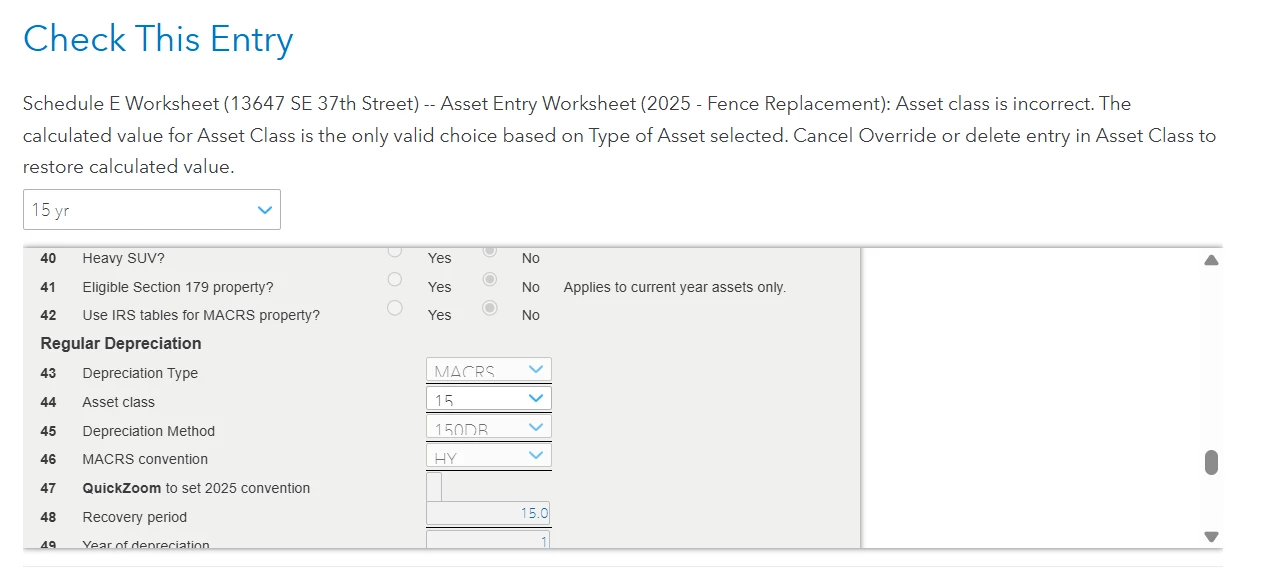
I need help with the error below on my CA Schedule E Worksheet - it's related to a fence replacement I did for my WA rental property.
When I add in a fence replacement item (which I purchased and put in place on 1/31/2025) into my Federal Tax returns and select the Special Depreciation Allowance (under the One Big Beautiful Bill) to recognize 100% of the costs for 2025, I run into the issue below when Turbo Tax ran the check over my CA State returns.
What is wrong with the below and what I should change it to?
It should not have an impact on the CA State tax I pay because this rental property is based out of Washington State.
However I don't want to leave this error unaddressed when I submit by CA Tax returns. How do I correct the error in this CA Schedule E Worksheet?
Thanks,
Alvin