Level 3
February 21, 2021
Solved

Form 8606 Calculation Error - Turbotax 2020

  • February 21, 2021
  • 3 replies
  • 124 views

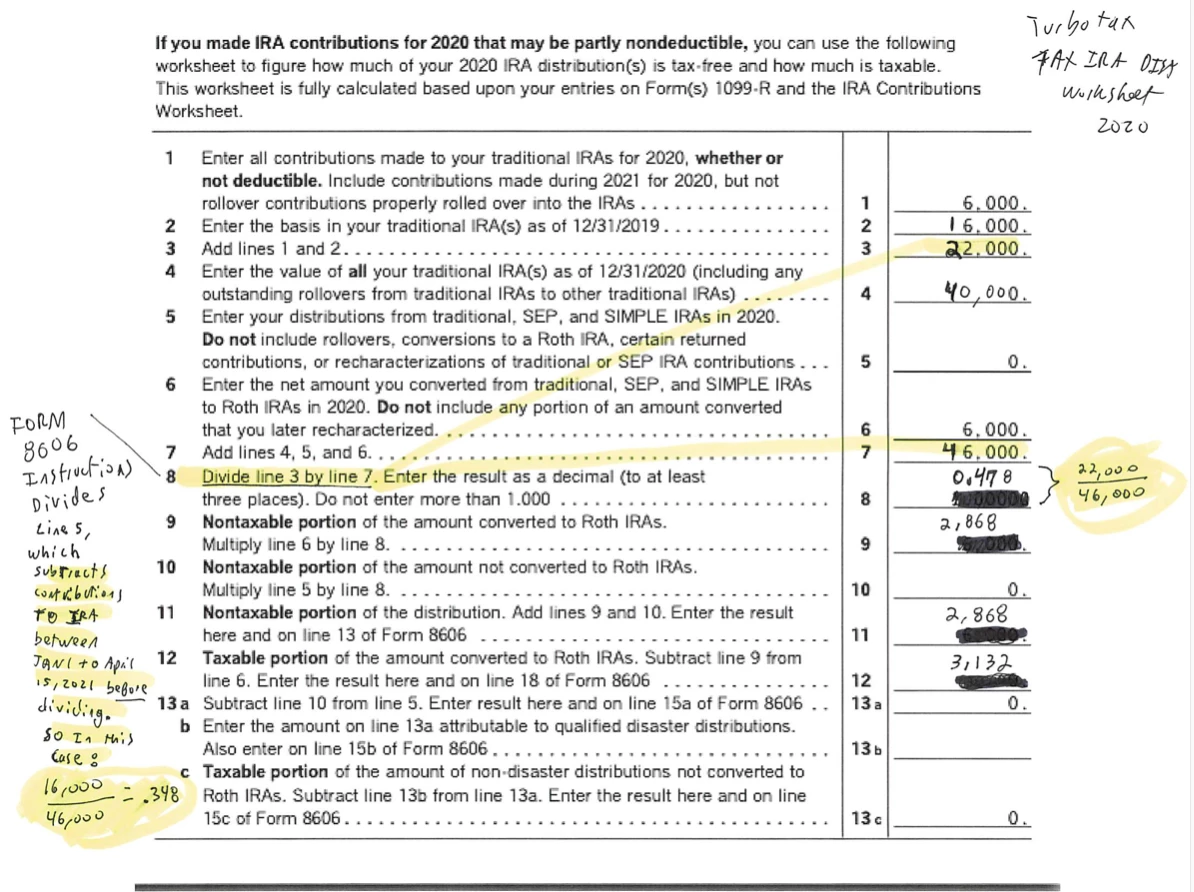
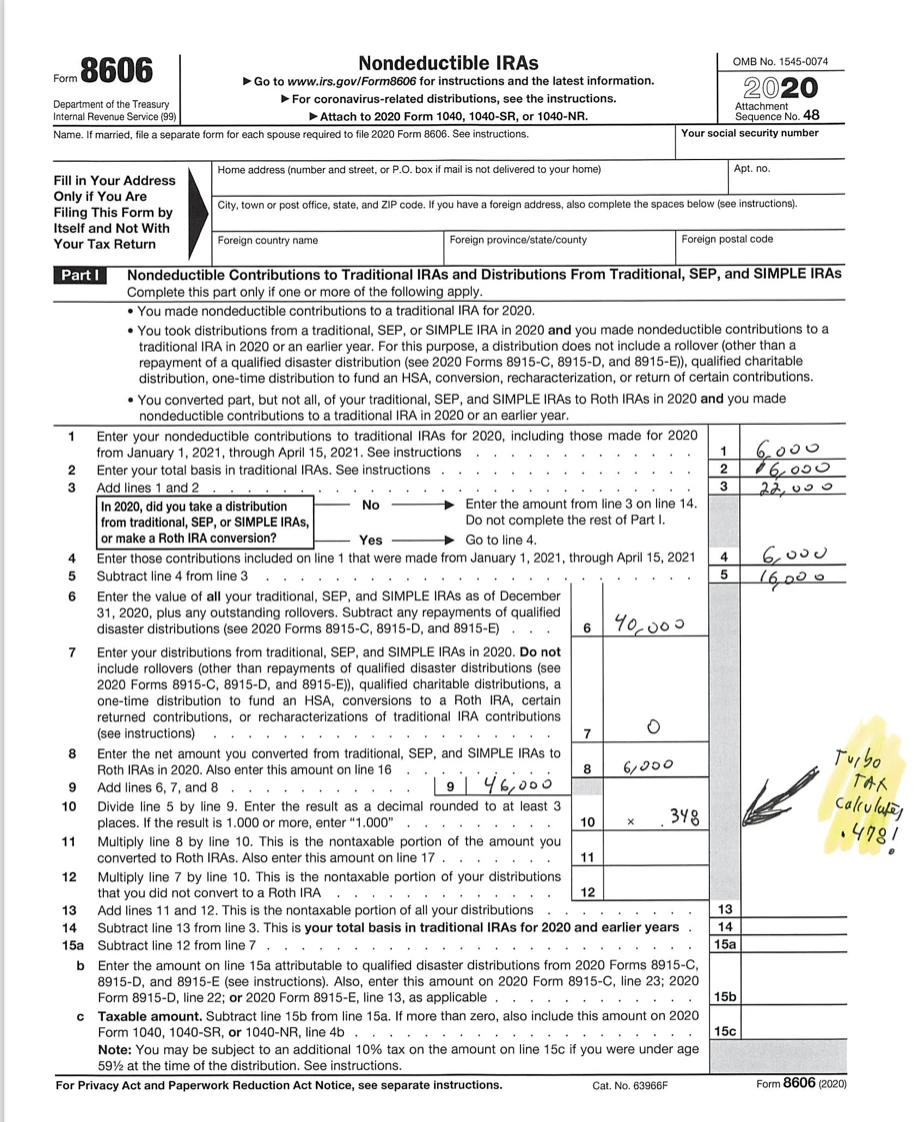
We believe we found a calculation error in the TurboTax 2020 calculation in a situation where non-deductible contributions to traditional IRAs for 2020 are made between January 1, 2021 and April 15, 2021.    In the TurboTax "Tax IRA Dist" worksheet, the calculation in line 8 divides line 3 by line 7.   However, in the Form 8606, the amount entered in the equivalent of line 3 SUBTRACTS first the non-deductible contributions to traditional IRAs for 2020 made between January 1, 2021 and April 15, 2021.   In the Turbotax worksheet, line 3 is using the amount before subtracting back out the amount contributed in 2021.    I attach a sample calculation in the picture attached using the TurboTax worksheet and using the Form 8606.  


I value your thoughts community!  Thanks 
    Best answer by macuser_22

    @69VanNuys wrote:

    Thank you for confirming the error.  I believe you are correct that the software is using Table 1-1, which works only if Line 4 of Form 8606 is ZERO. That is, if no contribution was made between January 1, 2021 and April 15, 2021.  Turbo tax is not running the calculation through the entire Form 8606 calculation and it results in a calculation error. 


    As user @dmertz pointed out - there is no error.     TurboTax is using the IRS worksheet 1-1 on Pub 590.B.


    You will find the TurboTax calculations on the "Taxable IRA Distribution Worksheet" in TurboTax.


    That IRS worksheet says to enter ALL contributions, including any made for the prior year before the due date and add them together which is what TurboTax does.


    We agree that the IRS worksheet seems to conflict with the 8606 instructions and will include the prior years contribution in the calculations which results in a lower tax then the 8606 calculations do, but that is what the IRS says to do and it seem that most tax software have started to use the worksheet instead of then 8606 because of the better tax treatment.

    3 replies

    Level 15
    February 21, 2021

    TurboTax is apparently using Worksheet 1-1 from IRS Pub 590-B to calculate the nontaxable and taxable amounts of this Roth conversion rather than doing the entire calculation on Form 8606, indicated by asterisks on lines 13, 15 and 18.


    https://www.irs.gov/publications/p590b#en_US_2019_publink1000270091

    69VanNuysAuthor
    Level 3
    February 21, 2021

    Thank you.  Does anyone know how to report this to TurboTax to get or fixed?   

    Level 2
    April 22, 2021

    Is there any update to this issue? 

    macuser_22
    Alumni - Champ
    Alumni - Champ
    April 22, 2021

    @madhavvi  wrote:

    Is there any update to this issue? 


    No.  Because it is not an issue.  It follows the published IRS worksheets.

    **Disclaimer: This post is for discussion purposes only and is NOT tax advice. The author takes no responsibility for the accuracy of any information in this post.**
    Level 2
    April 22, 2021

    Is there a possibility of TurboTax including worksheet in tax return to avoid IRS questions given this may result in a more favorable tax treatment for non deductible contributions as part of a Roth back door conversion than instructions on form 8606?


    In my case taxable part of conversion is $0 following worksheet but is approx $100 (due to $103 balance in a SEP IRA at end of 2020) if I followed instructions on form 8606. 

    Level 2
    June 11, 2021

    only got 1/2 of what your program states I should have gotten.


    Why??


    DoninGA
    Level 15
    Level 15
    June 11, 2021

    @ipd wrote:

    only got 1/2 of what your program states I should have gotten.


    Why??


    TurboTax receives no information from the IRS or a State concerning a tax refund.


    Go to this IRS website for federal tax refund FAQ's - https://www.irs.gov/refunds/tax-season-refund-frequently-asked-questions


    Why is my refund different than the amount on the tax return I filed? 

    All or part of your refund may have been used (offset) to pay off past-due federal tax, state income tax, state unemployment compensation debts, child support, spousal support, or other federal nontax debts, such as student loans. To find out if you may have an offset or if you have questions about an offset, contact the agency to which you owe the debt.

    We also may have changed your refund amount because we made changes to your tax return. This may include corrections to any incorrect Recovery Rebate Credit amount. You’ll get a notice explaining the changes.  Where’s My Refund? will reflect the reasons for the refund offset when it relates to a change in your tax return.

    Tax Topic 203, Refund Offsets for Unpaid Child Support, Certain Federal and State Debts, and Unemployment Compensation Debts has more information about refund offsets.