
Level 4
February 4, 2021
Question

BUG: ESPP Income - Cost basis computation

  • February 4, 2021
  • 5 replies
  • 0 views

This error is related to the known "Selling price per share" issue in TurboTax 2020.

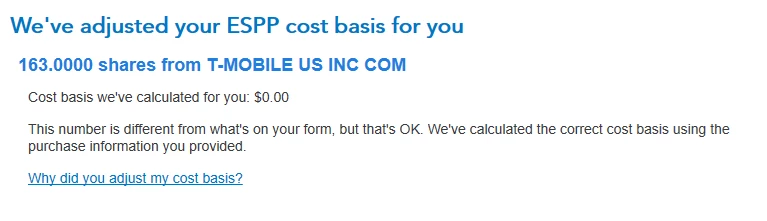
Even after the Feb. 4th update, TT will still not properly compute cost basis on ESPP income. I compared a virtually identical transaction in my 2019 TT, to the same one (just slightly different amount) in 2020. 

 Here are screen shots from TT:


2020:
2019, same kid of transaction:
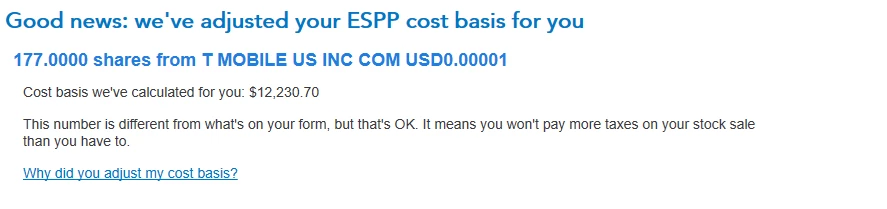


As you can see, in 2020, it's just computing a cost basis of Zero. That is a mistake. Each of those transactions were entered the same way, using information from my 1099-B (which was imported) and my 3922. 


Is this still a known issue the developers are working on?


    5 replies

    andrecsAuthor
    Level 4
    February 4, 2021

    Here is another screenshot from TT on this issue, that I believe gets at the heart of the problem.

    TT is simply not computing the cost basis correctly:

    Everything is just "$0". All the sale data was entered, so this makes no sense. 


    Level 14
    February 6, 2021

    The issue has been submitted and is currently under investigation.  Please click on the following link and sign up for an email notification when it's fixed.  


    Selling price per share


    Thank You for your patience


    Many large companies offer Employee Stock Purchase Plans (ESPP) that let you buy your employer's stock at a discount. These plans are offered as an employment incentive, giving you an opportunity to share in the growth potential of your company's stock.  For details about tax treatments, click here:   Employee Stock Purchase Plans

    andrecsAuthor
    Level 4
    February 6, 2021

    Hi Linaj2020, 


    The selling price per share issue is actually a separate issue than the problem that TT has with ESPP transactions. The selling price per share issue was actually fixed in the TT maintenance release yesterday, Feb. 4th. The link you provided discusses that issue, which is now fixed.


    What isn't fixed is the ESPP malfunction in the software that caused TT to compute $0 proceeds and a $0 cost basis on all ESPP transactions. I would love to hear an update specifically about that, if you have one.

    Level 2
    February 14, 2021

    For what its worth, updated toay ie 2/14, and bug still exists. If there are more than one ESPP sale, then it appears to "remember" old entries, misses cost basis computation, changes old entries when updating new ones, etc.


    essentially, ESPP part cannot be used. Does anyone if anyone from Intuit acknowledged the issue ?

    Level 3
    February 14, 2021

    i have exactly the same problem as of 2/14.

    I have entered 2 espp stock  sales, for 62 shares and 536 shares.

    Doing the walk  through on the first sale it asks for 3922 info and i  enter it , and it works out an adjusted cost basis correctly.

    When i  enter the second sale and try to  do the walk  through and add the 3922 info it refers to the 62 share sale not the 536, and pulls up all the previously entered info  for the first sale and enters a cost basis of $0 which is wrong.

    Level 2
    February 15, 2021

    Exact same bug noticed here with the cost basis of multiple ESPP entries being calculated as $0 after the first entry.  Please do not write this off as user error; this is a real bug that needs to be fixed and has real negative monetary implications.


    Level 3
    February 16, 2021

    Support called me back and the update is that this fix will be some time off...  My case is linked such that I would get an update when fixed.    Although support was great in documenting my issue and communicating back to me - TT as a whole needs to enable transparent communication as to what the issue is and when they can resolve it.  I purchased this package for just these kinds of computations = and now I have to dive into the forms and do it myself If I'm going to file anytime soon.  My ESPP sales is the last bit of info I need to enter to be done.  I  have to now also question TT's computations of my RSU and other transactions ???...    Really I expect some sort of refund.


    In any case looks like we are on our own for the foreseeable future. 

    Level 3
    February 16, 2021

    How can a fix for a basic error in stock processing in the version  that is specifically for stocks be 'some time off'??

    I'm a software engineer of 30  years,  this is a simple 'table or array processing not working on selected entry', the same thing is done for each  entry, all you have to do  is make sure the table is processed based on the selection made on the previous screen. It looks like it is always being set to the first table/array entry regardless of your selection.

    That really is basic stuff and easy to fix.

    andrecsAuthor
    Level 4
    February 16, 2021

    I agree, especially since this section always worked just fine in all the past years. 2019 and earlier was just fine. I don't know why they changed it for 2020? Someone made a huge mistake. 

    February 17, 2021

    The bug still exists today.  You have to be very careful otherwise you will get taxed twice on the incorrect gains amount.  Even manually putting in the adjusted capital gains amount does not calculate correctly.  Anyone know when this is supposed to be fixed?  

    Level 2
    February 18, 2021

    Hi - there was a program update today.  Anyone know if this bug was addressed in the update?  I can't find a list of what was fixed in today's update.....thanks

    Level 2
    February 18, 2021

    Nope, not fixed.  Just updated a minute ago to the 2/18/2021 update.  ESSP still corrupts the data on the second entry.  I imported my ESSP and RSU data from my broker through TurboTax.  Editing the first entry works fine, editing the second entry intermingles the data from the first entry, beginning at the "Ok, we just need a few more details".  Once you click 'continue' on that screen, the next screen shows data from your first transaction, and there's no recovery.  I'm stuck until a fix is released.  I've used TurboTax for two decades.  In a few days I'm going to try another program.

    Level 3
    March 10, 2021

    Update on my part.  I've no clue if they fixed it.  I did as others have suggested and entered a different account for each ESPP transition. ( the work around probably stated different brokerage but I found it worked under one brokerage and different account designations ).  After entering my transactions the corrected cost basis totals were very close to my W2 value reported so I called it good.  Intuit / TurboTax has been absolute crap in handling this.  They owe everyone purchasing this a refund of the price dif between the NON-ESPP versions and this up sell.  It is just a stupid software bug.  They took my data and were to have emailed me when the defect was fixed.  Never got an email.




