Level 2
January 28, 2023
Question

How do I enter my 740-NP-R

  • January 28, 2023
  • 3 replies
  • 7 views

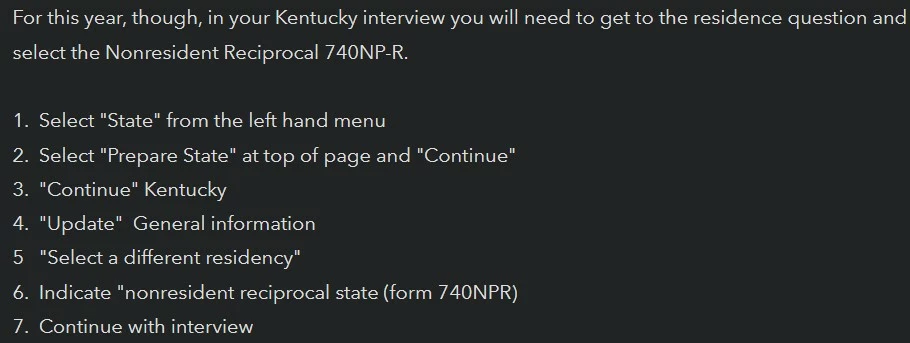
I have followed the following steps:

And I still get this caution message:
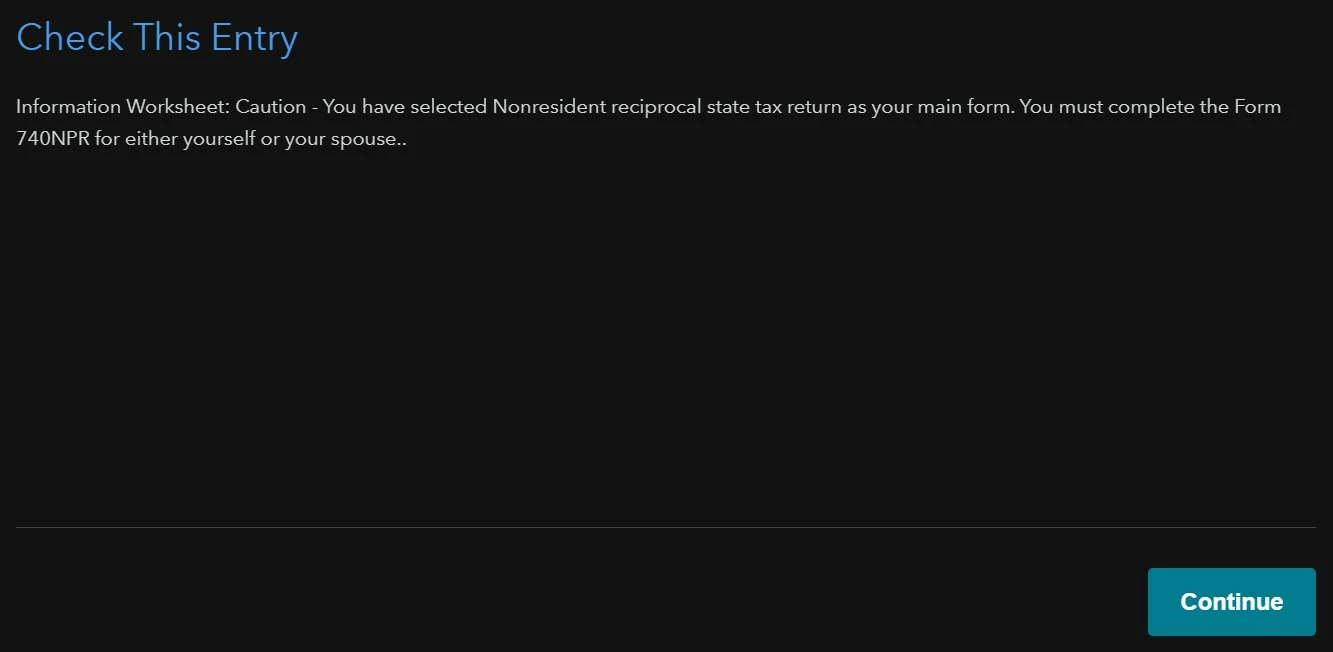


Is there somewhere that I actually need to upload/enter my 740-NP-R?

Or is this a bug that I can ignore?

3 replies

Level 15
January 28, 2023

TurboTax will create Form 749-NP-R.


  1. Select State Taxes in the left column
  2. Then Prepare State
  3. On Status of your state returns, select Add another state if you do not see Kentucky. Then add Kentucky or Continue
  4. On Your Recommended Kentucky Form, tap Select a Different Residency if you do not see Nonresident-Reciprocal State (Form 740-NP-R)
  5. If you do, Continue.
  6. On Nonresident Reciprocal Return, say YES to Were you a nonresident of Kentucky for the entire year
  7. On Select Your Reciprocal State(s) Your resident state should already be checked in the dropdown. If not, put a check beside your resident state
  8. On Nonresident Reciprocal Return, say YES to Are you reporting only income from salary or wages earned while you were a resident of xxxx.
  9. You will see Attach Resident State Return. then Continue
**Say "Thanks" by clicking the thumb icon in a post. **Mark the post that answers your question by clicking on "Mark as Best Answer"
_DJ_Author
Level 2
January 28, 2023

I have followed the steps above, however, there is no option to attach a copy of my 740-NP-R.

After clicking continue, it does not take me to a page with an option to upload my 740-NP-R.

Where would I go to upload my 740-NP-R?

Level 15
January 29, 2023

Kentucky wants you to attach a copy of your "resident return," your home state return. TurboTax will create Form 740-NP-R. That's what the KY program is doing.

**Say "Thanks" by clicking the thumb icon in a post. **Mark the post that answers your question by clicking on "Mark as Best Answer"
Level 2
April 7, 2023

When you have multiple state returns, you should generally complete the nonresident state return first - in this case, Kentucky Form 740 NP-R. TurboTax will prepare the form from your entries in the Kentucky interview.


The prompt you saw in the Kentucky interview asking you to attach a copy of your resident (in your case, Ohio) return to your Kentucky return is in case you are mailing in your returns. If you e-file, TurboTax sends one complete package to the IRS and states.


Once you have completed your Federal and State returns, you can preview them to see all of the forms that TurboTax has prepared from your entries. See here for details. 


_DJ_Author
Level 2
April 14, 2023

I have completed my Kentucky state return and my Ohio state return (in that order), but I still get the following error when I try to e-file:

What do I need to do in order resolve this caution message so I can e-file?

Level 15
April 14, 2023

It would be best to click here to give us a call, so we can better assist with this one. @_DJ_ 

**Say "Thanks" by clicking the thumb icon in a post. **Mark the post that answers your question by clicking on "Mark as Best Answer"
DaveF1006
Level 15
February 25, 2026

Enter the information in the following manner to avoid any issues with your filing. 


This error usually originates because of an entry in the Federal section.


  1. Go to Federal > Wages & Income.
  2. Edit your W-2.
  3. Scroll down to Box 15–17 (State Information).
  4. Ensure that Kentucky (KY) is listed with the amount of KY tax withheld, but verify the State Wages (Box 16) are also listed.
  5. Crucial: Go to the "My Info" (Personal Info) section on the left.
  6. Check the question: "Did you make money in another state?"
  7. Answer NO. Even though you worked in KY, for reciprocity purposes, the IRS and TurboTax need to see "No" here to stop the software from trying to file a standard 740-NP (Nonresident) return instead of  740-NP-R.

Now, how to handle this in Your kentucky State Return

  1. Now, go to the State Taxes tab for Kentucky. 
  2. When asked for your residency, select Nonresident.
  3. Look for a screen that asks: "Your Recommended Kentucky Form."
  4. Do not just click continue. Look for a link or button that says "Select a Different Residency" or "Nonresident Reciprocal State (Form 740-NP-R)."
  5. Once you select 740-NP-R, TurboTax will ask: "Were you a nonresident of KY for the entire year?" Answer YES.
  6. "Are you reporting ONLY income from salary or wages earned while a resident of Indiana?" Answer YES.
**Say "Thanks" by clicking the thumb icon in a post. **Mark the post that answers your question by clicking on "Mark as Best Answer"