
Level 2
January 15, 2024
Question

Turbo Tax 2023 Desktop Version on Windows 11

  • January 15, 2024
  • 3 replies
  • 7 views

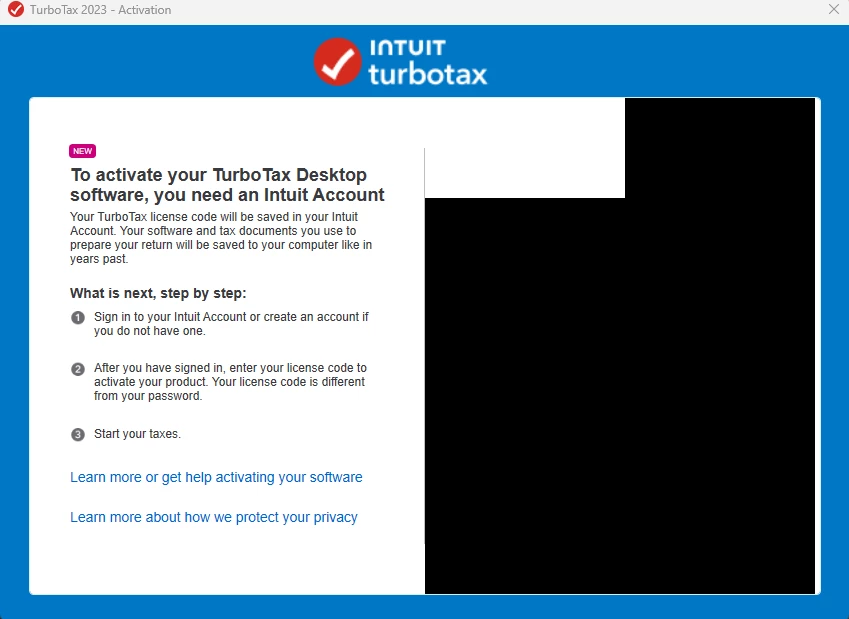
I installed Turbo Tax 2023 on Windows 11 and when it starts up for the activation screen, half of the screen is black, so I cannot activate it. 


  • I tried uninstalling and reinstalling multiple times even removing the leftover files under Program Data and the user profiles.
  • I installed updated graphics drivers.
  • I made sure scaling was 100% and even changed the resolution to every option available down to 800x600 and still nothing.
    3 replies

    DoninGA
    Level 15
    Level 15
    January 15, 2024

    Make sure that you are running the TurboTax program as an administrator.


    Close TurboTax

    Right click on the TurboTax icon

    Click on Properties

    Click on the Compatibility tab

    Check the box Run this program as an administrator

    Click on Apply and OK

    Start the TurboTax program again to see if the problem persists

    SteamTrain
    Level 15
    January 15, 2024

    @John2024 


    I signed into my Intuit account before I started the installation process.......don't recall getting that screen at all...maybe it skips past it.

    ____________*Answers are correct to the best of my knowledge when posted, but should not be considered to be legal or official tax advice.*
    Level 2
    February 12, 2024

    John2024,

    i have the identical problem with Windows 10. I have tried all of the support teams suggestions but still get the black activation screen. I have uninstalled and re-installed TurboTax. I have changed display settings. I have disabled my firewall. I have added TurboTax and CelfSharp.browser.subprocces.exe as safe programs in Windows Defender. I have run TT in Windows 8 compatibility mode. I have downloaded the latest version of Microsoft Visual C++. I have turned off my second monitor. None of these changes solved my black Activation Screen problem.
    John, did you find a solution to the problem?

    John2024Author
    Level 2
    February 12, 2024

    I figured out the issue on my own. Over the years of having Windows 10/11, something got corrupted in the Windows directory that was preventing that popup window from displaying properly. I reinstalled windows and the issue resolved itself and now I can see the popup window.




