

Solved
2026 federal estimated taxes
I'm using Turbo Tax Desktop version. Where can I manually override/enter my 2026 federal estimated tax payment amounts rather than accept the calculated payment totals?
I'm using Turbo Tax Desktop version. Where can I manually override/enter my 2026 federal estimated tax payment amounts rather than accept the calculated payment totals?
@Roberto99 I'm working on mine too. You can go to Forms and open the Est Tax Options worksheet and play around with that. I just made my prefilled 1040ES without any amount on them.
For the Desktop program. I finally got it to work to print prefilled 1040ES slips without an amount.
Go to Forms
Open the Est Tax Options worksheet from the left column
Try to make Amount of Estimated Taxes to pay blank. At the top I was able to select prepare estimates based on 90% and that changed it to zero estimates
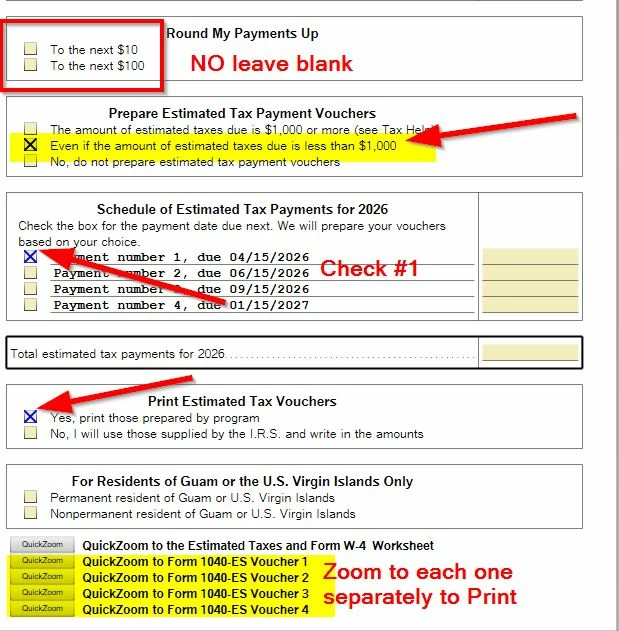
I left the Round My Payments Up box not checked
Then on Prepare Estimated Tax Payment Vouchers - check "Even if the amount due is less than 1,000."
For the Schedule you might have to check Payment number 1.
Print Estimated Tax Vouchers - check YES
Then you have to hit the QuickZoom button at the bottom to open each payment separately to print.
I made a screenshot on my Win 11 computer I'll attach here. Hope this isn't confusing.

Our experts are available on-demand, no appointment needed. Get help all year long with TurboTax Expert Assist.
Explore your optionsEnter your E-mail address. We'll send you an e-mail with instructions to reset your password.





©1997-2026 Intuit, Inc. All rights reserved.
Intuit, QuickBooks, QB, TurboTax, Credit Karma, and Mailchimp are registered trademarks of Intuit Inc. Terms and conditions, features, support, pricing, and service options subject to change without notice.
Security Certification of the TurboTax Online application has been performed by C-Level Security.
By accessing and using this page you agree to the Terms of Use.


© 2026 Intuit Canada ULC or its affiliated companies. All rights reserved. Intuit, QuickBooks, QB, TurboTax and ProFile are registered trademarks of Intuit Inc. Terms and conditions, features, support, pricing, and service options subject to change without notice.
Copyright © Intuit Canada ULC, 2026. All rights reserved.
© 2026, Entreprises Intuit Canada ULC ou ses sociétés affiliées. Tous droits réservés. Intuit, QuickBooks, QB, TurboImpôt et ProFile sont des marques déposées d’Intuit Inc. Les modalités, prix, fonctions et options de service et de soutien peuvent changer sans préavis.
© 2026, Entreprises Intuit Canada ULC. Tous droits réservés.


