Level 2
February 4, 2026
Question

FHSA Carryforward Amount Available to deduct

  • February 4, 2026
  • 19 replies
  • 100 views

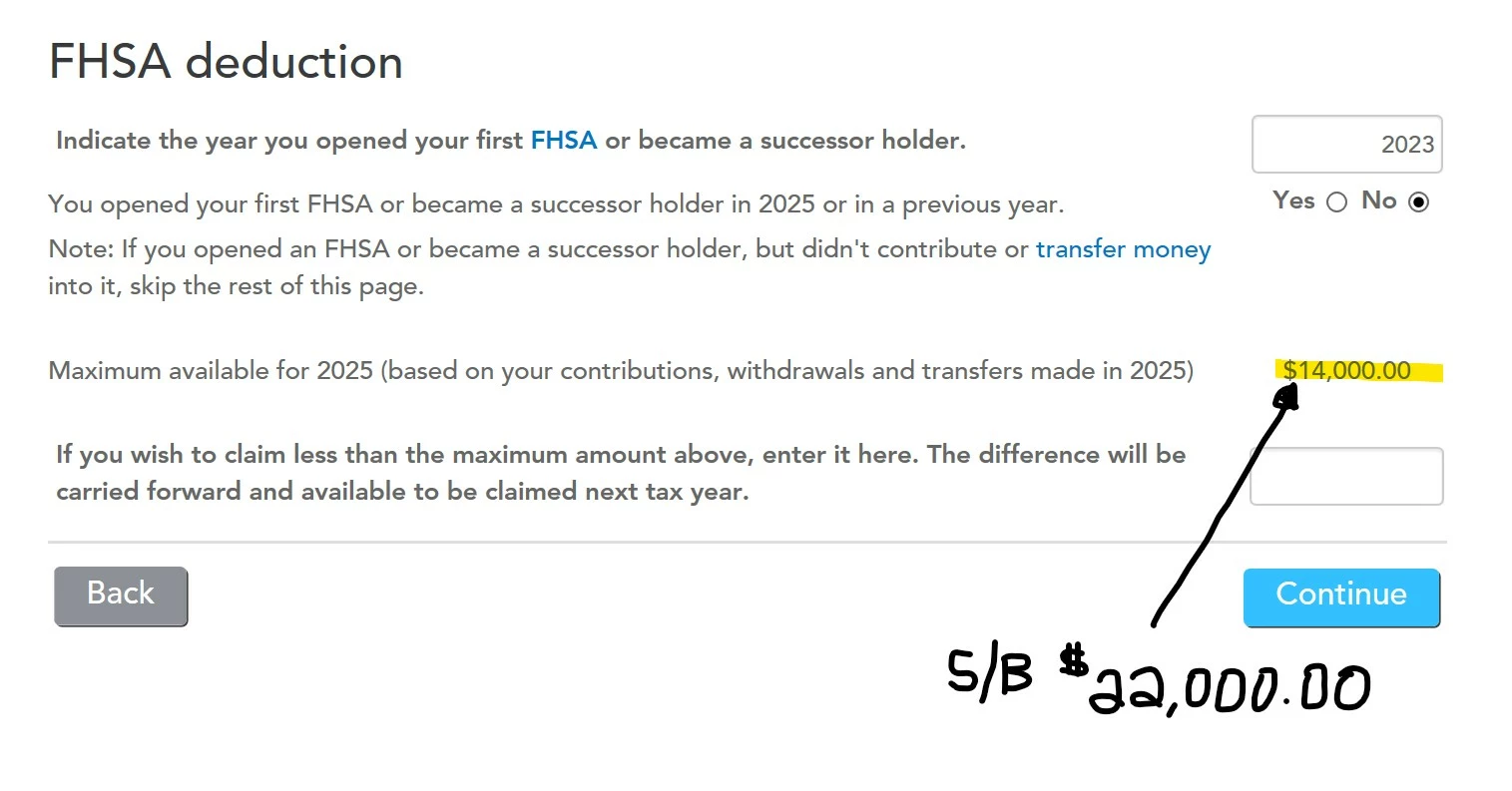
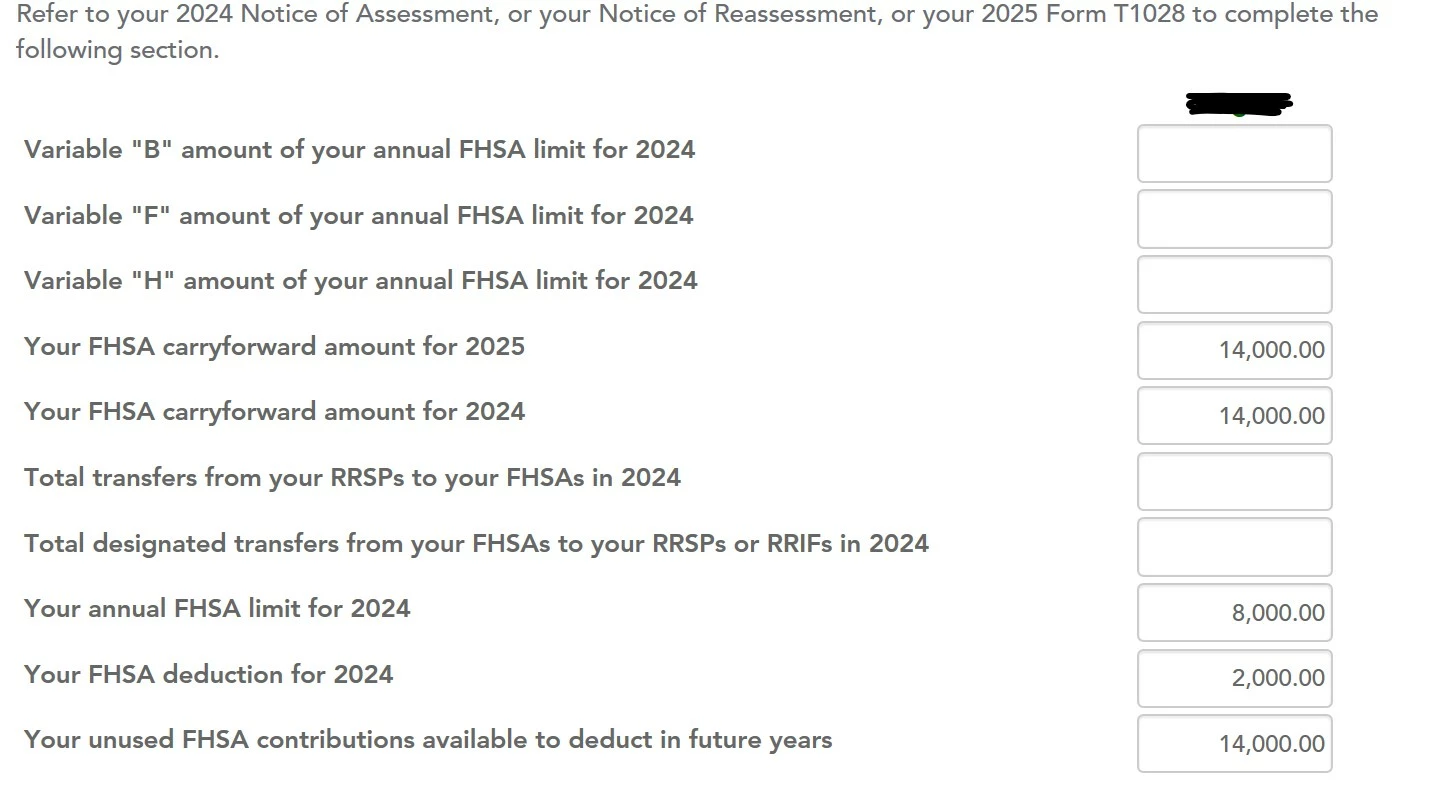
I have an FHSA opened in 2023. Have contributed $8000 each year since then, so working with $24,000 (2023, 2024, 2025). In 2024 I used $2000 of it and carried forward the rest. So now doing 2025 taxes and I can't seem to get the system to show $22,000 that I would like to deduct for 2025. (It will only allow me $14,000) And yes I did input my $8000 2025 contribution on the previous step by step page.  I have attached screenshots of the Turbotax FHSA pages. The only way I can make it work is input $8000 on the line "Variable "B" amount of your FHSA limit for 2024". So what am I missing, and/or where do I input my 2025 $8000 contribution to equal $22,000? 


    19 replies

    Level 6
    February 4, 2026

    I know that CRA Autofill is not available yet for TY 2025. I want to make sure that you have correctly added all the information from your TY2024 NOA.

    I have replicated and am getting the same results.

    If the software still shows $14,000, you can manually enter $8,000 into "Variable B." This field represents the sum of previous years' participation room; entering $8,000 here manually causes the software to recognize the total available room of $22,000.


    Thank you for choosing TurboTax.

    Level 6
    February 4, 2026

    Following further investigation, I'd like to confirm that you added T4FHSA first. When you reach the "Amounts from Notice of Assessment or Reassessment" section, double-check that you've entered the correct amounts for each year.

    I tried it using the information you provided, and the calculations were correct. I've attached a screenshot for reference.


    Level 2
    February 5, 2026

    Thanks for the suggestions. I checked with CRA and there is not anything regarding my FHSA on my 2024 NOA, CRA did verify that I did have $22,000 available to deduct for my 2025 taxes. Now it's just a matter of getting the boxes correct in Turbotax for the FHSA. I have attached screenshots showing that I input the $8000.00 contribution for 2025. I have also attached the main Turbotax FHSA page the way it stands now after Turbotax auto populated it. So as mentioned I have contributed $8000 each year of 2023, 2024, 2025 ($24,000), minus $2000 deducted in 2024, equals $22,000 that should be available to deduct for 2025. Is there a certain way the numbers S/B input so the bottom line shows $22,000? Or do I input $8000 in "Variable B" to force a total of $22,000 at the bottom? (As you have mentioned, entering in his field manually causes the software to recognize the total available room of $22,000?) Thanks! 


    Level 2
    February 24, 2026

    Were you able to find a solution for this. I am having issues as well. It won't calculate deductions for much the same situation as yours as well as for a new FHSA in 2025 (no carryforward info)?

    Level 6
    March 2, 2026

    @hhmyeung We recommend contacting phone support for more information on this issue so that they can screenshare and investigate it.

    To talk to our phone support team, visit https://support.turbotax.intuit.ca/contact/


    After entering some basic info about what you need help with, the page will give you the phone number for the team best suited to help.


    During tax season (from CRA NETFILE opening on February 24 to the regular filing deadline on April 30), support is available every day of the week during these hours:


    9 AM to midnight ET for English support

    Level 2
    March 7, 2026

    Just downloaded the software now. Issue not resolved. Is Intuit working on the issue, or are we on our own?


    Alumni - Intuit
    March 9, 2026

    The amounts in the calculations are correct—once you enter the amount you wish to contribute for the year on the line below the 14000 with your arrow, you will see when you click continue that the proper amount will be on the following page. 


    Thank you for choosing TurboTax.

    Thank you for choosing TurboTax / Merci d'avoir choisi TurboImpôt
    Level 2
    March 11, 2026

    Anyone have any idea how i would fill this page out to reflect, 

    Opening the FHSA in 2024

    Contributing 250 in 2024 

    Contributing 16 K in 2025 ( realize im 250 over, no worries)


    I have no idea, I cant get it to reflect 

    Level 2
    March 11, 2026

    Turbotax hasn't updated this software error, and I doubt they will before tax deadline. They had FHSA errors last year and promised to fix but they didn't. I would suggest playing around with putting the amounts in the software (Variable "B" worked for me), and just make sure the amount you want to deduct shows up properly. Check the FHSA worksheet in "Forms" rather than the Easy Step and you'll see what I mean. Also, watch the wording on the FHSA "If you want to claim less than the amount......". It's worded backwards!! TURBOTAX, YOU HAVE TO DO BETTER! I'VE BEEN USING TURBOTAX ALL MY LIFE AND UNACCEPTABLE!! We paid for a product that was supposedly easy, however it's been brutal for the past 3 years!   

    Level 2
    March 11, 2026

    Hey man, yes this is quite frustrating. If I play around with all the fields not paying attention to what they really are for, I’m able to enter a combination that shows what I want on the main page. It comes up as 16,500 total contributions, claiming 16,000. 

    as long as this page shows that do you think that’s OK?