
Level 2
February 16, 2026
Question

PPP Loan Forgiveness

  • February 16, 2026
  • 1 reply
  • 1 view

TurboTax for Windows (Desktop) for 2025 asks a bunch of questions in the Miscellaneous Income section, all of which I answered "No," to as we did not receive any of those types of income. And then, out of the blue, it asks for which years did we receive a PPP Loan and forgiveness. Uh... Neither 2020 or 2021 as far as I know. I am required to choose one or both years. Why? I went back to verify that I didn't answer "Yes" to anything, and I did not. It will not let you continue without choosing a year.
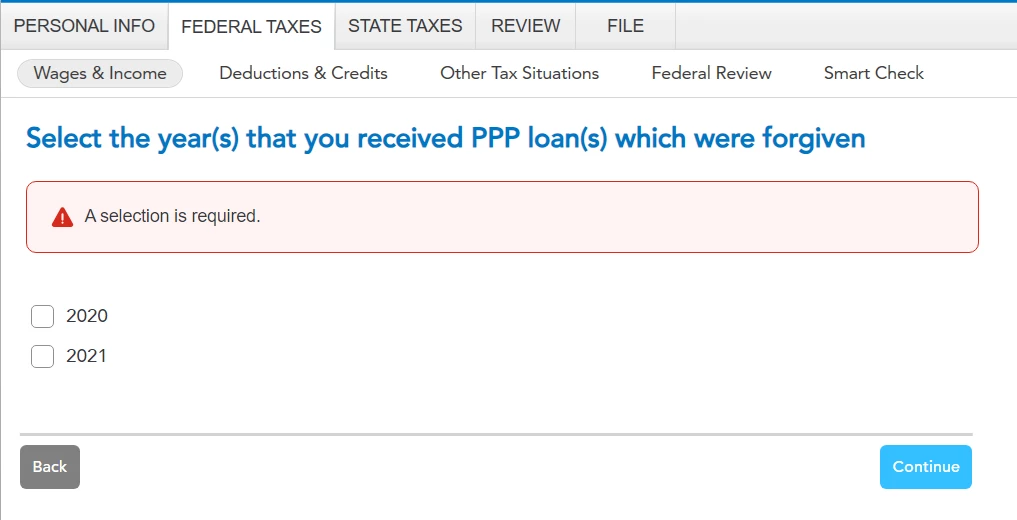
 

What am I missing here? Did this come in the form of something else? Am I not remembering something?


Thanks for any help.

    1 reply

    PatriciaV
    Level 15
    February 16, 2026

    If you choose a year, what happens when you click Continue? Does this clear the error or bring up more questions?


    We were unable to reproduce the experience you have seen. If you're not able to clear this page, it would be helpful for us to have a TurboTax ".tax2025" file to test this issue further.


    If you would be willing to send us a “diagnostic” file that has your “numbers” but not your personal information, please follow these instructions: 


    In TurboTax Desktop, open your return and go to Online in the TurboTax header. (On a Mac computer, choose Share or Help.)

    1. Choose Send Tax File to Agent.
    2. You will see a message explaining what the diagnostic copy is.  Click Send on this screen and wait for the Token number to appear.
    3. Reply to this thread with a screenshot of your Token number (this avoids Community filters for numbers with a dash) and tag (@) the Expert requesting the token from you.
    4. Please include any States that are part of your return - this is VERY important.

    We will then be able to see the same experience you are having. If we are able to determine the cause, we'll reply here and possibly provide you with a resolution. 

    **Say "Thanks" by clicking the thumb icon in a post. **Mark the post that answers your question by clicking on "Mark as Best Answer"
    wastcougrAuthor
    Level 2
    February 16, 2026

    @PatriciaV 


    Thanks for the quick reply.


    If I choose a year, it actually does both - clears the error AND wants more specific information. Here's a screen shot.


    I will send the file. I'm in Arizona. Here's the Token screenshot.


    Thanks again. I'm an IT professional so OF COURSE I want to help get this figured out. I HATE bugs. LOL


    -Christi


    PatriciaV
    Level 15
    February 17, 2026

    Thank you for the token. Since you're using TurboTax Desktop, you can fix this using Forms Mode.


    1. Open your return and click the Forms icon in the TurboTax header. 
    2. In the list of Forms in My Return on the left, notice that "PPP Loan Stmt" has a red exclamation mark. 
    3. Click the form name to open it in the large window. 
    4. Scroll down to the Smart Worksheet under 2020 Taxable Year.
    5. Uncheck box (1), which should remove the red exclamation mark.
    6. Click Step-by-Step in the header to return to the main screens.
    7. Now run SmartCheck again to see if the error has been resolved.

    We tested this fix and were not presented with the PPP Loan question again when clicking Continue at the bottom of the Income Summary page.

    **Say "Thanks" by clicking the thumb icon in a post. **Mark the post that answers your question by clicking on "Mark as Best Answer"




