
Level 4
March 12, 2024
Question

Form 1099-NEC

  • March 12, 2024
  • 2 replies
  • 24 views

Why is TT Deluxe treating this income as a business? It is a form I received from a company name Public Partnerships LLC which was used by Costco to make an extra payment for COVI-19, but I never worked for that company. 

I know it has to be entered as an income but it seems TT is treating this as a self-employed income?
 

    2 replies

    Alumni - Champ
    March 12, 2024

    This applies to Form 1099-NEC also.

    Enter it in the personal section, Other Common Income Form 1099-MISC.  To ensure it does not go to Schedule C (self-employment), you will answer the follow-up questions accordingly. 


    On the Describe the reason for this 1099-MISC screen, enter a description of the other income. (award/stipend)

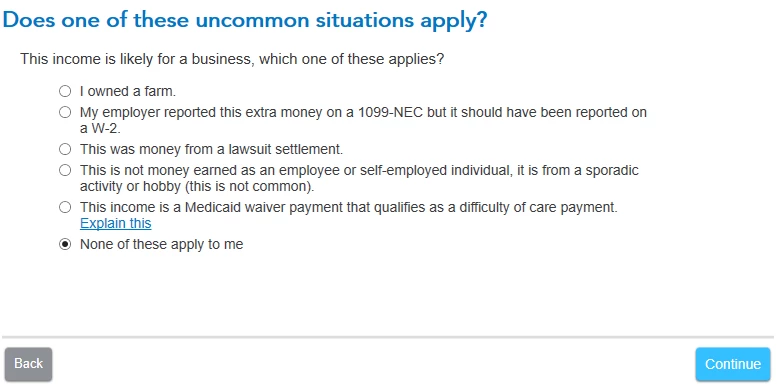
    Select None of these apply on the Does one of these uncommon situations apply? screen.

    Select No, it didn’t involve work like my day job on the Did the involve work that's like your main job? screen.

    Select I got it ONLY in 2023 on the How often did you get income for? screen.

    Select No, it didn’t involve intent to earn money on the Did the work involve an intent to earn money? screen.


    Answering differently to any of these questions will imply self-employment and generate Schedule C.  


    Please give feedback. If this helps click “Thumb” or “Best Answer” if it’s a solution.


    vpujolsAuthor
    Level 4
    March 12, 2024

    I will check again but do not recall any of those questions.....

    Level 15
    March 12, 2024

    It is not self employment.  For this reason you should delete Form 1099-NEC entry (see below), but keep the document and information that shows it was paid by Public Partnerships LLC which was used by Costco to make an extra payment for COVID-19.  Next report the income using the steps below in TurboTax Online Deluxe.


    You'll need to delete this form 1099-NEC. 

    • If you're using TurboTax Online software and need to delete a form, click here.
    • If you're using TurboTax CD\Download software and need to delete a form, click here


    Other Miscellaneous Income:

    1. Go to the Wages and Income  section of TurboTax
    2. Scroll to  Less Common Income > Select  Miscellaneous Income, 1099-A, 1099-C
    3. Select Other reportable Income > Enter a description (----) and the amount


    @vpujols 

    **Say "Thanks" by clicking the thumb icon in a post. **Mark the post that answers your question by clicking on "Mark as Best Answer"
    vpujolsAuthor
    Level 4
    March 12, 2024

    Thanks, did that. 


    Now TT Deluxe is prompting me to address a question from the form I had deleted when reviewing the taxes. Pointing me back to Schedule C where I had info from the 1099-NEC form.


    EDIT: I went into the Schedule C form and manually removed that company info and such, smart check ran fine this time.




