


- Community
- Topics
Turn on suggestions
Auto-suggest helps you quickly narrow down your search results by suggesting possible matches as you type.
Showing results for
- Community
- :
- Discussions
- :
- Taxes
- :
- Get your taxes done
- :
- Re: How do I enter information from a cost segregation study?


- Mark as New
- Bookmark
- Subscribe
- Subscribe to RSS Feed
- Permalink
- Report Inappropriate Content
How do I enter information from a cost segregation study?
Topics:
posted
February 28, 2026
9:58 PM
last updated
February 28, 2026
9:58 PM
Connect with an expert

Do you have an Intuit account?
You'll need to sign in or create an account to connect with an expert.
1 Best answer
Accepted Solutions


- Mark as New
- Bookmark
- Subscribe
- Subscribe to RSS Feed
- Permalink
- Report Inappropriate Content
How do I enter information from a cost segregation study?
You’ll need to enter each asset category from the cost segregation study separately for depreciation. Enter each asset using the cost and date placed in service from the study, select the correct asset type, and the software will apply MACRS and any applicable bonus depreciation.
**Say "Thanks" by clicking the thumb icon in a post
**Mark the post that answers your question by clicking on "Mark as Best Answer"
**Mark the post that answers your question by clicking on "Mark as Best Answer"
March 2, 2026
8:23 AM
8 Replies
- Mark as New
- Bookmark
- Subscribe
- Subscribe to RSS Feed
- Permalink
- Report Inappropriate Content
How do I enter information from a cost segregation study?
You’ll need to enter each asset category from the cost segregation study separately for depreciation. Enter each asset using the cost and date placed in service from the study, select the correct asset type, and the software will apply MACRS and any applicable bonus depreciation.
**Say "Thanks" by clicking the thumb icon in a post
**Mark the post that answers your question by clicking on "Mark as Best Answer"
**Mark the post that answers your question by clicking on "Mark as Best Answer"
March 2, 2026
8:23 AM
- Mark as New
- Bookmark
- Subscribe
- Subscribe to RSS Feed
- Permalink
- Report Inappropriate Content
How do I enter information from a cost segregation study?
Thank you. This is what I was looking for.
March 2, 2026
9:30 AM

- Mark as New
- Bookmark
- Subscribe
- Subscribe to RSS Feed
- Permalink
- Report Inappropriate Content
How do I enter information from a cost segregation study?
How does the bonus depreciation from the cost segregation get handled?
March 12, 2026
1:23 PM
- Mark as New
- Bookmark
- Subscribe
- Subscribe to RSS Feed
- Permalink
- Report Inappropriate Content
How do I enter information from a cost segregation study?
Bonus depreciation from a cost segregation study is handled by entering each asset from the study separately in the depreciation section of TurboTax. TurboTax will automatically apply any eligible bonus depreciation for the shorter-life assets when you enter the cost and placed-in-service date.
**Say "Thanks" by clicking the thumb icon in a post
**Mark the post that answers your question by clicking on "Mark as Best Answer"
**Mark the post that answers your question by clicking on "Mark as Best Answer"
March 15, 2026
5:46 AM
- Mark as New
- Bookmark
- Subscribe
- Subscribe to RSS Feed
- Permalink
- Report Inappropriate Content
How do I enter information from a cost segregation study?
Thanks for your answer. I was able to do it properly (i think) for a property placed in service for 2025 (the same year). However, I have another property that has been in service for several years. How do you do it for that situation? I have all the information. I just don't know how to put in the information for this scenario.
March 15, 2026
9:32 AM

- Mark as New
- Bookmark
- Subscribe
- Subscribe to RSS Feed
- Permalink
- Report Inappropriate Content
How do I enter information from a cost segregation study?
Since the property has been placed in service for "several years" you would need to file Form 3115 to report prior-year depreciation that was never taken in the current year. Form 3115 is only available in TurboTax Desktop and you will need to fill it out manually. Here's an IRS link that gives more information about Form 3115:
**Say "Thanks" by clicking the thumb icon in a post
**Mark the post that answers your question by clicking on "Mark as Best Answer"
**Mark the post that answers your question by clicking on "Mark as Best Answer"
March 18, 2026
5:05 AM

- Mark as New
- Bookmark
- Subscribe
- Subscribe to RSS Feed
- Permalink
- Report Inappropriate Content
How do I enter information from a cost segregation study?
Can you provide step by step instructions? I don't know how to enter multiple items in a rental house.
March 22, 2026
11:30 PM

- Mark as New
- Bookmark
- Subscribe
- Subscribe to RSS Feed
- Permalink
- Report Inappropriate Content
How do I enter information from a cost segregation study?
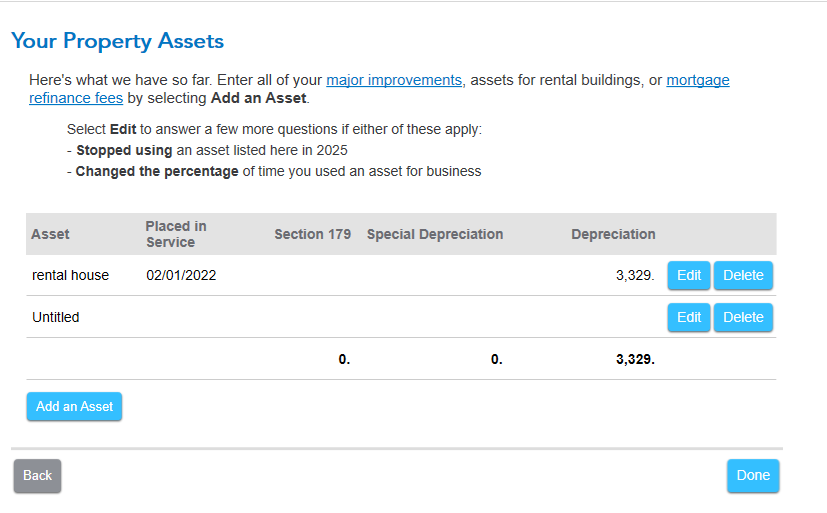
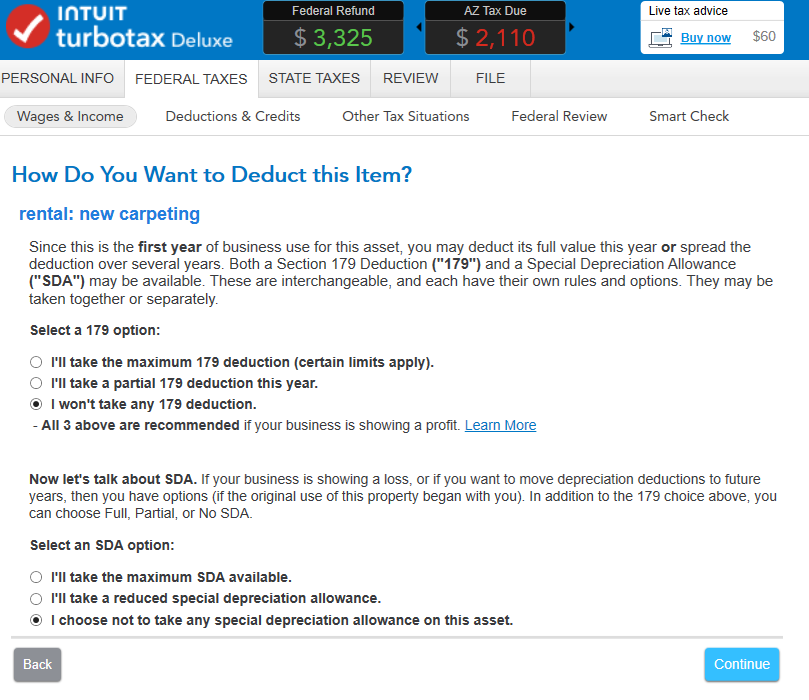
If you have your rental property set up in the Asset section, you can add other assets in the same section. At the Asset Summary page, choose 'Add an Asset' and choose the type of property. Appliances, carpeting, etc. are under 'Rental Real Estate Property'. Give a description, Cost, and Date Purchased.
You're then asked 'How Do You Want to Deduct this Item?' and are given several choices. Here's more detailed info on Depreciation of Business Assets and Rental Real Estate and Taxes to help you.
**Say "Thanks" by clicking the thumb icon in a post
**Mark the post that answers your question by clicking on "Mark as Best Answer"
**Mark the post that answers your question by clicking on "Mark as Best Answer"
a month ago
Still have questions?
Questions are answered within a few hours on average.
Post a Question*Must create login to post


Unlock tailored help options in your account.


Get more help
Ask questions and learn more about your taxes and finances.
Related Content

user17739785388
Level 1

JEinwal
New Member
7037851231
Level 1
TWO_TODDS
New Member
TWO_TODDS
New Member