
Level 4
January 28, 2021
Question

Charity Limit Form Error

  • January 28, 2021
  • 3 replies
  • 0 views

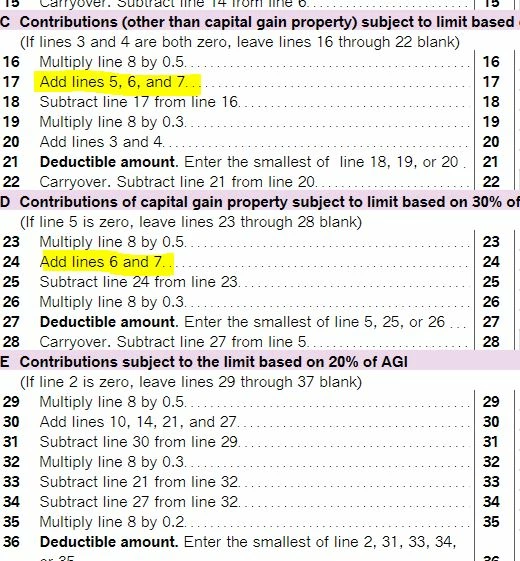
With the change to 100% type Charities in 2020, Cash Donations are reported on Line 1 of the Charity Limit form where 60% are reported on Line 7.  Section C and Section D do not include the 100% Charities in the calculation.  I believe this is an error.  Am I correct and if so when will this be corrected?
 

.

    3 replies

    Level 14
    February 1, 2021

    Please see use this link to view the instructions for entering Charitable Contributions


    What's New Qualified contributions. For 2020 and 2021, you may be able to elect a temporary suspension of certain limitations that apply to cash contributions made during the year. See Line 11, later, and Pub. 526 for more information


    Publication 526 Charitable Contributions  everything you need to know about the new Contribution Deduction.


    Schedule A Itemized Deductions Instructions  see Pages A11 - 12

    **Say "Thanks" by clicking the thumb icon in a post. **Mark the post that answers your question by clicking on "Mark as Best Answer"
    Level 2
    February 2, 2021

    Reebs

    I'm seeing the same issue, I think. I've just started entering charitable giving information and I can't figure out how the Charity Limit form(s) are working. I have some carryover that I think is playing into this. Have you been able to resolve whether these forms are working correctly? Thanks.

    ReebsAuthor
    Level 4
    February 3, 2021

    No it is not fixed as of version 1589.   It is a  programming calculation issue within TurboTax.  It is not something an Employee Tax Expert can help with unless they can get the program changed.

    Level 2
    February 4, 2021

    Thanks.

    I can confirm that the Carryover Calculation is also not functioning correctly. 

    So both Charity Limit form 1 and Charity Limit form 2 are not functioning correctly. I haven't been able to find a work-around for this so far.

    Level 2
    March 9, 2021

    I listed all our charity support and it exceeded the $300 limit on the federal standard deduction.  I am having issues trying to correct to the $300.

    Level 14
    March 9, 2021

     Yes. There is an issue with the contributions deduction and TurboTax is working to fix it.  We do not have an estimated date of correction, at this time.  I suggest you check back often to see if the correction has been made.


    There is a problem with the Contributions section of the Itemized deductions and also the above the line $300.00 deduction.  Because of the many changes due to the CARES Act, IRS is still developing the forms and publications on this issue.  Last update was January 13th where everything is still in draft.  Once IRS finalizes the forms, we will be able to update TurboTax to accurately reflect your Contributions deduction.


    Here are some of the changes due to the CARES ACT

    The new legislation allows tax deductions on two types of charitable gifts. First, it allows up to $300 given to a qualified charity to be claimed as an above-the-line deduction. After the Tax Cuts and Jobs Act, which went into effect in 2018, increased the standard deduction, many taxpayers had less incentive to donate to charities. Instead, they took the standard deduction and stopped itemizing.


    For taxpayers who will itemize deductions, the CARES Act effectively suspends the limit on deductions for cash contributions to public charities for 2020.  “That allows individuals to completely wipe out their AGI, and their tax liability, with a charitable contribution.

    **Say "Thanks" by clicking the thumb icon in a post. **Mark the post that answers your question by clicking on "Mark as Best Answer"
    Level 2
    April 30, 2021

    We are getting close to the federal filing date and it does not appear that the charity limit form error has been fixed. What is going on in getting this fixed so I can file my federal and state taxes?


    Thanks


    Doug




