turbotax icon
cancel
Showing results for 
Search instead for 
Did you mean: 
Close icon
Do you have a TurboTax Online account?

We'll help you get started or pick up where you left off.

Why does it keep putting 1099 misc under self employment?

 
x
Do you have an Intuit account?

Do you have an Intuit account?

You'll need to sign in or create an account to connect with an expert.

2 Replies

Why does it keep putting 1099 misc under self employment?

Please follow the steps below:


To delete Forms 1099-MISC

  1. Open TurboTax.
  2. In the panel on the left side, select Tax Tools > Tools.
  3. Delete a form.
  4. Delete Form 1099-MISC or 1099-MISC worksheet.
  5. Continue
  6. Sign out of TurboTax.

To report the income for the 1099-MISC on line 8z of Schedule 1.


  1. Open TurboTax.
  2. "Pick up where I left off."
  3. Federal > Wages & Income > " Less Common Income" > Miscellaneous Income, 1099-A 1099-C > Start or Revisit.
  4. "Other reportable income" > Revisit.
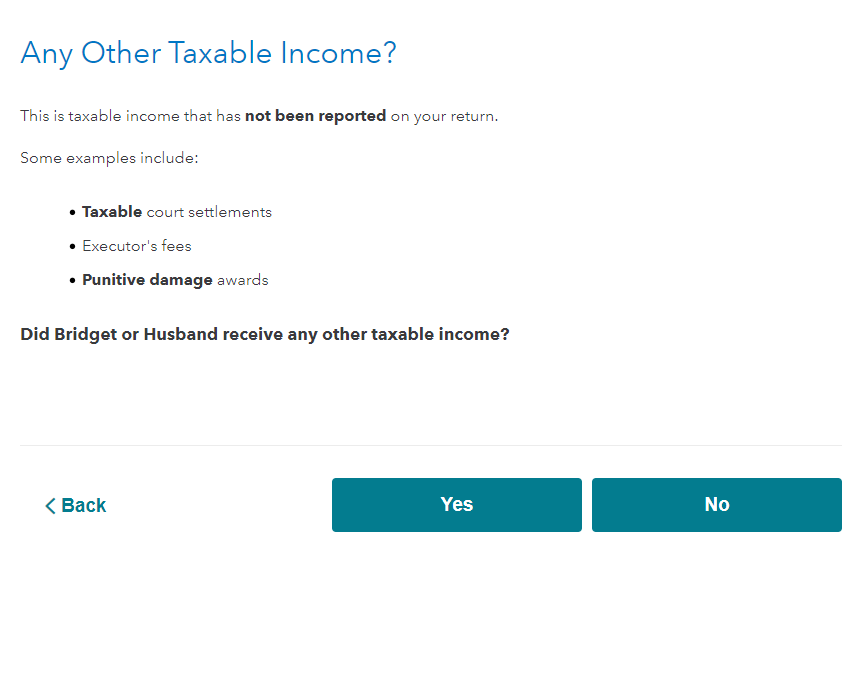
  5. On the screen below, select "Yes." 


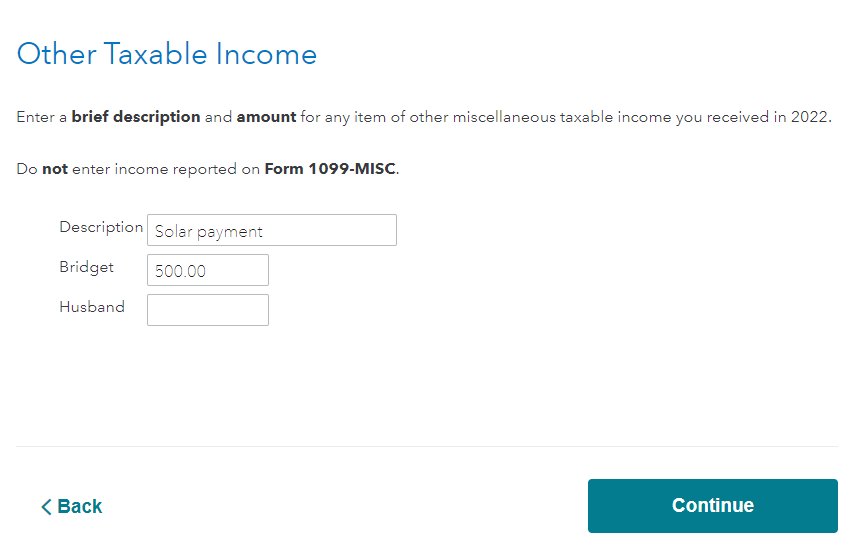
 6. On the screen below, enter the description and amount.


**Say "Thanks" by clicking the thumb icon in a post
**Mark the post that answers your question by clicking on "Mark as Best Answer"

Why does it keep putting 1099 misc under self employment?

Why did you get the 1099Misc ?

Unlock tailored help options in your account.

message box icon

Get more help

Ask questions and learn more about your taxes and finances.

Post your Question