


- Community
- Topics
Turn on suggestions
Auto-suggest helps you quickly narrow down your search results by suggesting possible matches as you type.
Showing results for
- Community
- :
- Discussions
- :
- Groups
- :
- Self employed
- :
- Re: when I try to enter 1099-MISC (Royalty)...I only get "something went wrong" anyone w/solution?


- Mark as New
- Bookmark
- Subscribe
- Subscribe to RSS Feed
- Permalink
- Report Inappropriate Content
when I try to enter 1099-MISC (Royalty)...I only get "something went wrong" anyone w/solution?
Can not enter Royalty Income 1099-MISC?
posted
February 9, 2025
3:37 PM
last updated
February 03, 2026
4:06 AM
Connect with an expert

Do you have an Intuit account?
You'll need to sign in or create an account to connect with an expert.
5 Replies


- Mark as New
- Bookmark
- Subscribe
- Subscribe to RSS Feed
- Permalink
- Report Inappropriate Content
when I try to enter 1099-MISC (Royalty)...I only get "something went wrong" anyone w/solution?
Please clarify which version of TurboTax you are using: Online or Desktop? Windows or Mac? If Online, which browser?
**Say "Thanks" by clicking the thumb icon in a post
**Mark the post that answers your question by clicking on "Mark as Best Answer"
**Mark the post that answers your question by clicking on "Mark as Best Answer"
February 10, 2025
8:54 AM
- Mark as New
- Bookmark
- Subscribe
- Subscribe to RSS Feed
- Permalink
- Report Inappropriate Content
when I try to enter 1099-MISC (Royalty)...I only get "something went wrong" anyone w/solution?
Requested clarification:
- Tubrotax Deluxe
- PC WIN 10
- MSN online
February 10, 2025
10:11 AM
- Mark as New
- Bookmark
- Subscribe
- Subscribe to RSS Feed
- Permalink
- Report Inappropriate Content
when I try to enter 1099-MISC (Royalty)...I only get "something went wrong" anyone w/solution?
Your best option is to enter the income for your royalty property under Rental Properties & Royalties. Follow the interview to add and set up your royalty property, then enter the information from Form 1099-MISC under the income section for that property. Be sure to check the box for Royalty Property (and not rental) when completing the property information.
If this is the process that isn't working for you, try the 1099-MISC topic under Wages & Income.
**Say "Thanks" by clicking the thumb icon in a post
**Mark the post that answers your question by clicking on "Mark as Best Answer"
**Mark the post that answers your question by clicking on "Mark as Best Answer"
February 10, 2025
12:44 PM
- Mark as New
- Bookmark
- Subscribe
- Subscribe to RSS Feed
- Permalink
- Report Inappropriate Content
when I try to enter 1099-MISC (Royalty)...I only get "something went wrong" anyone w/solution?
TurboTax Desktop w/ WIN 10 & MSN/EDGE Browser. Software instructions, Search for: "1099-MISC and select he "Jump to" link.... I cannot FIND a/the "Jump to Link". I again, receive the msg, "something went wrong".
Thx!
February 12, 2025
3:23 PM

- Mark as New
- Bookmark
- Subscribe
- Subscribe to RSS Feed
- Permalink
- Report Inappropriate Content
when I try to enter 1099-MISC (Royalty)...I only get "something went wrong" anyone w/solution?
Royalties can be entered directly without entering your 1099-MISC. First delete this form using the instructions below for TurboTax Desktop.
You'll need to delete Form 1099-MISC.
- If you're using TurboTax Desktop software and need to delete a form, click here.
Follow the instructions below to enter your royalty income.
- Next Open your TurboTax Desktop return.
- Search (upper right) > type royalties > Click the Jump to.. link
- Select Yes - Income from Rentals or Royalty Property You Own > Continue on the next screen
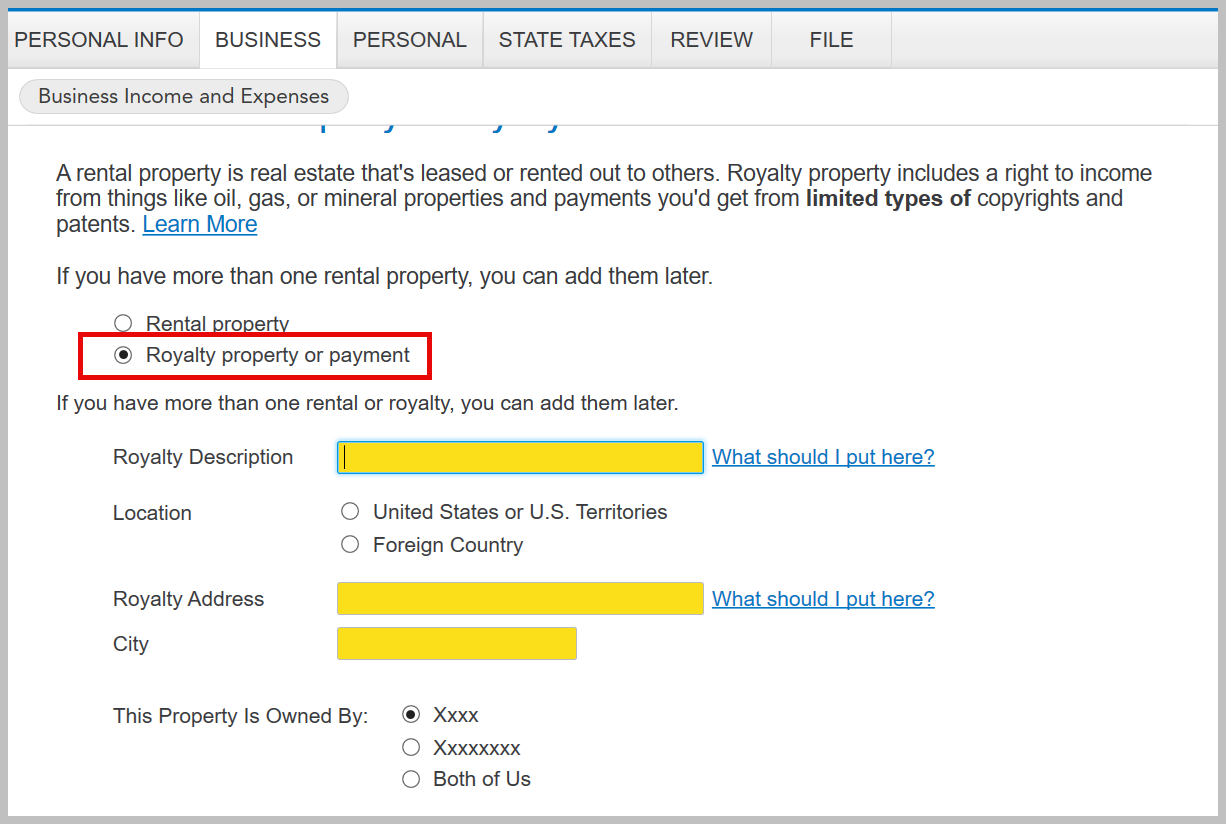
- Start or Add another Rental or Royalty > Select 'Royalty Property or payment' > Enter the Royalty Description, Address and City
- Continue to answer the questions until you complete your royalty property
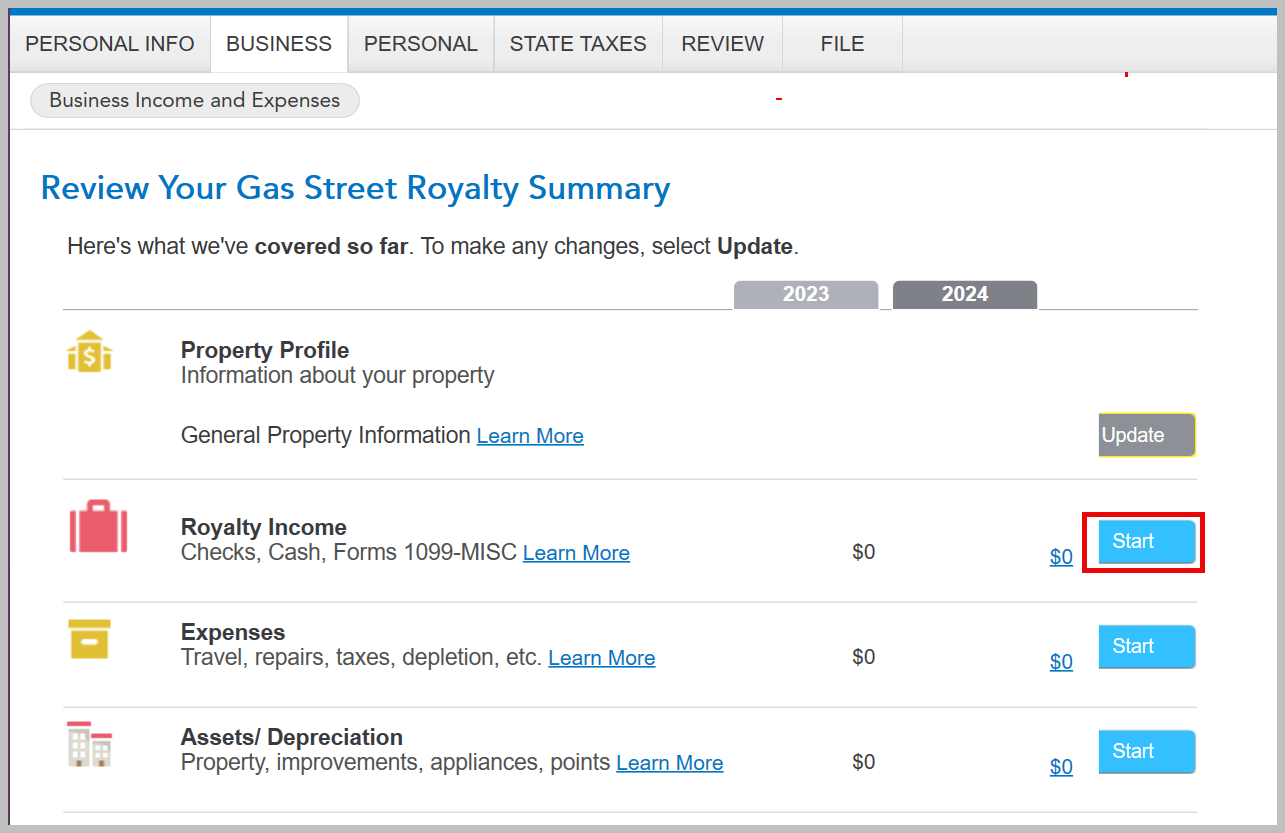
- When you come back to the screen 'Review Your___ Royalty Summary' select Royalty Income
- Select any expenses and complete your entry for Royalty Property
Depending on the type of royalties you may have depletion expenses.
[Edited: 02/12/2025 | 3:41 PM PST]
**Say "Thanks" by clicking the thumb icon in a post
**Mark the post that answers your question by clicking on "Mark as Best Answer"
**Mark the post that answers your question by clicking on "Mark as Best Answer"
February 12, 2025
3:39 PM
Still have questions?
Questions are answered within a few hours on average.
Post a Question*Must create login to post


Unlock tailored help options in your account.


Get more help
Ask questions and learn more about your taxes and finances.