You'll need to sign in or create an account to connect with an expert.
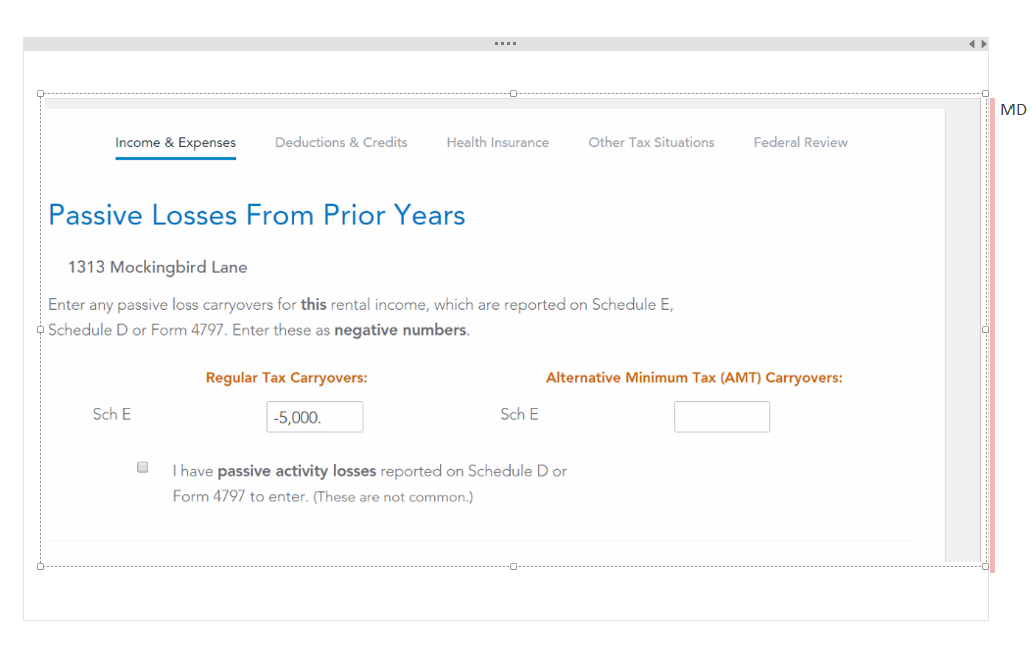
You can enter it manually. When you are in the rental section, you will encounter a screen that asks if "Any of these Situations Apply to You". One of the options is that you had prior passive losses. When you click that, you will encounter at some point in the rental interview, the screen shot below.
@ColeenD3 I have $7000 income from my rental this year. I followed the steps in the post here to enter the "unallowed" loss carryover from last year i.e. $5000 in the regular tax carryover field. Upon doing this the "Forms" mode shows that TT has calculated regular tax net income as $2000, but the step by step mode ends up displaying the net rental income as $7000.
in step mode the PAL losses suspended are not entered through the 8582 but rather through the PAL questions that will be asked for each property. you should come to a worksheet that at the top asks "do any of these situations apply to this property?". the last section is for carryovers which must be checked on the line that asks about prior year PALs
in forms mode on the line for the rental worksheet just below the line that says "carryovers to 2024 Smart Worksheet" line G enter as a negative. you also need the AMT PAL c/o. QBI too if it was treated as a qualified rental. see last year's form 8595don't know if the AMT 8582 was included in your 2023 return. without the AMT PAL
the $7K may be the AMT PAL c/o you're looking at

Thank you for your reply! I entered the amount from last year in all three boxes as negative numbers ie.. Regular Tax Carryover, AMT Carry over, QBI carryover. Yet TT does not reduce the net income by the prior year unallowed loss.
And the strange thing is not that forms mode considers the loss while calculating net income while step mode doesn't. The thing is that my taxes owed for current tax year is considering the amount of $7000 as the rental income on the rental income summary in the business section but showed $2000 in the personal icome summary.
in step mode it asks for the total and then on the next page it asks for a breakdown by year as negatives. in forms mode enter the total and lower down by year as negatives. mine worked. why yours didn't? if you have forms mode scroll the schedule E form to see if you can spot something or look at form 8582 the current year income should be on 1a with active participation and the c/o loss should be a negative on line 1c. if this doesn't help you'll have to contact support.
Still have questions?
Questions are answered within a few hours on average.
Post a Question*Must create login to post
Ask questions and learn more about your taxes and finances.
kramyou1
New Member
kramyou1
New Member
lasq90
Returning Member
MCSmith1974
Level 2
andrew1graves
New Member