


- Community
- Topics
Turn on suggestions
Auto-suggest helps you quickly narrow down your search results by suggesting possible matches as you type.
Showing results for
- Community
- :
- Getting started
- :
- Community Basics
- :
- Re: Charity bug Turbox Premier 2025 Windows


- Mark as New
- Bookmark
- Subscribe
- Subscribe to RSS Feed
- Permalink
- Report Inappropriate Content
Charity bug Turbox Premier 2025 Windows
After the Jan 7 update, I was able to enter charitable contributions, but when going back to the deductions and Credits heading, it says "Now Available" rather than presenting a 2025 total. Is this a bug?
As an aside, I find it mind-boggling that Intuit STILL has no bug reporting within Turbotax, after all these years.
posted
January 9, 2026
7:48 AM
last updated
January 09, 2026
7:48 AM
Connect with an expert

Do you have an Intuit account?
You'll need to sign in or create an account to connect with an expert.
39 Replies

- Mark as New
- Bookmark
- Subscribe
- Subscribe to RSS Feed
- Permalink
- Report Inappropriate Content
Charity bug Turbox Premier 2025 Windows
Hello! I sent you a private message to get more information on this.
**Say "Thanks" by clicking the thumb icon in a post
**Mark the post that answers your question by clicking on "Mark as Best Answer"
**Mark the post that answers your question by clicking on "Mark as Best Answer"
January 9, 2026
7:58 AM
- Mark as New
- Bookmark
- Subscribe
- Subscribe to RSS Feed
- Permalink
- Report Inappropriate Content
Charity bug Turbox Premier 2025 Windows
Hi - Thanks for your repsonse. Please resend the instructions PM. When I saw the case number was missing and saw a second PM, I deleted the first one expecting the full email instructions with case number, but you only included the case number without instructions. My mistake for being too quick on the delete function. Thanks.
January 9, 2026
3:33 PM

- Mark as New
- Bookmark
- Subscribe
- Subscribe to RSS Feed
- Permalink
- Report Inappropriate Content
Charity bug Turbox Premier 2025 Windows
I'm having the same issue with the Windows Desktop edition. Please send me instructions referenced in this thread.
The same issue exists with the "State and Local Refund" section that was recently added. The "Your 2025 Income Summary" shows "Available Now" for this section. I worked through the section and successfully completed all my entries. When I returned to the Summary page it still shows "Available Now" rather than the dollar amount it should show.
Please let me know your plans to fix this bug.
Thanks,
January 15, 2026
2:42 PM

- Mark as New
- Bookmark
- Subscribe
- Subscribe to RSS Feed
- Permalink
- Report Inappropriate Content
Charity bug Turbox Premier 2025 Windows
And I'm having the same issue with charitable donations of stock using TurboTax Deluxe (Windows). Very frustrating to enter all the data, click "Done", and then it disappears with no explanation.
January 15, 2026
3:28 PM
- Mark as New
- Bookmark
- Subscribe
- Subscribe to RSS Feed
- Permalink
- Report Inappropriate Content
Charity bug Turbox Premier 2025 Windows
FWIW, I started the process of reporting the problem and gave up. So many hoops to jump through. It's ridiculous.
I've used Turbotax for many years and this will likely be my last. They make it so difficult to report a problem. And then there's the lack of dark mode, which has been requested for years and never done.
January 17, 2026
4:57 PM
- Mark as New
- Bookmark
- Subscribe
- Subscribe to RSS Feed
- Permalink
- Report Inappropriate Content
Charity bug Turbox Premier 2025 Windows
And to make it more annoying to the PAYING CUSTOMERS, there are no release notes or notification that a bug has been fixed. So we have to waste time every few days redoing the entries to see if it now works. Ridiculous.
January 18, 2026
10:04 AM
8,341

- Mark as New
- Bookmark
- Subscribe
- Subscribe to RSS Feed
- Permalink
- Report Inappropriate Content
Charity bug Turbox Premier 2025 Windows
@rick466 and @user17685164325 In order to escalate I would need you to provide me with a token number to try and recreate the issue.
Below are steps to provide that:
- Open your return.
- Click “Online” and select "Send Tax File to Agent".
- This will generate a message that a diagnostic copy will be created. Click “OK”. The tax file will then be sanitized and sent to us. This action will generate a Token Number
- Please respond directly to this message and provide the Token Number that was generated.
Thanks!
January 19, 2026
8:31 AM
- Mark as New
- Bookmark
- Subscribe
- Subscribe to RSS Feed
- Permalink
- Report Inappropriate Content
Charity bug Turbox Premier 2025 Windows
Hello Katie,
Your instructions seem a lot simpler than what GabiU PM'd me originally.
I followed the instructions above and here's the token number that was generated (another note for the developers - the token number itself can't be highlighted and copied):
376389405-73443737
Thanks.
January 19, 2026
3:45 PM
- Mark as New
- Bookmark
- Subscribe
- Subscribe to RSS Feed
- Permalink
- Report Inappropriate Content
Charity bug Turbox Premier 2025 Windows
@BarryK123 @rick466 @user17685164325 Have you updated your software as of today and tried again?
KatieK7117
January 20, 2026
12:28 PM
- Mark as New
- Bookmark
- Subscribe
- Subscribe to RSS Feed
- Permalink
- Report Inappropriate Content
Charity bug Turbox Premier 2025 Windows
I think this particular bug was fixed with the 1/16/2026 TurboTax software update (at least it worked for me, because TurboTax doesn't seem to find it important to provide release notes to let us know when something has been fixed).
There is a related separate bug which I also reported in a community post. TurboTax has an error when reporting charitable deductions of both cash and stock to the same organization. It will accept the entries, and report it correctly on the Charitable Donations screen, but then if I view the form for the donations to that organization I get an error that is impossible to resolve. Specifically, I get red marks (screenshot below). I'm guessing that it gets confused by having 2 different types of donations to the same organization, but the software clearly allows me to select more than one when defining the donation type(s) in the Step-By-Step mode.

January 20, 2026
12:37 PM
- Mark as New
- Bookmark
- Subscribe
- Subscribe to RSS Feed
- Permalink
- Report Inappropriate Content
Charity bug Turbox Premier 2025 Windows
Katie - I'm not getting an update for today. I tried manually via the Online selection at the top and it appears I'm up to date. I believe my last update was 1/15 or 16.
January 20, 2026
2:24 PM

- Mark as New
- Bookmark
- Subscribe
- Subscribe to RSS Feed
- Permalink
- Report Inappropriate Content
Charity bug Turbox Premier 2025 Windows
@BarryK123 wrote:I believe my last update was 1/15 or 16.
The next update will likely be tomorrow (1/21) or Thursday. Keep trying.
January 20, 2026
2:38 PM
- Mark as New
- Bookmark
- Subscribe
- Subscribe to RSS Feed
- Permalink
- Report Inappropriate Content
Charity bug Turbox Premier 2025 Windows
Just installed the 1/22 update. Charity still shows "Available Now" and not the total entered on the charity screen.
January 22, 2026
5:31 AM

- Mark as New
- Bookmark
- Subscribe
- Subscribe to RSS Feed
- Permalink
- Report Inappropriate Content
Charity bug Turbox Premier 2025 Windows
Hi! I'm having the same problem. What is the fix?
January 27, 2026
11:16 AM
- Mark as New
- Bookmark
- Subscribe
- Subscribe to RSS Feed
- Permalink
- Report Inappropriate Content
Charity bug Turbox Premier 2025 Windows
I followed this procedure for the same bug!
January 27, 2026
11:30 AM
- Mark as New
- Bookmark
- Subscribe
- Subscribe to RSS Feed
- Permalink
- Report Inappropriate Content
Charity bug Turbox Premier 2025 Windows
@Newportmap Have you updated your software?
January 27, 2026
11:55 AM
- Mark as New
- Bookmark
- Subscribe
- Subscribe to RSS Feed
- Permalink
- Report Inappropriate Content
Charity bug Turbox Premier 2025 Windows
Of course
January 27, 2026
12:05 PM
- Mark as New
- Bookmark
- Subscribe
- Subscribe to RSS Feed
- Permalink
- Report Inappropriate Content
Charity bug Turbox Premier 2025 Windows
@Newportmap Are you sure? Other users have updated and the issue is no longer present.
January 27, 2026
12:07 PM
- Mark as New
- Bookmark
- Subscribe
- Subscribe to RSS Feed
- Permalink
- Report Inappropriate Content
Charity bug Turbox Premier 2025 Windows
Yes, I am sure
January 27, 2026
12:07 PM
- Mark as New
- Bookmark
- Subscribe
- Subscribe to RSS Feed
- Permalink
- Report Inappropriate Content
Charity bug Turbox Premier 2025 Windows
January 27, 2026
12:12 PM
- Mark as New
- Bookmark
- Subscribe
- Subscribe to RSS Feed
- Permalink
- Report Inappropriate Content
Charity bug Turbox Premier 2025 Windows
already did
January 27, 2026
12:15 PM
- Mark as New
- Bookmark
- Subscribe
- Subscribe to RSS Feed
- Permalink
- Report Inappropriate Content
Charity bug Turbox Premier 2025 Windows
What did Support say?
January 27, 2026
12:31 PM
- Mark as New
- Bookmark
- Subscribe
- Subscribe to RSS Feed
- Permalink
- Report Inappropriate Content
Charity bug Turbox Premier 2025 Windows
@Newportmap The issue has been recorded and you should receive an email when the issue is resolved.
January 27, 2026
12:39 PM

- Mark as New
- Bookmark
- Subscribe
- Subscribe to RSS Feed
- Permalink
- Report Inappropriate Content
Charity bug Turbox Premier 2025 Windows
Just got the 1/29 update. Still not fixed.
January 29, 2026
9:24 AM

- Mark as New
- Bookmark
- Subscribe
- Subscribe to RSS Feed
- Permalink
- Report Inappropriate Content
Charity bug Turbox Premier 2025 Windows
January 30, 2026
2:36 PM
- Mark as New
- Bookmark
- Subscribe
- Subscribe to RSS Feed
- Permalink
- Report Inappropriate Content
Charity bug Turbox Premier 2025 Windows
Same problem... even after updating today January 31st. This is ridiculous that they haven't fixed this.
Donations to Charity in 2025 -- data is entered but says Available Now Update
Sales Tax -- data is entered but says Available Now Update
January 31, 2026
12:23 PM
- Mark as New
- Bookmark
- Subscribe
- Subscribe to RSS Feed
- Permalink
- Report Inappropriate Content
Charity bug Turbox Premier 2025 Windows
Same problem here on Feb 1 even after update - should we just ignore "Available Now" ?
February 1, 2026
12:31 PM
- Mark as New
- Bookmark
- Subscribe
- Subscribe to RSS Feed
- Permalink
- Report Inappropriate Content
Charity bug Turbox Premier 2025 Windows
@user17693024314 @flcpa92 @Brik The issue has been recorded and you should receive an email when the issue is resolved.
February 2, 2026
9:37 AM
- Mark as New
- Bookmark
- Subscribe
- Subscribe to RSS Feed
- Permalink
- Report Inappropriate Content
Charity bug Turbox Premier 2025 Windows
Any time frame kn when this will be fixed. Kind of ridiculous this has been taken care of.
February 3, 2026
8:21 AM
- Mark as New
- Bookmark
- Subscribe
- Subscribe to RSS Feed
- Permalink
- Report Inappropriate Content
Charity bug Turbox Premier 2025 Windows
@Karichar1 We do not have an update now but please be on the look out for any email updates. Thanks!
February 3, 2026
9:19 AM
- Mark as New
- Bookmark
- Subscribe
- Subscribe to RSS Feed
- Permalink
- Report Inappropriate Content
Charity bug Turbox Premier 2025 Windows
Having same issue with 1099-MISC form. Cannot click on the Needs Review button. Suggestion on another thread is to delete data and re-input data. What is going on. Really annoyed paying money for this level of service.
February 3, 2026
1:39 PM
- Mark as New
- Bookmark
- Subscribe
- Subscribe to RSS Feed
- Permalink
- Report Inappropriate Content
Charity bug Turbox Premier 2025 Windows
JUst got the 2/6 update. This is still broken. Truly pathetic customer support.
February 7, 2026
5:59 AM
- Mark as New
- Bookmark
- Subscribe
- Subscribe to RSS Feed
- Permalink
- Report Inappropriate Content
Charity bug Turbox Premier 2025 Windows
Installed the 2/11 update. Still broken.
Keep up the fine customer support, Turbotax!
February 12, 2026
5:43 AM
- Mark as New
- Bookmark
- Subscribe
- Subscribe to RSS Feed
- Permalink
- Report Inappropriate Content
Charity bug Turbox Premier 2025 Windows
@BarryK123 After downloading the most recent update (2/19) can you confirm this has been addressed?
February 19, 2026
12:04 PM
- Mark as New
- Bookmark
- Subscribe
- Subscribe to RSS Feed
- Permalink
- Report Inappropriate Content
Charity bug Turbox Premier 2025 Windows
Yes... the charitable contriburtions and the sales tax issues have both been corrected.
February 19, 2026
6:53 PM
- Mark as New
- Bookmark
- Subscribe
- Subscribe to RSS Feed
- Permalink
- Report Inappropriate Content
Charity bug Turbox Premier 2025 Windows
@KatieK7117 Yes working now. After the update, it still said "available now," but after going into the charity subsecdtion, then coming back out, the correct number appeared. Thanks!
February 20, 2026
2:44 PM
5,697
- Mark as New
- Bookmark
- Subscribe
- Subscribe to RSS Feed
- Permalink
- Report Inappropriate Content
Charity bug Turbox Premier 2025 Windows
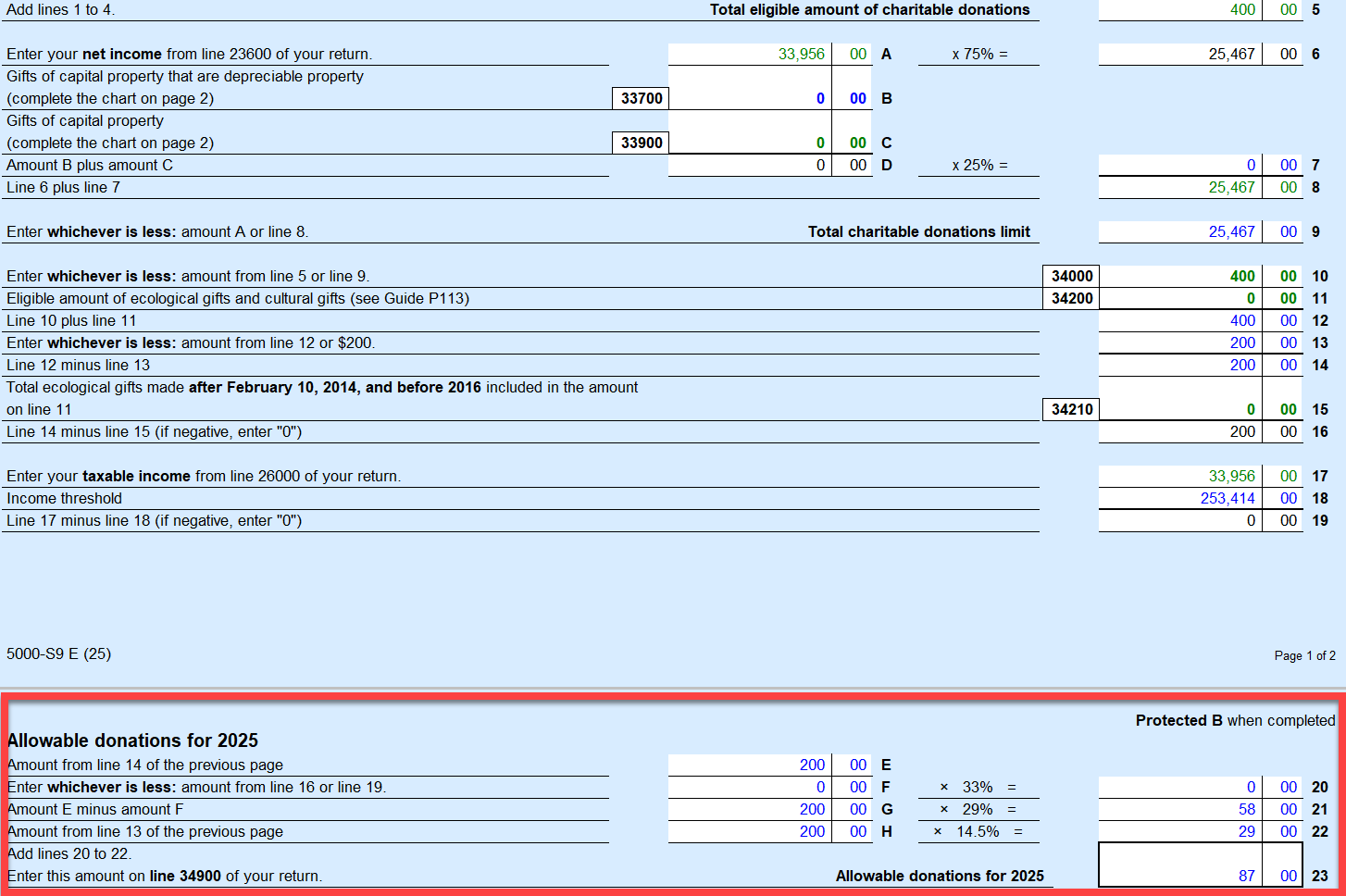
there is a new bug with Donations in the Deluxe 2025. You can enter the donation amount and it calculates the credit for the donation correctly. However it enters the wrong amounts in your tax boxes. It puts in the credit amount where the donation amount should be. And it does not subtract the credit amount from the taxes owed.
For example. Donation amount $400 Credit calculated (200 x 15% + 200 x 30% ) = $87.00. The Donation amount should show up in summary line 34900 as $400, but shows $87.00 and the tax owed, is not changed, therefore the credit is not applied at all.
March 6, 2026
6:19 PM

- Mark as New
- Bookmark
- Subscribe
- Subscribe to RSS Feed
- Permalink
- Report Inappropriate Content
Charity bug Turbox Premier 2025 Windows
@lmiceli I’m not following you and don’t know what you’re talking about. What credit amount? And line 34900? Are you in Canada? This is the USA forum. Here is the Canada forum
March 6, 2026
6:31 PM


- Mark as New
- Bookmark
- Subscribe
- Subscribe to RSS Feed
- Permalink
- Report Inappropriate Content
Charity bug Turbox Premier 2025 Windows
@lmiceli Line 34900 shows you the Allowable donation for the year, which may not be the full amount of donations that you entered.
As for why it's not reducing your amount owing, are you preparing your return with a spouse/partner? Is it going on their return instead?
March 8, 2026
2:24 PM
Still have questions?
Questions are answered within a few hours on average.
Post a Question*Must create login to post


Unlock tailored help options in your account.

Related Content

Joetex81
Level 1

BarryK123
Level 3