
Level 2
March 18, 2025
Solved

Deducting self-employed ACA premiums

  • March 18, 2025
  • 7 replies
  • 65 views

Deducting self-employed ACA premiums

I understand that, as a self-employed person, the ACA insurance premiums that I pay are fully deductible from my income (income>ACA) and are not subject to the "7% of AGI" threshold. I don't see how to enter this properly in TurboTax Deluxe, however.


Under business expenses, the line for "medical insurance" says to not enter ACA premiums because they are handled through form 1095. But when you enter data from form 1095, TurboTax doesn't give you an opportunity to say that these are business expenses, and looking directly at Schedule 1 Line 17 there is no entry for "self employed health insurance deduction."


What is the correct way to handle this in TurboTax Deluxe so that these premiums get deducted and not subjected to the 7% threshold?
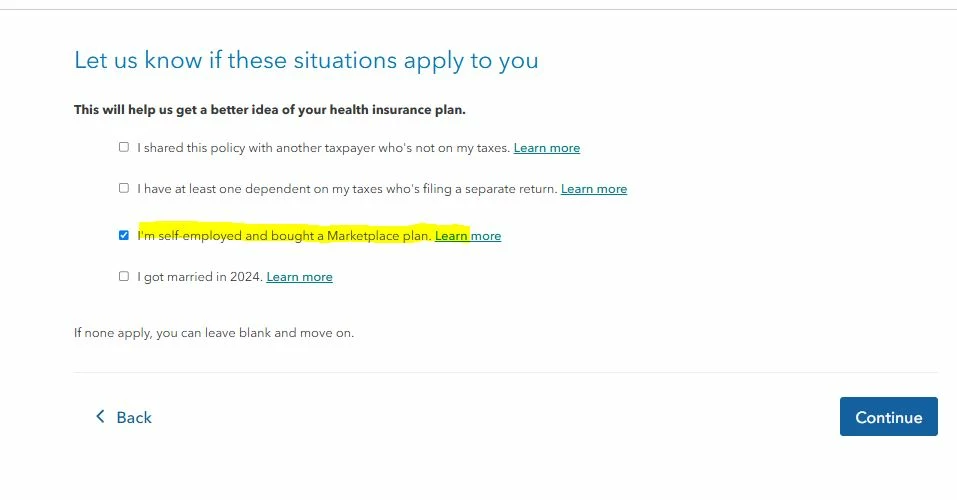
    Best answer by DoninGA

    Go back and edit the Form 1095-A you entered.  There will be a screen after the form entry asking if you were self-employed, check the box.


    7 replies

    DoninGA
    Level 15
    DoninGALevel 15Answer
    Level 15
    March 18, 2025

    Go back and edit the Form 1095-A you entered.  There will be a screen after the form entry asking if you were self-employed, check the box.


    Level 2
    July 16, 2025

    I have a related follow-up question. In looking at the forms that I will file, form 7206, line 14 says that the self employed insurance deduction is 0, yet on schedule 1, line 17, I am getting a deduction and I can't trace the amount to anywhere to verify the computation of that deduction.  I have a rather complicated situation - an ACA plan and self employed, and also have some non-passive income from a k-1 (form 1065).  Is there something wrong with the form?

    Level 2
    August 8, 2025

    I am having trouble replicating your issue to determine the appropriate solution. I would like to take a deeper look at this. However, I need a diagnostic file which is a copy of your tax return that has all of your personal information removed. You can send one to us by following the directions below:


    TurboTax Online:

    1. Sign into your online account.
    2. Locate the Tax Tools on the left-hand side of the screen.
    3. A drop-down will appear. Select Tools
    4. On the pop-up screen, click on “Share my file with agent.”
    5. This will generate a message that a diagnostic file gets sanitized and transmitted to us.
    6. Please provide the Token Number that was generated in the response.

    TurboTax Desktop/Download Versions:

    1. Open your return.
    2. Click the Online tab in the black bar across the top of TurboTax and select “Send Tax File to Agent” *
    3. This will generate a message that a diagnostic copy will be created.  Click on OK and the tax file will be sanitized and transmitted to us.
    4. Please provide the Token Number (including the dash) that was generated in the response.

    *(If using a MAC, go to the menu at the top of the screen, select Help, then, “Send Tax File to Agent”)


     @bkrett01 


    how to I send the token number without it being seen by all in the community pages?




