
Level 2
March 22, 2026
Question

Qualifying stablecoins section on 1099-DA

  • March 22, 2026
  • 1 reply
  • 84 views

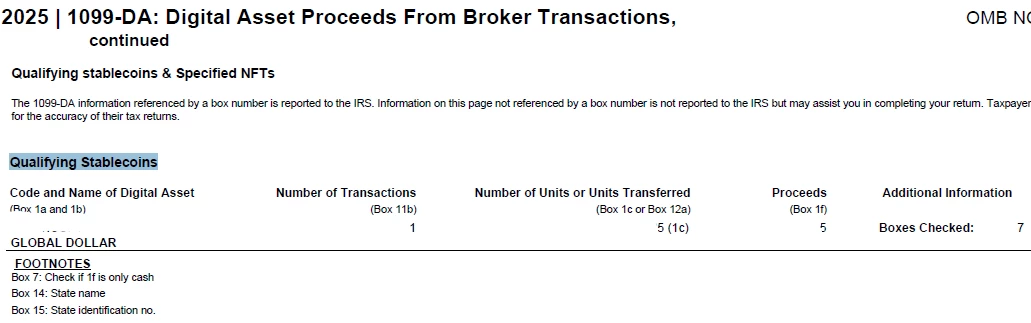
I got a 1099-DA form. There is a section called  Qualifying stablecoins . The following picture shows what is included and there is no cost basis. How do I report it in TurboTax Premier version? Thanks.
 

    1 reply

    Level 8
    March 22, 2026

    You can enter your cost basis (adjusted purchase price) manually to figure any gain/loss on the sale of these assets: 


    Manually enter your 1099-DA in TurboTax Online by following these navigational steps:

    1. Tax Home
    2. Federal
    3. Wages & Income
    4. Investment Income
    5. Select Start next to Stocks, Cryptocurrency, Mutual Funds, Bonds, Other
    6. Select (+) Add investments
    7. Select Skip Import
    8. Select Digital Assets, select Continue
    9. Proceed through the question screens to enter all your 1099-DA info.

    Manually enter your 1099-DA in TurboTax Desktop by following these navigational steps:

    1. Federal
    2. Wages & Income
    3. Select I'll choose what I work on
    4. Investment Income
    5. Select Start next to Stocks, Cryptocurrency, Mutual Funds, Bonds, Other
    6. Select (+) Add investments
    7. Select Skip Import
    8. Select Digital Assets, select Continue
    9. Proceed through the question screens to enter all your 1099-DA info.

    Learn more: TurboTax - Your Crypto Tax Guide

    **Say "Thanks" by clicking the thumb icon in a post. **Mark the post that answers your question by clicking on "Mark as Best Answer"




