
Level 2
March 18, 2020
Question

Help on reporting non-covered securities in TurboTax

  • March 18, 2020
  • 4 replies
  • 0 views

I got 1099 from Robinhood which had the below classification for "Proceeds not reported to the IRS"
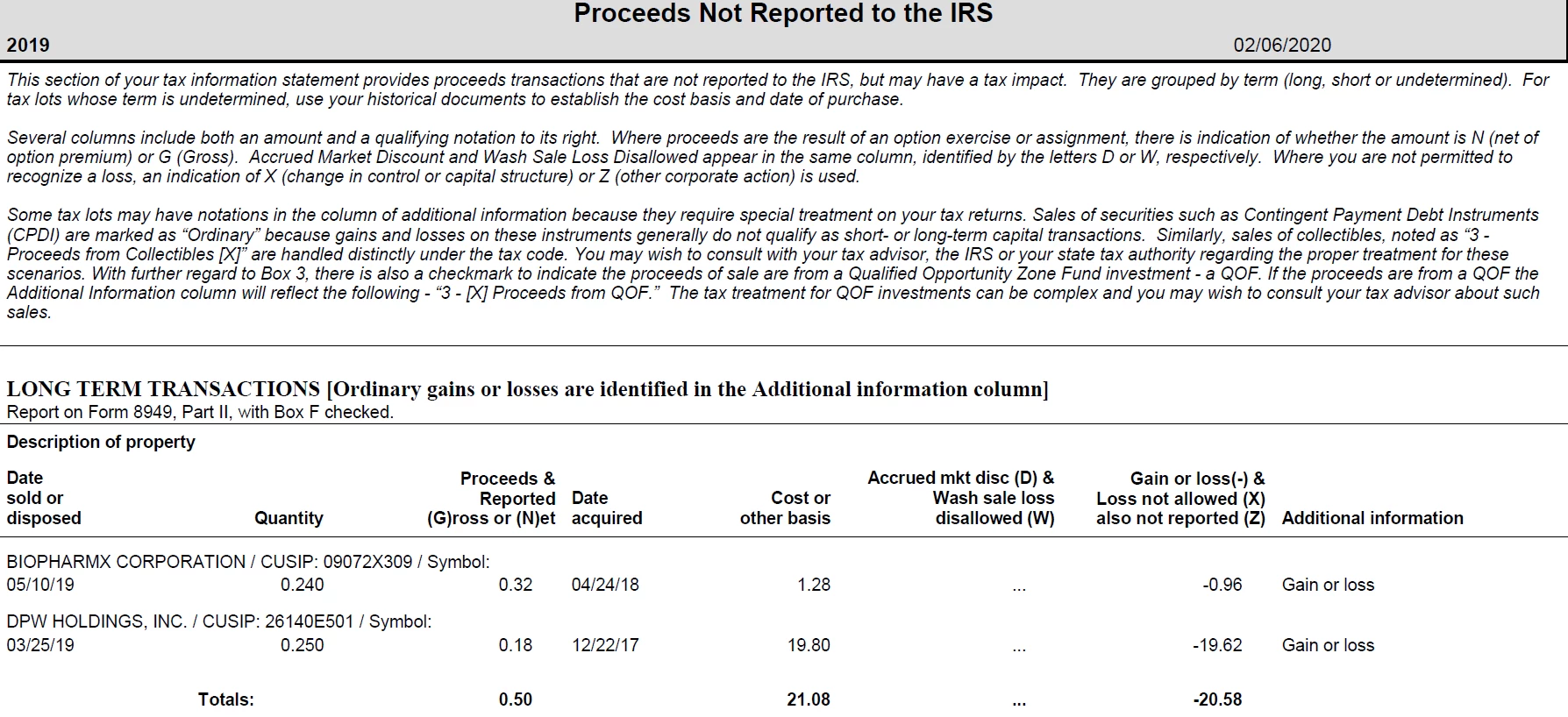
When i imported this in Turbotax, i kept getting an error to review to check this entry. It shows the below errors to be reviewed :-

  • Form 1099-B Worksheet (Robinhood Securities LLC): Noncovered Security applies only to a transaction reported on Form 1099-B. Do not enter for 26140E501 DPW HOLDINGS, INC. 0.

  • Form 1099-B Worksheet (Robinhood Securities LLC): Cost/Basis Not Reported applies only to a transaction reported on Form 1099-B. Do not enter for 26140E501 DPW HOLDINGS, INC. 0.
  • Form 1099-B Worksheet (Robinhood Securities LLC): Holding Period applies only to a transaction reported on Form 1099-B. Do not enter for 26140E501 DPW HOLDINGS, INC. 0.

I am not really sure what needs to be done here. Can i get some help on this?

4 replies

Level 15
March 18, 2020

I'm not sure what the error message is implying, but it is referring to the DPW investment sale. I suggest you delete that transaction in Turbo Tax and re-enter it manually.


**Say "Thanks" by clicking the thumb icon in a post. **Mark the post that answers your question by clicking on "Mark as Best Answer"
Admin987Author
Level 2
March 18, 2020

Should i be just completely deleting that transaction as its not been reported to IRS?  

Level 15
March 18, 2020

I would delete what was imported, and enter it manually.

**Say "Thanks" by clicking the thumb icon in a post. **Mark the post that answers your question by clicking on "Mark as Best Answer"
Admin987Author
Level 2
March 18, 2020

It states "Cost/Basis Not Reported applies only to a transaction reported on Form 1099-B" but when i see the PDF which opens up it clearly has the cost basis value. Not sure what i am missing here. Is turbotax just prompting me to review the values here? Do i need to uncheck the checkbox stating "Non-Covered security".

AmyC
Level 15
March 18, 2020

Your 1099B should match what you received except for maybe the basis. Leave the non-covered box checked. Non-covered security means the broker isn't sure about the basis. You should review your records and verify the basis.

**Say "Thanks" by clicking the thumb icon in a post. **Mark the post that answers your question by clicking on "Mark as Best Answer"
Admin987Author
Level 2
March 25, 2020

Can someone clarify on this? Should I be deleting the below entries in Turbotax as 1099 states "Proceeds Not Reported to the IRS"? Should these below transactions still be in Turbotax? 

Or should i uncheck the boxes "Noncovered Security", "Cost/Basis Not Reported" in the review "Check this entry" section?

AmyC
Level 15
March 25, 2020

On the last screenshot, Proceeds Not Reported to the IRS, it does say, underneath Long Term Transactions - report on Form 8949 Part II (F). In English, that means: 

Form 8949 - Sales of Capital Assets

Part II - long term

(F) - Not reported on 1099-B.


What you need to do:

You have the F marked.

Below it is line 2, mark that is was not reported on a 1099-B.

Uncheck Cost basis not reported - that does not apply in your situation since it is NOT a 1099-B.


It is a covered security with the basis confirmed by you as correct. It is not a non-covered security. 


**Say "Thanks" by clicking the thumb icon in a post. **Mark the post that answers your question by clicking on "Mark as Best Answer"
Level 2
June 29, 2020

I had the same issue with Short Term Security so I have guessed how it works:


When you get to review this transaction 3 times screen will pop:


1. Holding Period applies only to a transaction reported on Form 1099-B

-For this you should select No Entry. This means there is no entry on 1099-B. If you specify Short Team / Long Term that means this is reported to IRS, but in this case its not as mentioned in your 1099-B.


2. Cost/Basis Not Reported applies only to a transaction reported on Form 1099-B

-For this you should uncheck this checkbox as its not reported to IRS and you are kind of figuring this number yourself, robinhood is not sure about this number.


3. Noncovered Security applies only to a transaction reported on Form 1099-B

-For this you should uncheck this checkbox as you are covering it by reviewing it


-After making above 3 changes it worked like a charm for me.


I have seen this happening at time of Reverse Stock Splits to me. Suppose you have 122 stock of some company and reverse split is happening for 20 to 1. So you will have 6 stocks + 2/20. So to avoid this situation before reverse split make sure you have stocks in the multiple of 20, to avoid this situation in future. So here in the example either you can but 18 stocks or sell 2 stocks before reverse split date.


Hope this helps. Enjoy!!!

Level 2
July 13, 2020

I entered suggested options and it worked! Else it was asking to mail a paper return. Thanks!




